If you’re considering a SYMYNELEC light bulb camera, this is one of the more relevant brands to look at if you specifically want a security camera that screws into an existing light socket.
Unlike Ring or Blink, where the closest alternatives use separate mounts, batteries or hardwired floodlights, SYMYNELEC currently sells true E26/E27 light bulb security cameras.
That makes SYMYNELEC a better match for someone whose main goal is simple socket-powered installation, especially when an existing porch, garage or covered outdoor fixture is already in a useful camera position.
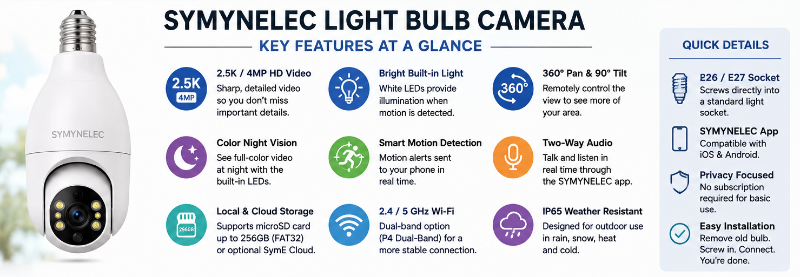
The current P4 lineup includes both a 2.4GHz version and a dual-band 2.4GHz/5GHz version. SYMYNELEC lists 2.5K/4MP video, pan-and-tilt coverage, color night vision, app control, motion features and optional local or cloud recording among the features available on its current bulb-camera models.
But a light bulb camera still isn’t automatically the right choice for every location. Fixture clearance, Wi-Fi strength, socket power, camera angle, storage preferences and privacy all matter.
This guide looks at what SYMYNELEC does well, the limitations to consider, and who should choose one instead of a conventional security camera.
This page may contain affiliate links. If you purchase through these links, we may earn a commission at no extra cost to you. As an Amazon Associate I earn from qualifying purchases.
Jump to:
SYMYNELEC Light Bulb Camera: Quick Verdict
SYMYNELEC makes the most sense when you already have a powered E26/E27 light socket in a useful location and want a camera without running a separate power cable.
The current P4 is especially interesting because SYMYNELEC offers both a 2.4GHz model and a dual-band model that supports 2.4GHz and 5GHz Wi-Fi.
It also provides features many shoppers expect from this camera category, including 2.5K/4MP video, app-controlled viewing, motorized coverage, motion detection, night vision and local microSD recording.
I would be more cautious if your existing socket is poorly positioned, enclosed inside a tight fixture, controlled by a switch that people regularly turn off, or located where a conventional mounted camera would provide a better angle.
Check SYMYNELEC Light Bulb Camera on Amazon
What Is the SYMYNELEC Light Bulb Camera?
SYMYNELEC’s P4 is a Wi-Fi security camera built into a body designed to screw into a standard E26/E27 light socket.
The socket supplies continuous power to the camera, so you don’t normally have a battery to recharge or a separate USB cable to route to the installation point.
Once installed and connected to Wi-Fi, the camera is controlled through the SYMYNELEC app.
This type of design is most useful when the existing socket is already close to the area you want to monitor.
Possible locations include:
- Porches
- Garage entrances
- Back doors
- Covered patios
- Side entrances
- Indoor utility areas
- Other compatible fixtures with adequate clearance
The important part is not simply whether a socket exists. The socket also needs to provide a useful camera view.
SYMYNELEC P4 Key Features
SYMYNELEC’s current P4 listings include many of the features people typically look for in a light bulb security camera.
- E26/E27 light socket installation
- 2.5K / 4MP video on current P4 models
- Motorized viewing coverage
- Motion detection and tracking features
- Color night vision
- Two-way communication through the app
- Local microSD recording
- Optional cloud storage
- Outdoor-capable IP65-rated versions
- SYMYNELEC mobile app
- 2.4GHz Wi-Fi model available
- Dual-band 2.4GHz/5GHz P4 model available
That last point is worth noticing.
Many inexpensive light bulb cameras only support 2.4GHz Wi-Fi. SYMYNELEC currently offers a P4 version with dual-band Wi-Fi, which may make setup easier in homes where both bands are used.
Always check the exact version on the product listing before ordering because SYMYNELEC also sells a 2.4GHz-only P4.
Installation: One of SYMYNELEC’s Biggest Advantages
The main appeal of this camera design is installation.
Instead of drilling holes and running a power cable, you can use a compatible existing light socket.
The basic process is:
- Turn off power to the socket.
- Remove the existing bulb.
- Screw the camera into the compatible socket.
- Restore power.
- Install the SYMYNELEC app.
- Add the camera and connect it to your Wi-Fi network.
- Position the camera view in the app.
SYMYNELEC also notes that an extension socket can be used when needed to help position compatible models.
Fixture Fit Matters More Than It Seems
A camera can technically fit the socket but still be a poor installation.
Light bulb cameras are much larger than ordinary bulbs. A narrow shade, glass enclosure or deep recessed fixture can block part of the camera body or restrict its movement.
Before buying, look at the space around the socket.
Ask:
- Is there enough room for the camera body?
- Will the lens have a clear view?
- Can the camera rotate without hitting the fixture?
- Will a wall or overhang block part of the image?
- Is the camera likely to point toward the area I actually want to monitor?
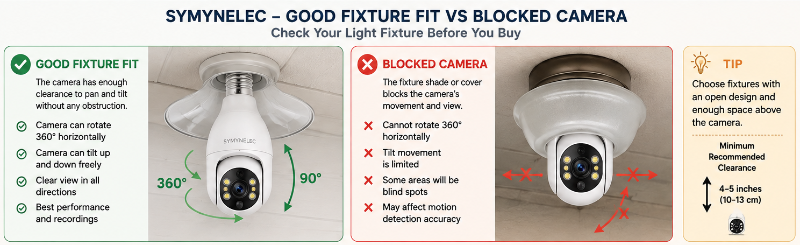
A conventional mounted camera may be the better choice if the socket itself creates a poor viewing angle.
Remember: The Light Switch Needs to Stay On
A socket-powered security camera needs electricity.
If the fixture is controlled by a wall switch and someone turns that switch off, the camera loses power.
This is one of the most common practical issues with converting an existing light fixture into a camera location.
If other people use the switch, consider whether it can realistically remain on all the time.
See our guide: Do Light Bulb Cameras Work When the Light Is Off?
Video Quality and Night Vision
SYMYNELEC currently describes its P4 dual-band model as a 2.5K 4MP camera with color night vision.
That’s a useful level of resolution for general home monitoring, but resolution alone does not determine how useful the footage will be.
Real-world image quality can also depend on:
- Available light
- Distance from the subject
- Wi-Fi quality
- Camera angle
- Lens cleanliness
- Video compression
- Whether you’re viewing Live View or recorded footage
For nighttime use, test the camera after dark from the actual installation point.
Porch lights, reflective walls, windows and nearby surfaces can all affect nighttime images.
Pan, Tilt and Motion Tracking
Motorized movement is one of the biggest reasons someone may choose a bulb camera over a fixed camera.
Instead of physically repositioning the camera every time you want a different view, compatible SYMYNELEC models can be controlled through the app.
Motion tracking can also allow the camera to follow movement within its supported range.
There is an important limitation, though.
Pan-and-tilt cannot fix a bad installation location.
If the camera is inside a restrictive fixture or installed beside a wall, part of its theoretical viewing range may be physically blocked.
SYMYNELEC also advises users not to manually force the rotating portion of the camera. If movement or tracking becomes inaccurate, camera calibration and restarting are among the manufacturer’s troubleshooting steps.
Wi-Fi: Check Which P4 Version You’re Buying
This is an area where it’s important not to assume every SYMYNELEC bulb camera has identical networking.
SYMYNELEC currently lists:
- A P4 model that uses 2.4GHz Wi-Fi
- A P4 model supporting both 2.4GHz and 5GHz Wi-Fi
If your router combines 2.4GHz and 5GHz under one network name, the dual-band version may be the easier choice.
For an outdoor camera, however, 2.4GHz can still be useful because it generally provides better range and wall penetration than 5GHz.
Whichever version you choose, check Wi-Fi signal at the socket before installing the camera.
A strong connection near your router does not guarantee a strong connection outside the garage or at the far end of the house.
The SYMYNELEC App
The camera uses the SYMYNELEC app for setup and normal operation.
The app is used for functions such as:
- Adding the camera
- Live viewing
- Changing camera direction
- Reviewing recordings
- Adjusting motion settings
- Managing storage settings
- Sharing camera access
- Camera calibration
SYMYNELEC also provides web access for compatible setups after the camera has first been configured through a phone or tablet.
Local Storage vs Cloud Storage
One of SYMYNELEC’s more useful features is that cloud storage is optional rather than the only recording path.
microSD Storage
SYMYNELEC supports local microSD recording on compatible cameras.
The manufacturer currently specifies FAT32 formatting and support for cards up to 256GB.
The card is not necessarily included, so check the exact package you’re buying.
After inserting a compatible card, recording needs to be enabled in the camera’s storage settings.
SYMYNELEC describes both event recording and continuous recording options for supported setups.
Cloud Storage
SYMYNELEC also offers optional SymE Cloud plans.
The company’s current cloud service offers features such as cloud recording, playback and retention options of up to 30 days depending on the plan.
Some Smart Cloud features also add AI event categories such as people, pets, vehicles and packages.
You do not need to choose cloud storage simply because the camera supports it.
If avoiding a recurring storage subscription is important to you, local microSD storage is one of the main reasons to consider SYMYNELEC.
One Storage Limitation to Know
SYMYNELEC says recorded video stored on the camera’s SD card is encrypted and normally accessed through its app rather than simply removing the card and playing ordinary video files on a computer.
That’s worth knowing before buying if your ideal workflow is to remove the memory card and browse standard video files directly on a PC.
Can You Use a SYMYNELEC Light Bulb Camera Outdoors?
SYMYNELEC currently rates its P4 bulb camera for outdoor and indoor use, with an IP65 weather-resistance rating on the current product listing.
However, an outdoor rating doesn’t mean every outdoor installation is equally suitable.
You still need to consider:
- The condition of the electrical socket
- Whether the fixture is intended for outdoor use
- Exposure to driving rain
- Snow and ice
- Temperature extremes
- Whether water can collect around the socket
- Whether the camera has enough physical clearance
I would favor a protected porch or overhang over an unnecessarily exposed location when both provide a useful view.
For more, see Best Light Bulb Cameras for Outdoor Use.
Two-Way Audio
Compatible SYMYNELEC bulb cameras support two-way communication through the app.
That can be useful when you want to speak with someone near an entrance without physically going to the door.
Remember that audio raises different privacy considerations from video.
Recording conversations may be subject to different laws depending on where you live and how the camera is used.
See Do Light Bulb Cameras Record Audio? and Are Light Bulb Cameras Legal?.
Privacy and Security Considerations
A Wi-Fi camera should be treated like any other internet-connected device.
Use a strong, unique account password and keep the camera, app and router software current.
Also review:
- Who has access to the camera account
- Whether camera sharing is still needed
- Motion notification settings
- Cloud-storage settings
- Where the camera is pointed
- Whether audio recording is appropriate
A camera’s ability to rotate also makes placement especially important. Avoid positioning it where normal pan-and-tilt movement could unnecessarily look into private neighboring areas.
See Are Light Bulb Cameras Safe From Hacking? and our Privacy-First Light Bulb Camera Buyer Checklist.
SYMYNELEC Light Bulb Camera Pros and Cons
Pros
- True E26/E27 screw-in camera design
- No separate camera power cable when a suitable socket already exists
- Current 2.5K/4MP P4 models
- Pan-and-tilt functionality
- Motion detection and tracking features
- Color night vision
- Local microSD recording available
- Cloud storage is optional
- Current dual-band P4 supports 2.4GHz and 5GHz Wi-Fi
- Outdoor-rated P4 option
Cons
- Camera location is limited by available light sockets
- Large camera body may not fit every fixture
- Wall switches can accidentally cut camera power
- Pan-and-tilt can be restricted by surrounding fixtures
- Different P4 versions have different Wi-Fi capabilities
- microSD card may need to be purchased separately
- Recorded SD-card video is designed to be accessed through the SYMYNELEC system
- A conventional mounted camera may provide a better angle in some locations
Who Should Buy a SYMYNELEC Light Bulb Camera?
I would put SYMYNELEC near the top of the list for someone who specifically wants the convenience of a true socket-powered camera.
Good Fit
Consider it if:
- You already have a powered E26/E27 socket in a useful location
- You want to avoid running a separate camera power cable
- You want pan-and-tilt
- You want local microSD recording
- You prefer optional rather than mandatory cloud storage
- You want an outdoor-capable bulb-camera option
- You want a dual-band Wi-Fi option
Probably Not the Best Fit
Look at another camera type if:
- Your light socket is in a poor camera position
- Your fixture is too small or enclosed
- The wall switch is frequently turned off
- You want a small, discreet camera
- You want a completely wire-free battery camera
- You need a dedicated wired floodlight system
- You prefer recordings stored as easily removable standard video files
Check SYMYNELEC Light Bulb Camera on Amazon
SYMYNELEC Alternatives
SYMYNELEC vs LaView
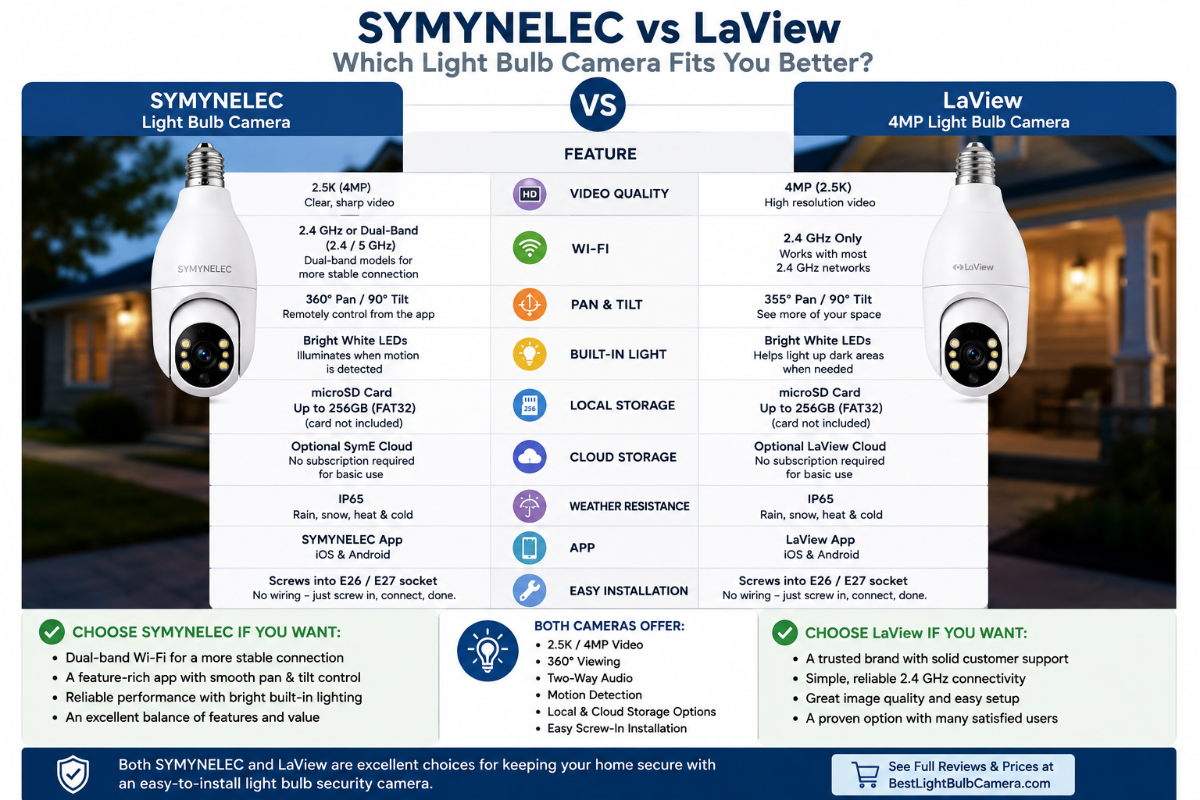
LaView is another true light bulb camera brand and is the most direct alternative among the products covered on this site.
Both brands are relevant if your main requirement is an E26/E27 screw-in camera rather than a separately mounted security camera.
Compare the exact models for Wi-Fi support, resolution, storage options, app features and fixture dimensions before choosing.
Check LaView Light Bulb Camera on Amazon
SYMYNELEC vs Blink
These are very different approaches.
Choose SYMYNELEC when using an existing bulb socket is the priority.
Choose a battery-powered Blink outdoor camera when placement flexibility matters more than socket-powered installation.
SYMYNELEC vs Ring
Ring does not currently offer the same traditional screw-in bulb-camera design.
Ring makes more sense when you want to build around Ring’s broader camera and smart-home ecosystem.
SYMYNELEC makes more sense when the actual screw-in bulb-camera format is the feature you’re looking for.
SYMYNELEC vs Wyze
Wyze’s bulb-camera approach is also worth comparing if you want a recognizable smart-home camera brand combined with lighting.
The important comparison is not just brand name. Look at how each product installs, where the camera sits relative to the light, storage options, app features and whether it fits your existing fixture.
See our Wyze Bulb Cam Guide for a closer look.
What I Would Check Before Ordering
Before buying a SYMYNELEC camera, I would check these seven things:
- Socket: Confirm you have a compatible E26/E27 socket.
- Clearance: Make sure the camera body can fit and rotate.
- View: Confirm the socket points toward a useful monitoring area.
- Power: Make sure the socket can remain powered continuously.
- Wi-Fi: Check signal strength at the actual installation point.
- Model: Decide whether you want the 2.4GHz-only or dual-band P4.
- Storage: Decide whether you want microSD, optional cloud storage or both.
If those seven items work for your location, the P4 becomes a much more sensible purchase.
Our Light Bulb Camera Buyer Checklist goes through the broader buying process.
Frequently Asked Questions
Is SYMYNELEC a real light bulb camera?
Yes. SYMYNELEC sells cameras designed to screw into compatible E26/E27 light bulb sockets.
Does the SYMYNELEC P4 support 5GHz Wi-Fi?
It depends on the version. SYMYNELEC currently sells a 2.4GHz-only P4 and a dual-band P4 supporting both 2.4GHz and 5GHz. Check the exact listing before ordering.
Does SYMYNELEC require a subscription?
No mandatory cloud subscription is required for basic use. Compatible cameras can use local microSD storage, while optional SymE Cloud plans are available for buyers who want cloud recording and additional features.
What size microSD card does SYMYNELEC support?
SYMYNELEC currently specifies compatible FAT32-formatted microSD cards up to 256GB for supported cameras.
Is a microSD card included?
Not necessarily. SYMYNELEC’s setup information notes that a microSD card is not included with some models and packages. Check the exact product listing.
Can SYMYNELEC record continuously?
SYMYNELEC documents both event recording and continuous recording when compatible local storage is installed and recording is configured correctly.
Can I use a SYMYNELEC light bulb camera outdoors?
The current P4 product is listed as IP65 weatherproof for indoor and outdoor use. The electrical socket and fixture also need to be appropriate for the installation environment.
Does the camera still work if I turn the wall switch off?
No. Turning off the switch supplying the socket cuts power to the camera.
Can I manually turn the camera head?
You should use the app controls rather than forcing the motorized camera by hand. SYMYNELEC warns that manually rotating the moving section can require recalibration.
Can more than one person view the camera?
SYMYNELEC provides device-sharing features through its app so access can be shared with another account rather than everyone using the same login.
Can I view SYMYNELEC on a computer?
SYMYNELEC provides web access for compatible cameras after initial configuration through the mobile app.
Is SYMYNELEC better than LaView?
Neither brand is automatically best for everyone. Compare the exact current models for Wi-Fi support, video resolution, app experience, storage, fixture fit and price. SYMYNELEC’s current dual-band P4 is particularly worth considering if 5GHz Wi-Fi support matters to you.
Final Thoughts: Is the SYMYNELEC Light Bulb Camera Worth Considering?
SYMYNELEC is a much more natural fit for this site than trying to force a conventional security-camera brand into the light bulb camera category.
It makes a genuine E26/E27 socket-powered camera, and the current P4 offers a useful combination of 2.5K/4MP video, motorized viewing, night vision, motion features and local or optional cloud storage.
The availability of a dual-band 2.4GHz/5GHz P4 is another meaningful advantage for buyers who don’t want to deal with a 2.4GHz-only camera.
Its biggest strength, though, remains the basic concept: if you already have a suitable powered light socket in the right location, installation can be considerably simpler than adding a conventional powered camera.
Its biggest weakness is the other side of that same advantage.
The camera is only as well positioned as the socket you put it in.
If the fixture blocks the camera, the socket points in the wrong direction or someone keeps turning off the wall switch, a conventional mounted camera may be the better solution.
For the right location, however, SYMYNELEC is one of the true light bulb camera options I would consider rather than simply an alternative security camera that happens to include a light.
Check SYMYNELEC Light Bulb Camera on Amazon