One of the most confusing things about light bulb security cameras is understanding what happens when the light is turned off.
Does the camera shut off too?
Can it still record at night?
Does motion detection continue working?
The answer depends on what you mean by “the light is off.”
If you turn off the camera’s built-in light through its app, the camera can generally continue operating because the light socket is still supplying electricity.
But if you turn off the wall switch that supplies electricity to the socket, the camera loses power and generally stops working completely.
That’s the key distinction:
Light off does not necessarily mean camera off.
Power off means camera off.
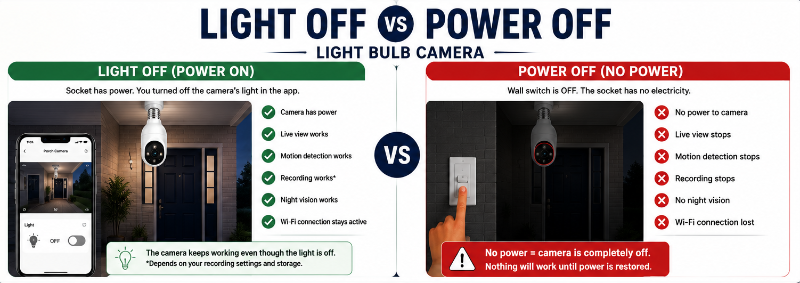
Quick Answer: Will a Light Bulb Camera Work With the Light Off?
Usually, yes, as long as the light socket remains powered.
Many light bulb cameras allow the camera and built-in light to operate somewhat independently.
For example:
Wall switch ON + camera light OFF
→ Camera has power
→ Live view can work
→ Motion detection can work
→ Recording can work
→ Night vision can work
But:
Wall switch OFF
→ Socket has no power
→ Camera shuts down
→ Live view stops
→ Motion detection stops
→ Recording stops
→ Wi-Fi connection is lost
The exact features available with the built-in light off depend on the camera, so check the instructions for your particular model.
The Most Important Difference: Light Off vs Power Off
This is where most of the confusion comes from.
A light bulb security camera combines two devices:
Security camera + light
The camera needs electricity continuously.
The visible light doesn’t necessarily need to remain illuminated continuously.
Think about a traditional outdoor security camera with a spotlight.
Turning off the spotlight doesn’t necessarily shut down the entire security camera.
Many light bulb cameras work on the same basic principle.
Situation #1: You Turn the Light Off in the App
The socket still has electricity.
The camera remains powered.
The visible light turns off, but supported camera functions continue operating.
Situation #2: You Turn Off the Wall Switch
Now you’ve cut electricity to the entire device.
The camera doesn’t simply think:
“Turn the light off.”
It loses its power source.
That’s why keeping the socket continuously powered is such an important part of light bulb camera installation.
For the complete installation process, see our How to Install a Light Bulb Camera guide.
How Does a Light Bulb Camera Get Power?
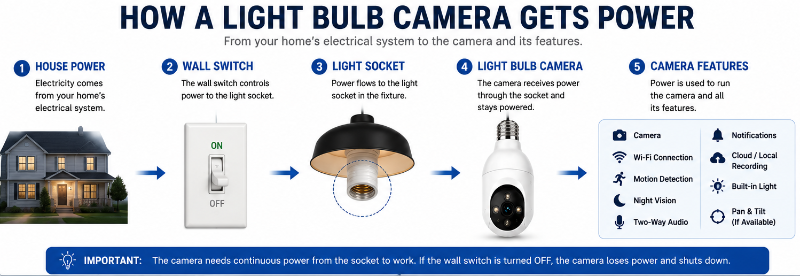
A typical installation looks something like this:
House electrical supply
↓
Wall switch
↓
Light fixture/socket
↓
Light bulb camera
Once electricity reaches the camera, its electronics can power the:
- Camera sensor
- Wi-Fi connection
- Processor
- Motion detection
- microSD storage
- Microphone
- Speaker
- Pan-and-tilt motor, if equipped
- Infrared LEDs
- Visible light
The camera’s software can then control certain components independently.
For example, you might leave the wall switch on 24 hours a day but configure the visible light to:
- Stay off
- Turn on manually
- Activate after motion
- Follow a schedule
- Turn on at night
- Operate through an app
Available controls vary considerably between models.
Why the Wall Switch Usually Needs to Stay On
If your porch light is controlled by a regular wall switch, that switch controls electricity reaching the socket.
Turn it off and the camera can no longer operate.
This can create an easy-to-overlook problem.
Imagine installing a bulb camera over your front entrance.
You leave the switch on because you know the camera needs power.
Later that evening, someone else in the house sees the switch and thinks:
“Nobody needs the porch light right now.”
Click.
The camera goes offline.
This is one of the reasons we recommend thinking about continuous power before purchasing a bulb camera.
Our How to Choose the Right Light Bulb Camera guide includes continuous power as one of the important compatibility checks.
Can a Light Bulb Camera Record With Its Light Off?
Generally, a light bulb camera can record with its visible light turned off if the camera remains powered and the model supports the selected recording mode.
The visible light and recording system don’t necessarily need to operate together.
For example, you might configure a camera to:
- Keep its visible light off
- Detect movement
- Record events to microSD
- Send motion notifications
- Use infrared night vision
The exact behaviour depends on the camera.
Continuous Recording
Some cameras support continuous recording to a microSD card.
If the camera is powered, supported continuous recording can continue whether or not its visible light is illuminated.
Motion/Event Recording
Other cameras record when motion or another qualifying event is detected.
Again, the visible light doesn’t necessarily need to be on.
Cloud Recording
Cloud recording also depends on the camera having:
Motion detection is a camera function rather than simply a function of the visible bulb.
If the camera is powered, it may continue monitoring for movement even when the built-in visible light is off.
Depending on the model, this might include:
- Basic motion detection
- Person detection
- Vehicle detection
- Detection zones
- Automatic tracking
- Push notifications
You may even be able to configure the camera so that detected motion turns the light on.
That can be useful for a porch or entrance.
Instead of keeping the light illuminated continuously:
Area dark
↓
Camera detects motion
↓
Light activates
↓
Camera records event
Again, exact behaviour varies by model and configuration.
Can Night Vision Work When the Light Is Off?
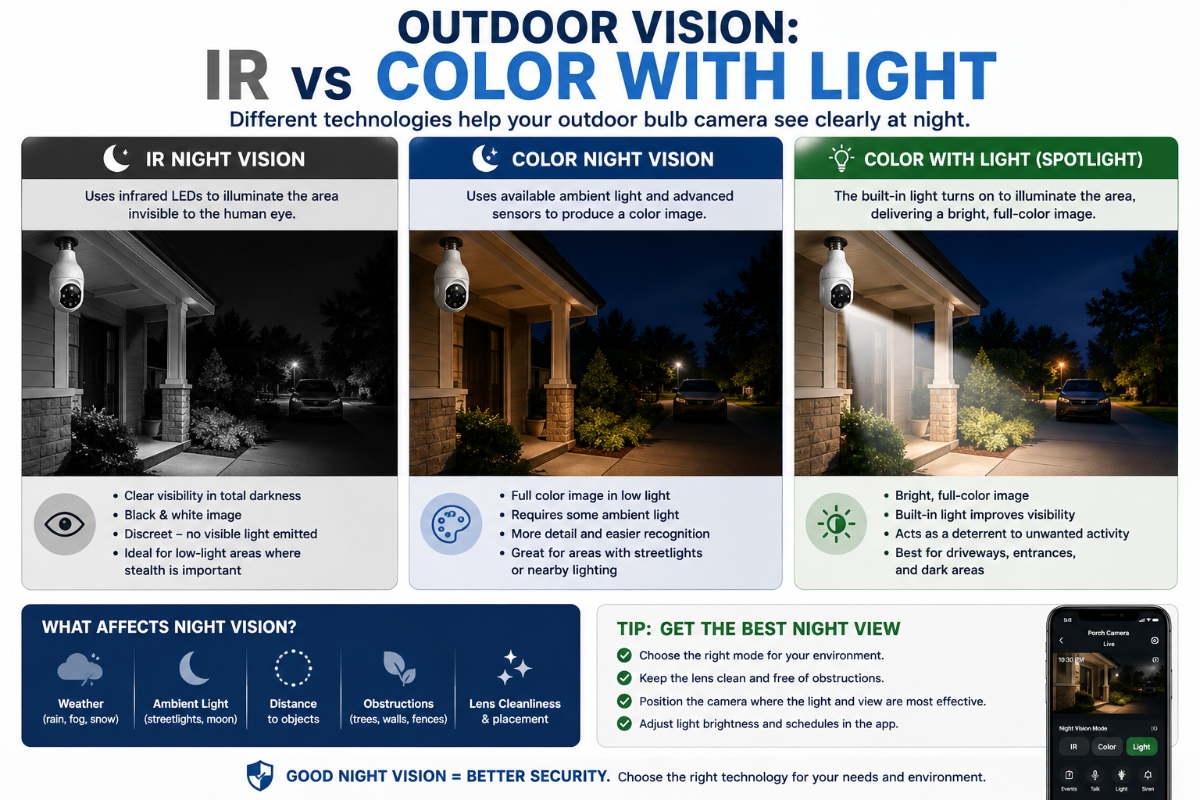
Potentially, yes.
But it helps to understand the different types of nighttime imaging.
Infrared Night Vision
Many security cameras use infrared LEDs to illuminate an area with light that isn’t normally visible to the human eye.
The camera sensor can use that infrared illumination to produce a nighttime image.
The resulting video is often black and white.
That means the camera’s visible light can remain off while the camera still sees the area using infrared.
Example
Visible bulb:
OFF
Infrared LEDs:
ON
Camera:
Recording
To someone standing outside, the area may appear dark even though the camera is producing usable nighttime footage.
Color Night Vision
Color nighttime video generally requires more visible illumination.
Depending on the camera and environment, that illumination might come from:
- Porch lights
- Street lights
- Landscape lighting
- Nearby buildings
- The camera’s own built-in light
If there isn’t enough ambient light, the camera may need to activate its light to provide useful full-colour nighttime footage.
Some cameras automatically switch between colour and infrared modes based on available light.
Don’t Assume “Color Night Vision” Means Total Darkness
A product may advertise colour night vision, but that doesn’t necessarily mean it can produce a bright full-colour image in complete darkness with every visible light turned off.
Check how the specific camera achieves its nighttime image.
Can You Turn the Camera Light Off Through the App?
Many light bulb cameras provide lighting controls through their apps.
Depending on the model, you may be able to:
- Turn the light on
- Turn the light off
- Adjust brightness
- Create schedules
- Activate lighting after motion
- Configure automatic nighttime operation
This is one of the major differences between:
Turning off the camera’s light in software
and
turning off electricity at the wall.
The app tells the powered camera:
“Don’t illuminate the visible LEDs.”
The wall switch tells the entire device:
Nothing, because you’ve removed its electricity.
What Happens If Someone Turns Off the Wall Switch?
The camera generally shuts down.
That means you can lose:
- Live viewing
- Motion detection
- Recording
- Notifications
- Two-way audio
- Pan-and-tilt
- Cloud uploads
- Wi-Fi connection
Once power is restored, the camera normally needs to boot and reconnect.
How quickly this happens depends on the camera and network.
Will It Automatically Reconnect?
Many smart cameras are designed to reconnect automatically after a normal power interruption.
However, you should test this with your particular camera.
Turn the camera off according to the manufacturer’s instructions, restore power, and check whether it:
- Boots normally.
- Reconnects to Wi-Fi.
- Appears in the app.
- Resumes the expected recording mode.
- Restores motion detection and notifications.
If it doesn’t reconnect properly, our Light Bulb Camera Not Connecting to Wi-Fi Troubleshooting Guide walks through the connection problems to check.
What Happens During a Power Outage?
A normal light bulb camera relies on electricity from the socket.
If your home loses power, the camera normally loses power as well unless your particular installation has some form of backup power.
That means the camera can’t normally:
- Record new footage
- Detect motion
- Send notifications
- Provide Live View
- Upload video
Any footage already stored before the outage should be handled according to the camera’s storage system, but new recording requires the camera itself to be powered.
After Power Returns
The camera may automatically restart and reconnect.
It’s worth checking the app after an outage to make sure the camera has returned online.
What Happens If Wi-Fi Goes Down but the Camera Still Has Power?
This is very different from losing electricity.
Suppose:
Wall switch ON
Camera powered
Internet/Wi-Fi unavailable
The camera itself still has electricity.
What happens next depends heavily on the model.
Live Remote Viewing
Remote viewing generally won’t work without the required network/internet connection.
Cloud Recording
Cloud uploads won’t work while the required internet connection is unavailable.
Notifications
Remote push notifications may not reach your phone.
Local microSD Recording
This is where things become interesting.
Some cameras can continue recording locally to a microSD card during an internet interruption because recording occurs inside the camera.
Other camera functions may depend more heavily on network or cloud services.
Check your model’s documentation rather than assuming local recording continues.
Built-In Light
The light may continue operating according to locally stored settings or controls, depending on the camera.
The important distinction is:
Power outage = camera can’t operate.
Internet outage = some local functions may potentially continue.
Light Off vs Power Off vs Wi-Fi Off
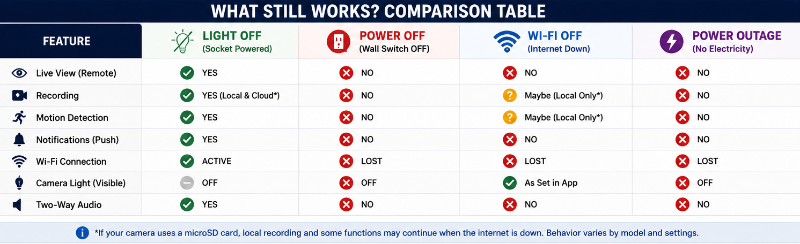
Here’s a useful general comparison:
| Situation | Camera Powered? | Live View | Recording | Motion Detection | Visible Light |
|---|---|---|---|---|---|
| Light off through app | ✓ | Usually ✓ | Usually ✓ | Usually ✓ | ✕ |
| Wall switch off | ✕ | ✕ | ✕ | ✕ | ✕ |
| Home power outage | ✕ | ✕ | ✕ | ✕ | ✕ |
| Wi-Fi/internet down | ✓ | Remote access unavailable | Local may continue* | May continue* | May work* |
| Light on + socket powered | ✓ | ✓ | ✓ | ✓ | ✓ |
*Exact behaviour depends on the camera, storage method, and whether the feature relies on local processing or cloud connectivity.
This distinction is much more useful than simply asking whether a camera “works with the light off.”
What About Dimmers?
Be careful with dimmer switches.
A dimmer isn’t simply an ON/OFF switch.
It changes the electrical power delivered to the connected light.
A smart camera contains electronics that expect an appropriate power supply, and a dimmer may not be suitable.
Don’t assume that because the original LED bulb worked on a dimmer, the camera will too.
Check the camera manufacturer’s instructions.
If the manufacturer says not to use the camera with a dimmer, follow that recommendation.
What About Timers and Motion-Controlled Fixtures?
These deserve similar attention.
A traditional outdoor light might be configured to receive electricity only:
- At night
- During scheduled hours
- After motion is detected
- When a timer activates
That’s fine for an ordinary bulb.
It’s potentially a problem for a security camera that needs continuous electricity.
Consider a motion-controlled fixture:
No motion
↓
Fixture cuts power
↓
Camera shuts down
↓
Camera can’t detect motion itself because it has no power
That’s obviously not what you want.
The camera may have its own motion detection and lighting controls, making the fixture’s original automation unnecessary or incompatible.
Always check the camera and fixture instructions.
Can You Leave a Light Bulb Camera Powered 24/7?
A security camera generally needs continuous power if you expect continuous availability.
That’s different from leaving its visible light illuminated 24/7.
The camera can remain powered while the light is off if the model supports independent lighting control.
This allows the camera to remain available for:
- Monitoring
- Motion detection
- Recording
- Notifications
- Remote viewing
without illuminating the area continuously.
How To Prevent Someone From Accidentally Turning Off The Camera
This sounds minor until it happens repeatedly.
If a wall switch controls your camera’s socket, everyone in the household needs to know that the switch now controls a security device.
A few practical options include:
Tell Everyone What the Switch Controls
The simplest solution may be enough.
Explain that the light itself can be controlled through the camera app and the wall switch needs to remain on.
Label the Switch
A small label such as:
CAMERA – LEAVE ON
can prevent accidental shutdowns.
Use an Appropriate Switch Guard
A switch guard can discourage someone from casually flipping the switch while still allowing access when needed.
Make sure anything you install is appropriate for your switch and doesn’t create an electrical or accessibility problem.
Don’t Modify Electrical Wiring Yourself Unless Qualified
If you want to change how a fixture or switch is wired, that’s no longer simply a camera setup issue.
Have electrical modifications performed appropriately.
Is a Light Bulb Camera a Good Choice If You Regularly Use the Wall Switch?
Maybe not.
This is an important buying consideration.
A bulb camera makes the most sense when you have:
A suitable socket + continuous power + useful camera position + reliable Wi-Fi
If you need to repeatedly turn the socket itself on and off, another camera format may be more practical.
You could consider:
- Plug-in security camera
- Battery camera
- Hardwired camera
- Doorbell camera
- Floodlight camera
Our Light Bulb Camera vs Ring vs Wyze vs Blink comparison looks at some of the alternatives.
Does Turning Off the Light Make the Camera Invisible at Night?
Not necessarily.
Even with the visible light off, the camera itself may have:
- Status LEDs
- Infrared LEDs
- Reflections
- Other indicators
Some infrared LEDs can produce a faint visible red glow, depending on the camera.
Don’t assume that switching off the visible illumination makes the camera completely undetectable.
You should also never rely on concealment as a substitute for responsible camera placement.
For privacy and positioning considerations, see our Privacy-First Light Bulb Camera Buyer Checklist.
Does Turning the Light Off Affect Video Quality?
It can, particularly at night.
During daylight, turning off the built-in light may make little difference.
At night, the result depends on:
- Ambient lighting
- Infrared night vision
- Camera sensor
- Lens
- Built-in illumination
- Distance to the subject
A camera may switch from:
Color video with visible lighting
to
Black-and-white infrared video without visible lighting.
Neither is automatically better.
Infrared can be useful for discreet monitoring, while visible illumination can provide additional colour information and potentially more detail in some situations.
Test both modes at the actual installation location.
Outdoor Installations Need Extra Attention
If you’re using a bulb camera outdoors, continuous power is only one consideration.
Also check:
- Weather rating
- Fixture suitability
- Socket protection
- Operating temperature
- Wi-Fi strength
- Viewing angle
- Nighttime reflections
A covered porch installation and a fully exposed fixture aren’t necessarily equivalent.
Our Best Light Bulb Cameras for Outdoor Use guide covers those considerations in more detail.
Apartments and Rentals
Light bulb cameras can be appealing to renters because installation may require little more than replacing an existing bulb.
But wall-switch behaviour is particularly important in rentals.
Before installing one, determine:
- Whether the socket stays powered
- Whether the fixture is suitable
- Whether you’re allowed to install the device
- What the camera will capture
- Whether it monitors common areas
- Whether neighbouring doors or windows are unnecessarily visible
See our Best Light Bulb Cameras for Apartments & Renters for more renter-specific considerations.
Frequently Asked Questions
Do light bulb cameras work when the light is turned off?
Usually, yes, if you’re turning off only the camera’s built-in visible light while leaving electricity supplied to the socket.
If you turn off the wall switch and remove power from the socket, the camera generally stops working.
Does the wall switch need to stay on for a light bulb camera?
Usually, yes, when that switch controls electricity to the socket.
The camera needs continuous power to remain online.
Can a light bulb camera record in the dark?
Many can.
Cameras equipped with infrared night vision can potentially record in very dark conditions without keeping their visible light illuminated.
Nighttime capabilities vary by model.
Will motion detection work when the camera light is off?
It can, as long as the camera itself remains powered and the model supports motion detection without visible illumination.
Does turning off the wall switch turn off recording?
Yes, if turning off the switch removes electricity from the camera.
Without power, the camera can’t continue recording.
Can a bulb camera record when Wi-Fi is off?
Some cameras may continue local microSD recording without an active internet connection, but this depends on the model and configuration.
Cloud recording and remote access generally require network connectivity.
Will a light bulb camera reconnect after a power outage?
Many connected cameras are designed to reconnect after power is restored, but behaviour varies.
After an outage, check the camera in its app and verify that recording and notifications have resumed.
Can I use a light bulb camera with a dimmer switch?
Don’t assume that you can.
Check the manufacturer’s requirements for your exact camera. A dimmer changes the electrical supply and may be unsuitable for a smart security camera.
Can I control the camera’s light separately from the camera?
Many bulb cameras provide independent lighting controls through their apps, but available features vary by model.
Should I leave my light bulb camera on all the time?
If you want continuous camera availability, the device generally needs continuous electrical power.
That doesn’t necessarily mean its visible light needs to stay illuminated.
The Simple Rule to Remember
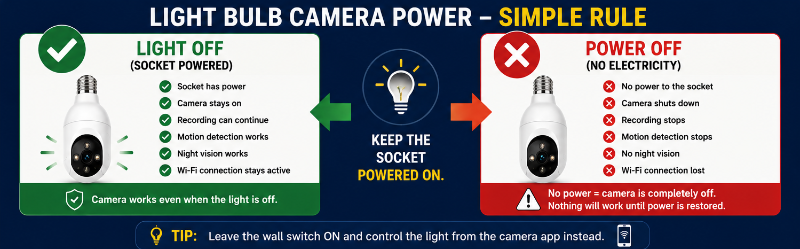
If there’s one thing to remember from this guide, it’s this:
Camera light OFF ≠ camera power OFF
Turning off the visible light through the camera’s controls can still leave the security camera running.
But:
Wall switch OFF = socket power OFF = camera OFF
That’s why continuous power is one of the first things you should check before installing a light bulb camera.
If you’re currently setting one up, our How to Install a Light Bulb Camera guide walks through the complete installation process.
And if your camera isn’t coming back online after restoring power, use our Light Bulb Camera Not Connecting to Wi-Fi troubleshooting guide.
Final Thoughts
A light bulb security camera doesn’t normally need its visible light to stay on continuously.
It needs its electrical power to stay on.
Keeping those two things separate makes bulb cameras much easier to understand.
With the socket continuously powered, a compatible camera may be able to keep monitoring, recording, detecting motion, sending notifications, and using infrared night vision while its visible light remains off.
Turn off the wall switch supplying the socket, however, and the entire camera normally shuts down.
Before installing a bulb camera, therefore, ask:
Can this socket remain continuously powered?
If the answer is yes, you can then use the camera’s own controls to determine when its visible light should actually illuminate.