Choosing a home security camera isn’t simply a matter of finding the model with the longest feature list.
The first decision is often more basic:
What type of security camera actually makes sense for where you want to install it?
Light bulb cameras can be convenient when you already have a well-positioned light socket. Ring offers a much broader home-security ecosystem. Wyze combines relatively affordable cameras with strong local-storage options, while Blink is particularly well known for wireless battery-powered cameras.
None of these approaches is automatically better.
The right choice depends on where you want the camera, how you plan to power it, whether you want local or cloud storage, your willingness to pay for subscriptions, and whether you’re building a larger home-security system.
This guide compares light bulb cameras vs Ring vs Wyze vs Blink to help you decide which approach makes the most sense for your home.
Note: Features vary between individual models. This comparison focuses on the general strengths and limitations of each camera ecosystem rather than suggesting that every product from a particular brand has identical features.
Light Bulb Camera vs Ring vs Wyze vs Blink: Which Security Camera Is Right for You?
| Feature | Light Bulb Camera | Ring | Wyze | Blink |
|---|---|---|---|---|
| Best For | Existing light sockets | Complete security ecosystem | Value & local recording | Flexible battery placement |
| Typical Power | Light socket | Wired, plug-in, battery or solar depending on model | Plug-in/wired, battery and other options | Battery, wired/plug-in depending on model |
| Installation Flexibility | Limited by socket location | High | High | Very high with battery models |
| Local Storage | Depends on camera | Limited/model & system dependent | Available on most cameras | Available through compatible Sync Module |
| Cloud Storage | Depends on manufacturer | Available with subscription | Optional plans available | Available with subscription |
| 24/7 Recording | Some models | Select eligible cameras/plans | Available locally on compatible microSD models | Not the main strength |
| Integrated Lighting | Yes | Select cameras | Select cameras | Select models |
| Best Ecosystem | Varies by manufacturer | Strong security-focused ecosystem | Broad affordable smart-camera ecosystem | Simple multi-camera monitoring |
| Good for Renters | Often | Depends on model | Often | Particularly good with battery models |
The biggest takeaway is that “light bulb camera” describes a camera format, while Ring, Wyze and Blink are brands offering multiple types of cameras.
In fact, Wyze itself now makes a light bulb camera.
So this isn’t strictly a brand-versus-brand comparison. It’s really about deciding which camera approach and ecosystem best matches your needs.
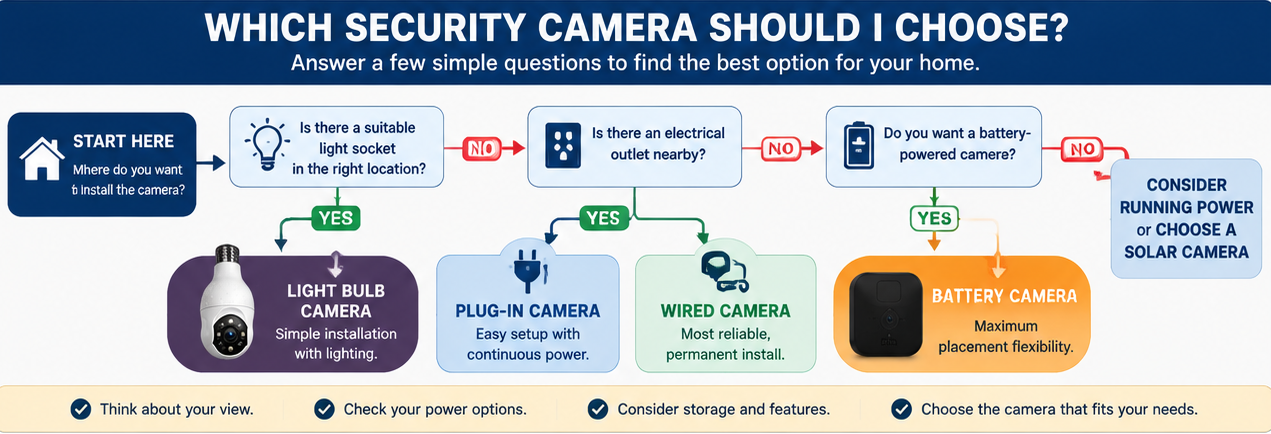
What Makes a Light Bulb Camera Different?
A light bulb camera combines a security camera and light in a device designed to screw into a compatible light socket.
Its biggest advantage is installation.
If you already have a useful light fixture, you may be able to install the camera without:
- Running a new power cable
- Drilling a camera mount into the wall
- Charging batteries
- Hiring someone to install new wiring
The camera gets continuous electricity through the existing socket.
That can make bulb cameras particularly attractive for porches, garages, entrances and some rental properties.
But that convenience creates their biggest limitation too.
You’re Limited by the Location of the Light Socket
A conventional security camera can generally be mounted where you need it.
A bulb camera needs a suitable socket.
If the existing light fixture doesn’t provide the view you need, the convenience of screw-in installation doesn’t matter very much.
Some bulb cameras compensate with motorized pan-and-tilt viewing, but the physical installation point is still determined by the fixture.
Before buying one, our How to Choose the Right Light Bulb Camera guide covers socket compatibility, Wi-Fi, storage and placement in more detail.
When a Light Bulb Camera Makes the Most Sense
I’d consider a light bulb camera when:
- You already have a suitable light socket
- The socket provides a useful camera position
- You want relatively simple installation
- You still need lighting from the fixture
- You don’t want to run another power cable
- You want to avoid regularly charging batteries
- You aren’t trying to build an elaborate whole-home security system
This is where the format really shines.
If there’s already an exterior light directly above your entrance, for example, turning that fixture into both a light and camera can be an efficient use of something that’s already there.
For our current recommendations, see Best Light Bulb Cameras for 2026.
When a Light Bulb Camera Doesn’t Make Sense
Don’t force a bulb camera into an installation simply because it’s easy to screw in.
I’d choose something else when:
- The light socket is poorly positioned
- The fixture blocks the camera’s view
- The socket can’t remain continuously powered
- The camera would be excessively exposed to weather
- You need precise camera placement
- You want a large coordinated security system
- There isn’t an existing light socket where you need surveillance
In those situations, Ring, a conventional Wyze camera, Blink, or another dedicated security camera may be more appropriate.
Light Bulb Camera vs Ring
For a closer look at Ring alternatives to a screw-in bulb camera, see our Ring Light Bulb Camera Alternatives guide.
Ring has a very different strength from the typical standalone bulb camera: ecosystem depth.
Ring offers doorbells, indoor cameras, outdoor cameras, spotlight cameras, floodlight cameras and home alarm products.
That makes Ring particularly attractive if you’re thinking beyond a single camera.
Where Ring Has the Advantage
Imagine that today you want a front-door camera.
Six months from now you may want:
- A backyard camera
- Video doorbell
- Floodlight camera
- Indoor camera
- Alarm system
Staying within one ecosystem means these devices can be managed together rather than accumulating separate camera apps.
Ring also offers cameras with multiple power options, including battery, plug-in, wired and solar configurations depending on the product.
A bulb camera generally can’t compete with that installation flexibility.
Where the Light Bulb Camera Has the Advantage
If you only need one camera and already have the perfect light socket, Ring’s larger ecosystem may not provide much practical benefit.
A bulb camera can potentially solve both your lighting and camera needs with one device.
You may also find bulb cameras offering pan-and-tilt functionality at relatively low prices.
The Ring Subscription Question
This is an important difference.
Ring cameras can provide Live View without a subscription, but saved video history is tied to an appropriate Ring Protect plan. Ring also offers 24/7 Continuous Recording on eligible continuously powered cameras as a paid add-on to an eligible plan.
Ring’s current Canadian Ring Protect plans include Solo for one device, Multi for devices at one location, and Pro for broader monitoring and intelligence features. Ring renamed its Ring Home plans to Ring Protect in 2026.
That doesn’t automatically make Ring expensive or a poor value. It simply means subscription cost should be part of your comparison, not just the hardware price.
Choose Ring If…
Ring is particularly worth considering if:
- You want a video doorbell
- You’re building a larger home-security system
- You want multiple cameras managed within one ecosystem
- You want flexible camera-placement options
- You’re comfortable considering subscription services for recorded video and additional features
Choose a Light Bulb Camera Instead If…
A bulb camera may be preferable if:
- You need only one or two cameras
- You already have ideally positioned light sockets
- Simple screw-in installation is important
- You specifically want integrated lighting
- You prefer local-storage options available on a particular bulb-camera model
Light Bulb Camera vs Wyze
Wyze is particularly interesting in this comparison because Wyze offers both conventional cameras and a Bulb Cam.
That means choosing Wyze doesn’t necessarily mean choosing against the light bulb format.
The current Wyze Bulb Cam is a true E26 screw-in camera with 2K video, an 800-lumen dimmable light and local microSD recording up to 256GB. Its camera angle is manually positioned rather than remotely motorized, which makes it different from pan-and-tilt bulb cameras such as current LaView and SYMYNELEC options.
Read our Wyze Bulb Cam Review.
Instead, you can potentially use different Wyze camera types in different parts of the home.
Where Wyze Has the Advantage
One of Wyze’s biggest strengths is local storage.
Wyze continues to make local storage a major part of its camera lineup. The current Wyze Bulb Cam records continuously to a compatible microSD card up to 256GB without requiring a subscription.
Compatible cameras with a microSD card can record continuously or record events locally without requiring a subscription.
That is a substantial advantage for someone who doesn’t want their basic recording capability tied entirely to a monthly cloud plan.
What About Wyze Subscriptions?
Wyze cameras don’t require a subscription for basic use.
Wyze says free users can access features including live streaming and motion detection, while its paid camera plans add cloud video recording and additional smart-detection features.
That gives users a choice:
Local microSD recording
or
Cloud subscription features
or, depending on the camera and your preferences,
both.
Wyze Also Gives You More Camera Choices
Suppose a bulb camera works perfectly on your porch but not in your backyard.
You could use a Wyze Bulb Cam at the porch and a conventional Wyze camera elsewhere.
For example, the current Wyze Bulb Cam supports 24/7 local microSD recording up to 256GB without requiring a subscription, while other compatible Wyze cameras also offer direct microSD recording.
That’s more flexible than building your entire setup around light sockets.
Where a Non-Wyze Light Bulb Camera Can Still Win
A dedicated bulb-camera manufacturer may offer features you specifically want, such as motorized 360-degree pan-and-tilt viewing or dual-band Wi-Fi on a particular model.
That’s why the decision shouldn’t simply be:
Wyze = good / bulb camera = bad
Instead ask:
Does the exact camera have the viewing, storage, connectivity and installation features I need?
Choose Wyze If…
Wyze makes particular sense if:
- Local microSD recording is important
- You want to minimize required subscription costs
- You may eventually use several different camera types
- You want an affordable smart-camera ecosystem
- You like the option of combining local storage with optional cloud services
Choose Another Light Bulb Camera If…
A different bulb camera may make more sense if:
- Motorized pan-and-tilt is a priority
- Your selected bulb model supports connectivity or features a Wyze model doesn’t
- You’re only buying one camera and don’t care about building an ecosystem
Light Bulb Camera vs Blink
For a closer comparison of Blink cameras and true screw-in bulb cameras, see our Blink Light Bulb Camera Alternatives guide.
Blink has another distinct advantage:
placement flexibility, particularly through battery-powered camera options.
A light bulb camera needs an electrical socket.
A battery-powered Blink camera doesn’t.
That distinction can immediately determine which one is appropriate for your home.
Where Blink Has the Advantage
Imagine you want a camera overlooking the side yard.
There’s no outlet nearby.
There’s no light fixture.
Running electrical wiring would be inconvenient.
That’s exactly the kind of situation where a battery camera becomes attractive.
You’re not trying to make an existing electrical location work. You’re choosing a camera location based primarily on the view you need.
Where the Light Bulb Camera Has the Advantage
Battery cameras trade wiring convenience for another consideration:
the battery eventually needs attention.
A light bulb camera connected to a continuously powered socket doesn’t need periodic battery charging or replacement.
It can also provide everyday lighting from the same device.
So if you already have a suitable powered fixture, the bulb camera may actually be the simpler long-term solution.
Blink Storage Options
Blink provides both cloud and local-storage approaches.
Blink says local storage can be provided through a compatible Sync Module using either a USB flash drive with Sync Module 2 or a microSD card with Sync Module XR. Cloud storage is available through Blink subscription plans.
That’s different from many Wyze cameras where the microSD card goes directly into the camera itself.
The extra hardware requirement is worth understanding before comparing prices.
Choose Blink If…
Blink is worth considering when:
- There’s no power source where you want the camera
- Flexible placement is a major priority
- Battery operation suits your installation
- You want several cameras positioned around a property
- You’re comfortable using the Blink ecosystem and its storage approach
Choose a Light Bulb Camera Instead If…
A bulb camera may be preferable when:
- A suitable powered light fixture already exists
- You don’t want to manage batteries
- You need both lighting and video
- You want simple socket installation
- Your selected camera provides direct microSD storage
The Biggest Difference May Be Power, Not Video Quality
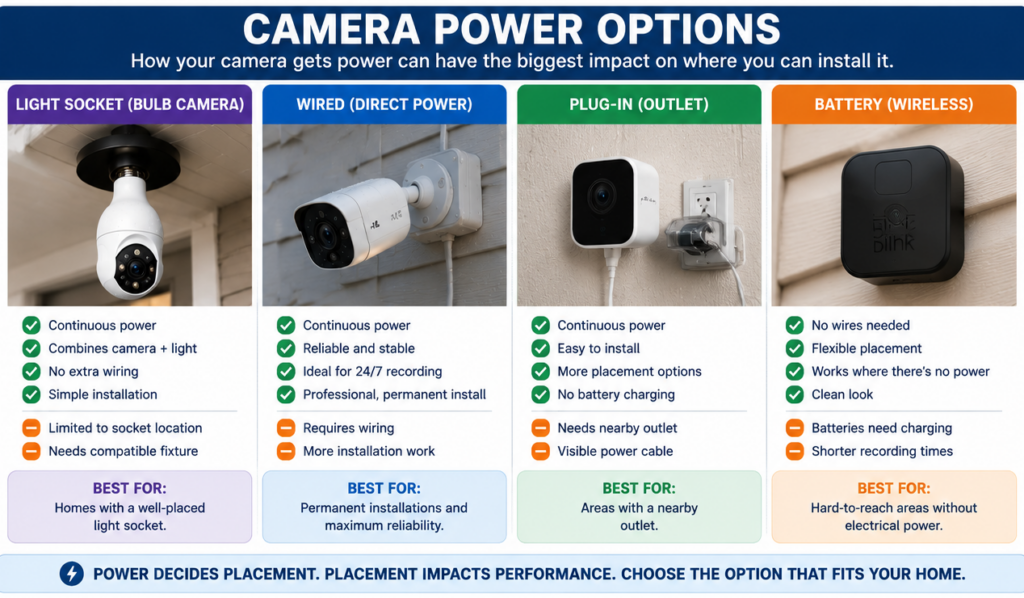
People often start by comparing resolution:
1080p vs 2K vs 4MP
But power can have a much greater impact on whether you’ll actually be happy with the camera.
Light Bulb Camera
Powered continuously through a compatible light socket.
Advantage: no battery charging.
Disadvantage: camera location depends on the socket.
Wired or Plug-In Camera
Receives continuous power but can usually be positioned more precisely than a bulb camera.
Advantage: continuous power and better placement flexibility.
Disadvantage: may require wiring, an outlet or more installation work.
Battery Camera
Can be positioned in many places without nearby electrical power.
Advantage: excellent installation flexibility.
Disadvantage: batteries eventually require charging or replacement, with actual battery life depending heavily on activity and settings.
Before obsessing over small differences in resolution, decide how you’re going to power the camera.
That can eliminate half your options immediately.
Which Is Best for Local Storage?
If avoiding mandatory cloud storage is a priority, pay particularly close attention here.
Light Bulb Cameras
Varies significantly.
Some record directly to microSD cards. Others rely more heavily on cloud services.
Check the exact model.
Ring
Ring’s standard camera experience is strongly cloud-oriented. Without a subscription, Ring provides Live View but doesn’t save ordinary camera videos/photos for later review. Ring does offer local video storage through specific Alarm Pro configurations, so this isn’t a blanket statement that Ring can never store video locally.
Wyze
This is one of Wyze’s strongest areas.
Compatible cameras with microSD slots support local recording, including continuous recording, without requiring a subscription.
Blink
Blink supports local storage through compatible Sync Modules using USB or microSD storage, depending on the module.
Our Take
If straightforward camera-level local storage is one of your highest priorities, Wyze deserves serious consideration.
But don’t choose based solely on storage. A camera still needs to fit the location and provide the coverage you need.
Our Privacy-First Light Bulb Camera Buyer Checklist covers additional questions about storage, accounts and privacy.
Which Is Best If You Don’t Want a Subscription?
This question requires a little nuance.
A camera being usable without a subscription isn’t the same as every advertised feature being available without one.
Light Bulb Cameras
This varies by manufacturer. Some provide substantial local functionality without a subscription, while others reserve cloud storage or advanced detection features for paid plans.
Ring
You can use Live View without a Ring subscription, but saved video history and several other capabilities are associated with Ring’s subscription plans.
Wyze
Wyze cameras can be used without a paid plan, and compatible microSD-equipped cameras can record locally without a subscription. Paid plans add features such as cloud recording and smarter detection capabilities.
Blink
Blink offers local-storage options through compatible Sync Modules, while cloud storage is available through its subscription plans.
If avoiding ongoing fees is one of your biggest priorities, compare what each camera does without paying monthly, not simply whether the manufacturer advertises an optional subscription.
Which Is Best for Renters?
There’s no single winner.
Light Bulb Camera
Great when you already have an appropriate socket and want an installation that can be removed relatively easily.
Ring
A battery-powered or otherwise renter-appropriate Ring camera may work well, particularly if you want a doorbell-style solution, but consider how the device needs to be mounted.
Wyze
Small plug-in cameras can work well inside an apartment, while the Bulb Cam may suit an existing compatible fixture.
Blink
Battery-powered placement can be particularly appealing when you don’t want to depend on a nearby electrical outlet.
For apartment-specific privacy, lease, fixture and placement considerations, see our Best Light Bulb Cameras for Apartments & Renters guide.
Which Is Best for Outdoor Use?
Again, it depends on the location.
For an existing covered porch light, an outdoor-rated bulb camera can be an elegant solution.
For the edge of a property where there’s no electrical fixture, a battery or solar camera could be considerably easier.
For a large driveway where strong illumination is important, a purpose-built floodlight camera may be the better tool.
And for a permanent whole-home security system, dedicated outdoor cameras can offer much more control over exact positioning.
Our Best Light Bulb Cameras for Outdoor Use guide explains weather ratings, socket protection, temperature limits and outdoor installation in more detail.
What About Privacy?
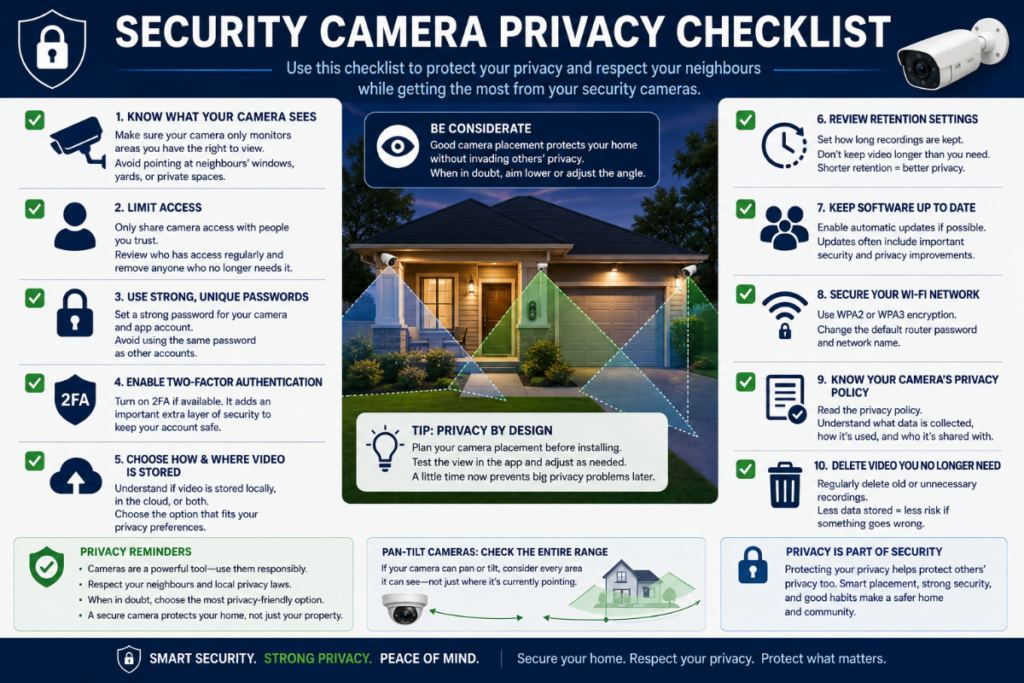
Privacy considerations apply regardless of brand.
Before installing any connected camera, consider:
- What areas the camera can see
- Whether it unnecessarily captures neighbouring property
- Who has access to the account
- Whether two-factor authentication is available
- Where recordings are stored
- Whether recordings are uploaded to the cloud
- How long recordings are retained
- Which household members have access
- Whether the camera and app receive security updates
For a pan-and-tilt bulb camera, also consider the entire area the camera could be rotated toward, not just where it’s currently pointing.
Camera security isn’t simply about preventing someone from getting into your home. It also includes responsible handling of the footage your cameras collect.
What About Total Cost?
Don’t compare cameras based solely on the price displayed beside the Buy button.
Think about:
Hardware
What does the camera itself cost?
Storage
Do you need to purchase a microSD card, USB drive or Sync Module?
Subscription
Are the features you care about included without a monthly plan?
Power accessories
Will you need a solar panel, additional wiring, outdoor adapter or other equipment?
Additional cameras
Will you eventually expand the system?
A $50 camera with ongoing costs isn’t automatically cheaper over several years than an $80 camera with the functionality you need available locally.
Likewise, paying a subscription may be completely reasonable if you value cloud storage and the additional services it provides.
The important thing is understanding the total setup, not merely the initial purchase price.
Which Camera Type Should You Choose?
Here’s the simplest way I’d make the decision.
Choose a Light Bulb Camera If…
You already have a well-positioned light socket and want a simple combination of security camera and lighting.
If that’s you, start with our Best Light Bulb Cameras for 2026.
Choose Ring If…
You want to build a broader security ecosystem involving cameras, doorbells and potentially an alarm system, and you’re comfortable evaluating Ring’s subscription options.
Choose Wyze If…
You value affordable camera options, local microSD recording on compatible models, and the flexibility to combine different camera types.
Choose Blink If…
Battery-powered placement flexibility is particularly important, or you want cameras in locations without convenient electrical power.
Frequently Asked Questions
Are light bulb cameras better than Ring cameras?
Not necessarily.
A light bulb camera can be more convenient when you already have an appropriately positioned socket. Ring is generally better suited to someone who wants a larger security ecosystem with several types of cameras, video doorbells and potentially an alarm system.
Is Wyze better than a light bulb camera?
Wyze actually offers its own Bulb Cam, so these categories overlap.
Conventional Wyze cameras provide more placement options, while a bulb camera takes advantage of an existing powered light fixture.
The better choice depends primarily on installation location, viewing needs and storage preferences.
Does Ring require a subscription?
A Ring camera can provide Live View without a subscription, but Ring says saved video history requires an appropriate subscription.
Consider whether recorded video history is important to you when comparing the ongoing cost.
Does Wyze require a subscription?
No. Wyze says its cameras can be used without a paid subscription, and compatible microSD-equipped models can record locally without one. Paid plans add cloud storage and additional smart features.
Does Blink offer local storage?
Yes. Blink supports local storage using compatible Sync Modules. Sync Module 2 uses USB storage, while Sync Module XR supports microSD storage.
Which is best if I don’t have an electrical outlet nearby?
A battery-powered camera such as an appropriate Blink or battery-powered Ring model can make more sense than a bulb camera when there is no suitable powered light socket.
Which is best for 24/7 local recording?
Wyze is particularly strong here because compatible cameras with microSD slots support continuous local recording without requiring a subscription.
Individual bulb cameras may also support continuous local recording, so check the exact model.
Is a bulb camera better than a doorbell camera?
They solve different problems.
A doorbell camera is specifically positioned around visitor activity at an entrance.
A bulb camera can potentially monitor a wider area and provide lighting, but its position depends on the existing light fixture.
If your main goal is seeing who’s directly at your door, a doorbell camera may be the more appropriate choice.
Final Verdict: Light Bulb Camera vs Ring vs Wyze vs Blink
There isn’t one winner for every home.
Light bulb cameras are strongest when you already have a suitable light fixture and want simple installation, continuous power and lighting in the same device.
Ring makes the most sense when you’re interested in a broader security ecosystem and want cameras, doorbells and potentially an alarm system working together.
Wyze stands out for affordable camera choices and straightforward local microSD recording on compatible models.
Blink is particularly attractive when battery-powered flexibility matters and you want to position cameras where electrical power isn’t readily available.
The best way to choose is to start with where the camera needs to go, not which brand has the longest feature list.
Determine the viewing position, power source, storage method and features you actually need. Then choose the camera ecosystem that fits those requirements.
If you’ve decided a light bulb camera is the right approach, continue with our Best Light Bulb Cameras for 2026 guide to compare our current recommendations.