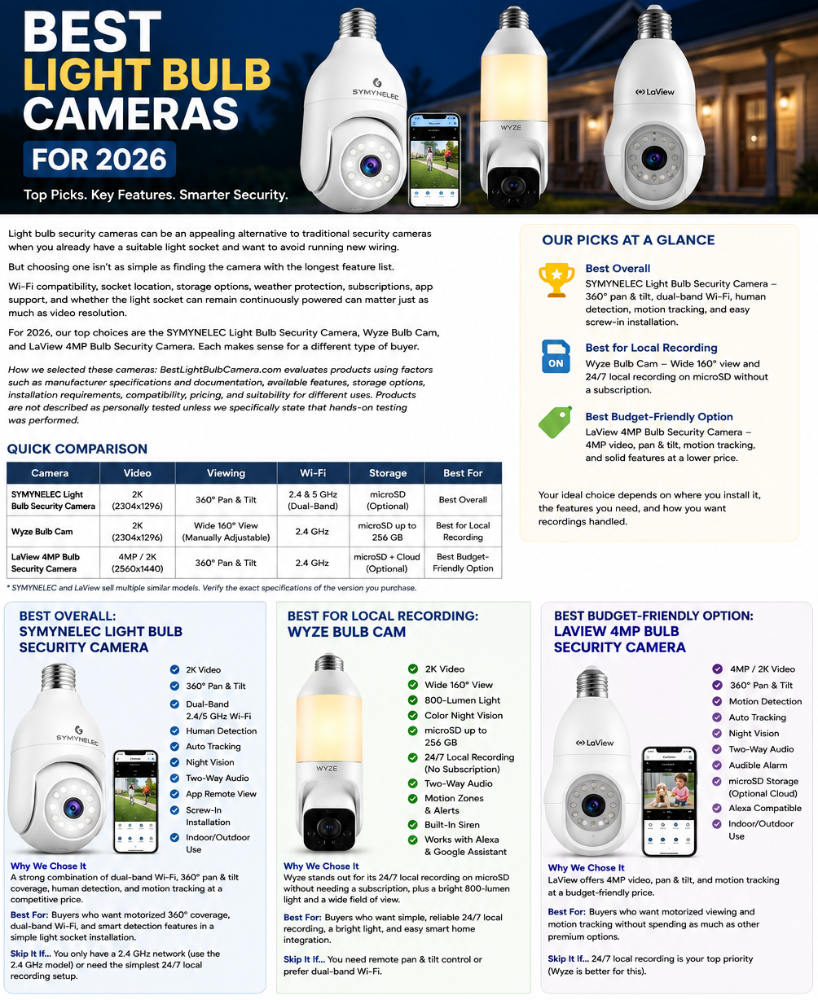
Light bulb security cameras can be an appealing alternative to traditional security cameras when you already have a suitable light socket and want to avoid running new wiring.
But choosing one isn’t as simple as finding the camera with the longest feature list.
Wi-Fi compatibility, socket location, storage options, weather protection, subscriptions, app support, and whether the light socket can remain continuously powered can matter just as much as video resolution.
For 2026, our top choices are the SYMYNELEC Light Bulb Security Camera, Wyze Bulb Cam, and LaView 4MP Bulb Security Camera.
Each makes sense for a somewhat different buyer.
How we selected these cameras: BestLightBulbCamera.com evaluates products using factors such as manufacturer specifications and documentation, available features, storage options, installation requirements, compatibility, pricing, and suitability for different uses. Products are not described as personally tested unless we specifically state that hands-on testing was performed.
Affiliate disclosure: Some links in this guide are affiliate links. If you purchase through them, BestLightBulbCamera.com may earn a commission at no additional cost to you. This does not affect which products we recommend.
Quick Comparison
| Camera | Video | Viewing | Wi-Fi | Best For |
|---|---|---|---|---|
| SYMYNELEC Light Bulb Security Camera | 2K | 360° pan/tilt | 2.4/5 GHz* | Best overall |
| Wyze Bulb Cam | 2K | Wide 160° view | 2.4 GHz | Best for local recording |
| LaView 4MP Bulb Security Camera | 4MP / 2K | 360° pan/tilt | 2.4 GHz* | Best budget-friendly option |
*SYMYNELEC and LaView sell multiple similar bulb-camera models. Verify the specifications of the exact version you’re purchasing.
Our Picks at a Glance
Best Overall: SYMYNELEC Light Bulb Security Camera
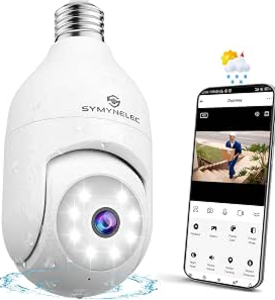
SYMYNELEC gets our overall recommendation because the model selected for this guide combines dual-band Wi-Fi, 360-degree pan-and-tilt coverage, motion tracking, night vision and straightforward light-socket installation at a competitive price.
Best for Local Recording: Wyze Bulb Cam
Wyze is particularly interesting for buyers who want continuous local recording. With a compatible microSD card, it supports 24/7 recording without requiring a subscription.
Best Budget-Friendly Option: LaView 4MP Bulb Security Camera
LaView combines 4MP/2K video, pan-and-tilt coverage, motion tracking, night viewing and two-way audio in an affordable package.
These categories are more useful than declaring one camera “best” for everyone. Your ideal choice depends on where you’re installing it, what features you actually need, and how you want recordings handled.
If cost is a priority, you may want to compare additional options in our Best Light Bulb Cameras Under $100 guide.
Best Overall: SYMYNELEC Light Bulb Security Camera
Why We Chose It
The SYMYNELEC model selected for this guide provides an appealing combination of features and price.
Unlike many inexpensive light bulb cameras limited to 2.4 GHz Wi-Fi, the dual-band model supports both 2.4 GHz and 5 GHz connections. That gives buyers more flexibility when connecting the camera to a home network.
It also offers motorized pan-and-tilt viewing, allowing the camera to monitor a much wider area than a fixed-position camera.
Human detection and automatic tracking add another useful layer. Rather than simply detecting general movement, the camera is designed to identify human activity and can follow movement through its viewing area.
Important Features
Features of the selected SYMYNELEC model include:
- 2K video
- Dual-band 2.4 GHz and 5 GHz Wi-Fi
- Wi-Fi 6 support
- 360° pan-and-tilt coverage
- Human detection
- Automatic motion tracking
- Night vision
- Two-way audio
- App-based remote viewing
- Light-socket installation
- Indoor/outdoor use
- Optional recording/storage features depending on configuration
What We Like
The biggest advantage is the combination of dual-band Wi-Fi and motorized viewing.
Many bulb cameras force buyers to choose between inexpensive pan-and-tilt models that support only 2.4 GHz Wi-Fi and more expensive cameras from larger smart-home brands.
SYMYNELEC provides an interesting middle ground.
Pan-and-tilt control is particularly useful with light bulb cameras because the electrical socket determines where the camera has to be installed. Being able to reposition the view remotely gives you more flexibility after installation.
The standard screw-in design also keeps installation relatively simple when you already have a suitable light fixture.
What to Consider Before Buying
SYMYNELEC sells several light bulb cameras that look quite similar but don’t necessarily have identical specifications.
That’s important.
Some models support only 2.4 GHz Wi-Fi, while others support both 2.4 and 5 GHz. Video resolution, storage options and other features can also vary.
Make sure the listing you’re purchasing matches the specifications you want rather than assuming every SYMYNELEC bulb camera is identical.
Fixture clearance is another consideration. Light bulb cameras are considerably larger than ordinary bulbs and may not fit properly inside enclosed fixtures or narrow sconces.
Best For
SYMYNELEC makes the most sense for someone who wants:
- Motorized 360° viewing
- Dual-band Wi-Fi
- Human detection
- Automatic tracking
- Simple light-socket installation
- A strong feature set without moving to a more expensive security system
Check SYMYNELEC Light Bulb Camera Price on Amazon
Skip It If…
Wyze may be the better choice if straightforward, well-documented 24/7 local microSD recording is your highest priority.
You may also prefer a traditional security camera if your existing light fixture isn’t positioned where a camera actually needs to be.
Best for Local Recording: Wyze Bulb Cam
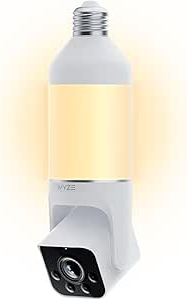
The Wyze Bulb Cam takes a different approach from SYMYNELEC and LaView.
Instead of motorized 360-degree pan-and-tilt coverage, Wyze provides a very wide viewing area. The camera can be manually extended, rotated and tilted during installation to achieve the desired angle.
Why We Chose It
The standout feature is its approach to local storage.
With a compatible microSD card, Wyze allows continuous 24/7 local recording without requiring a subscription.
The Bulb Cam supports microSD cards up to 256 GB, giving buyers a straightforward option for storing recordings locally.
That makes it particularly appealing to someone who wants continuous recording without depending entirely on paid cloud storage.
Important Features
The Wyze Bulb Cam includes:
- 2K video at 2304 × 1296
- Wide 160° viewing coverage
- Color Night Vision
- 800-lumen dimmable LED
- 2.4 GHz Wi-Fi
- microSD storage up to 256 GB
- 24/7 local recording
- Two-way audio
- Motion notifications
- Detection zones
- Built-in siren
- Optional AI detection features
- Alexa and Google Assistant support
- Support for additional Wyze Accessory Bulbs
The camera portion carries an IP65 weather-resistance rating, although the electrical socket connection still needs appropriate protection from direct water exposure.
What We Like
Continuous local recording is the main attraction.
A compatible microSD card lets the camera continuously save footage locally without requiring a subscription for the recording itself.
The built-in 800-lumen light is another strong point. This allows the Bulb Cam to function as useful exterior lighting rather than simply attaching a camera beneath a weak light.
Its wide viewing angle also means the camera can monitor a substantial area without a motorized pan-and-tilt mechanism.
Wyze also allows one Bulb Cam to coordinate with additional Wyze Accessory Bulbs, which may be useful when several fixtures illuminate the same porch, driveway or exterior area.
What to Consider Before Buying
The Wyze Bulb Cam does not remotely pan and tilt.
Its camera position is manually adjusted during installation.
That’s an important difference from SYMYNELEC and LaView.
If you want to use an app to rotate the camera toward different parts of your property, Wyze isn’t the strongest choice of these three.
It also uses 2.4 GHz Wi-Fi rather than offering 5 GHz connectivity.
Some advanced detection and cloud features require an optional Wyze subscription, although basic 24/7 microSD recording does not.
Best For
Wyze makes the most sense for someone who wants:
- 24/7 local recording
- A wide viewing area
- A bright integrated light
- A well-established smart-home ecosystem
- Optional accessory lighting
- Basic recording without depending on a monthly subscription
Check Wyze Bulb Cam Price on Amazon
Skip It If…
Choose SYMYNELEC or LaView if motorized pan-and-tilt control is important.
SYMYNELEC may also be preferable if you specifically want dual-band Wi-Fi.
Renters may also want to review the Best Light Bulb Cameras for Apartments before choosing a model.
Best Budget-Friendly Option: LaView 4MP Bulb Security Camera
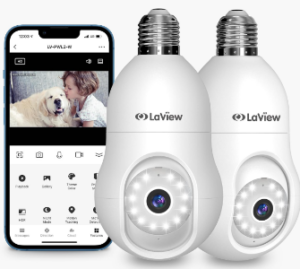
The LaView 4MP Bulb Security Camera offers many of the features people commonly look for in a bulb camera while remaining a relatively affordable option.
It combines 4MP/2K-class video with pan-and-tilt coverage, motion detection and tracking, night viewing, two-way audio and app-based remote access.
Why We Chose It
LaView provides an interesting alternative to both SYMYNELEC and Wyze.
You get motorized viewing and motion tracking rather than the manually positioned camera used by Wyze, while still getting the convenience of installation in a compatible light socket.
Its 4MP resolution also provides more nominal image detail than a basic 1080p security camera.
Important Features
Depending on the exact LaView 4MP version, features include:
- 4MP / 2K-class video
- 360° pan-and-tilt viewing
- Motion detection
- Automatic motion tracking
- Night viewing
- Two-way audio
- Audible alarm
- App-based remote viewing
- Local microSD storage
- Optional cloud storage
- Light-socket installation
Check the specifications of the particular LaView model before purchasing because the company sells several similar bulb-camera versions.
What We Like
The amount of functionality for the price is the main attraction.
Motorized viewing and motion tracking distinguish LaView from a fixed camera when you need to monitor a broader area.
It can therefore make sense for someone who likes the basic concept of the SYMYNELEC but wants another relatively affordable option.
What to Consider Before Buying
Model differences are the biggest consideration.
Don’t assume specifications from one LaView bulb-camera listing apply to every LaView model.
Before purchasing, verify:
- Wi-Fi compatibility
- microSD support and maximum capacity
- Cloud-storage requirements
- Outdoor installation requirements
- Smart-home compatibility
- Warranty and support
- Exact features included with the model
This is particularly important when comparing marketplace listings that may appear almost identical.
Best For
LaView makes sense for someone who wants:
- An affordable light bulb camera
- 2K-class video
- Motorized pan-and-tilt viewing
- Motion tracking
- Local recording capability
- Two-way audio
- Simple screw-in installation
Check LaView 4MP Bulb Security Camera Price on Amazon
Skip It If…
Wyze may be the better choice if 24/7 local recording is your highest priority.
SYMYNELEC may be preferable if dual-band Wi-Fi is important.
What We Look for in a Light Bulb Camera
The best camera on paper can still be the wrong camera for your home.
Here are the factors we think deserve the most attention.
Socket and Power Compatibility
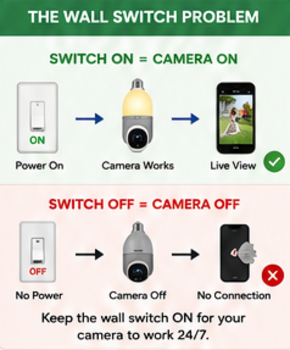
A light bulb camera still needs electricity from the socket.
One easily overlooked issue is the wall switch controlling that socket.
If someone switches the fixture off, the camera can lose power completely.
The camera doesn’t have a magical independent power source simply because the light itself can be controlled through an app.
For most installations, the wall switch needs to remain on so the camera continues receiving electricity.
This is worth thinking about before purchasing.
If family members are accustomed to turning a porch light off at the wall, a bulb camera can repeatedly go offline unless everyone remembers that the switch needs to remain on.
Some cameras even include a reminder sticker for the wall switch for exactly this reason.
Fixture size matters too.
A camera can have the correct E26/E27-style base and still be physically too large for an enclosed or unusually shaped fixture.
Measure the available clearance if your fixture is narrow.
Wi-Fi Compatibility
Don’t assume every camera will connect to every home network.
Some bulb cameras support only 2.4 GHz Wi-Fi, while certain models support both 2.4 and 5 GHz.
The Wyze Bulb Cam, for example, operates on 2.4 GHz Wi-Fi.
The particular SYMYNELEC model selected for this guide supports dual-band connectivity.
More importantly, consider signal strength at the actual fixture.
A phone showing excellent Wi-Fi inside your living room doesn’t guarantee that a camera mounted outside the garage will maintain the same connection quality.
If you’re unsure whether your existing fixture is suitable, our Light Bulb Camera Buyer Checklist covers the main things to check before purchasing.
Local Storage vs Cloud Storage
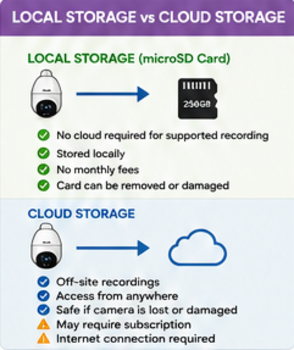
This is one of the biggest differences between security cameras.
Local storage typically saves recordings to a microSD card installed in the camera.
Advantages can include:
- No cloud required for supported recording
- Recordings stored locally
- Potentially fewer recurring costs
Potential disadvantages include:
- The card can fail
- Storage capacity is finite
- Recordings could potentially be lost if the camera or card is damaged or removed
Cloud storage sends supported recordings through the internet to remote servers.
Advantages can include:
- Recordings stored away from the camera
- Convenient remote access
- Footage may remain available if the camera is damaged or stolen
Potential disadvantages include:
- A subscription may be required
- Cloud recording depends on internet connectivity
- Features and retention periods depend on the provider
Neither approach is automatically better.
Some people prefer local storage specifically to avoid monthly fees. Others value cloud storage because important recordings aren’t stored solely inside the camera.
Some cameras offer both.
Before buying, check:
- Whether microSD storage is supported
- Maximum supported card capacity
- Whether continuous recording is available
- Which features require cloud storage
- Subscription prices
- Recording retention period
- What happens when local storage becomes full
Outdoor Use
A covered porch and a completely exposed exterior wall are very different environments.
Don’t assume a camera is suitable for rain and snow simply because product photos show it outdoors.
Check the weather-resistance specifications and installation instructions for the exact model.
Also remember that a weather-resistant camera doesn’t automatically make the electrical connection waterproof.
The socket and surrounding fixture still need to be appropriate for the environment.
Camera placement matters just as much as weather resistance. See Where NOT to Install a Light Bulb Camera for common placement mistakes to avoid.
Video Resolution
Higher resolution can provide more image detail, but resolution alone doesn’t determine image quality.
Lighting, compression, camera optics, positioning, Wi-Fi performance and nighttime conditions all affect what you actually see in a recording.
That’s why we wouldn’t choose a camera simply because “2K,” “3K” or “4MP” appears prominently in its advertising.
Night Vision
Consider what you’re actually trying to monitor.
Infrared night vision can provide visibility in dark areas, while color nighttime recording generally depends on having enough available or supplemental light.
A bulb camera with integrated lighting may therefore have an advantage in locations that would otherwise be very dark.
App and Notification Features
A security camera isn’t particularly useful if important alerts are constantly missed or the app is frustrating to use.
Useful features can include:
- Motion zones
- Sensitivity controls
- Human detection
- Vehicle detection
- Notification settings
- Live viewing
- Two-way audio
- Playback controls
- Motion tracking
Some advanced features may require a subscription.
Separate the camera’s free/basic functionality from its paid features when comparing products.
Light Bulb Camera vs Traditional Security Camera
A light bulb camera isn’t automatically the best security camera simply because installation is easier.
A light bulb camera may make sense when:
- You already have a suitable powered light socket
- You don’t want to run additional wiring
- You want relatively simple installation
- The socket provides a useful viewing location
- You want a camera that can be removed relatively easily
A traditional security camera may be better when:
- You need precise camera positioning
- Your light fixtures are poorly located
- You need a more permanent installation
- You need stronger environmental protection
- Someone could frequently turn off the wall switch
- You need features unavailable from suitable bulb cameras
Sometimes the best buying decision is not buying a light bulb camera at all.
Before You Buy: 7 Things to Check
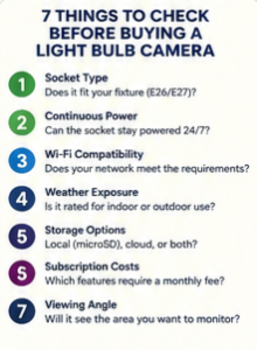
1. Socket Type
Does the camera physically fit your light fixture and use the correct socket?
2. Continuous Power
Can the socket remain powered 24/7 without someone regularly turning off the wall switch?
3. Wi-Fi
Does the camera support your network, and is the Wi-Fi signal strong enough at the actual installation location?
4. Weather Exposure
Is the camera rated appropriately for where you intend to install it?
5. Storage
Do you want local microSD recording, cloud storage, or both?
6. Subscriptions
Which features work without a subscription, and which require a recurring payment?
7. Viewing Angle
Will the existing light socket actually position the camera where it can see the area you want to monitor?
Checking these seven things before ordering can be more valuable than comparing another dozen specifications.
Frequently Asked Questions
Are light bulb cameras actually good?
They can be useful when a light socket is conveniently located and the camera’s features match what you need.
Their biggest advantage is relatively simple installation. However, socket location and the need for continuous electrical power can make them less flexible than dedicated security cameras.
Do light bulb cameras need Wi-Fi?
Most smart light bulb cameras use Wi-Fi for features such as remote live viewing, notifications, app control and cloud services.
Exact requirements vary by product.
Can a light bulb camera work when the light switch is off?
Generally, no.
If the wall switch cuts electrical power to the socket, the camera loses the power it needs to operate.
The wall switch normally needs to remain on continuously, while supported lighting functions can be controlled through the camera’s app.
Can I use a light bulb camera outside?
Some models are designed for outdoor environments, but don’t assume every bulb camera is.
Check the manufacturer’s weather-resistance rating and installation instructions for the exact model.
Also consider whether the socket and electrical connection will be adequately protected from water.
Do I need a subscription?
Not necessarily.
Some cameras provide local microSD recording without requiring a monthly subscription.
Wyze Bulb Cam, for example, supports continuous 24/7 local recording to a compatible microSD card without a subscription.
Cloud storage, advanced detection or other features may still require optional paid plans depending on the manufacturer.
Is 2K better than 1080p?
2K provides greater nominal resolution than 1080p, but resolution isn’t the only factor affecting usable video quality.
Lighting, compression, optics, camera position and nighttime performance matter too.
Do light bulb cameras record 24/7?
It depends on the camera and storage configuration.
Some models provide continuous local recording while others focus primarily on motion-triggered recordings.
The Wyze Bulb Cam supports 24/7 continuous local recording when a compatible microSD card is installed.
Which Light Bulb Camera Should You Choose?
Start with your installation location rather than a brand name.
For most buyers, we’d narrow the decision in this order:
Installation location → Socket and power → Wi-Fi → Storage → Features → Price
If you want motorized 360-degree coverage, dual-band Wi-Fi and human tracking at a competitive price, the SYMYNELEC Light Bulb Security Camera is our overall choice.
If continuous local recording, bright integrated lighting and a more established smart-home ecosystem are higher priorities, the Wyze Bulb Cam is particularly compelling.
If you want an affordable alternative with pan-and-tilt viewing and motion tracking, the LaView 4MP Bulb Security Camera is worth considering.
If you’re still working out which features you need, visit our Light Bulb Camera Buying Guide for a more detailed explanation of features, installation, privacy and different use cases.
Final Thoughts
Light bulb cameras solve a specific problem well: they can turn an appropriately located light socket into a security-camera location without requiring a conventional camera installation.
That convenience comes with tradeoffs.
The best choice isn’t necessarily the camera advertising the highest resolution or greatest number of features. It’s the camera that’s compatible with your fixture and network, provides the recording options you want, and suits the environment where you intend to use it.
For 2026, SYMYNELEC is our best overall choice for its combination of pan-and-tilt coverage, dual-band connectivity, tracking features and competitive positioning.
The Wyze Bulb Cam is our preferred option for straightforward 24/7 local recording and offers an unusually bright integrated 800-lumen light.
The LaView 4MP Bulb Security Camera rounds out our recommendations as an affordable pan-and-tilt alternative.
Whichever you choose, verify the specifications of the exact model before ordering. Manufacturers may update hardware, software, subscriptions, features and product listings over time.
Related Light Bulb Camera Guides
- How to Choose the Right Light Bulb Camera
- Best Light Bulb Cameras Under $100
- Best Light Bulb Cameras for Apartments
- Privacy-First Light Bulb Camera Buyer Checklist
- Where NOT to Install a Light Bulb Camera