If you’re searching for a Blink light bulb camera, you may be looking for a simple security camera that combines easy installation, outdoor monitoring and possibly built-in lighting.
There is one important thing to know first.
Blink does not currently offer a traditional light bulb security camera that simply screws into a standard E26 or E27 light socket.
Blink does, however, offer several cameras that can solve parts of the same problem in different ways.
The closest current options include the Blink Outdoor 4 Floodlight Camera, the newer Blink Outdoor 2K+, the compact Blink Mini 2K+, and the Blink Mini Pan-Tilt.
If your main priority is a camera that actually screws directly into an existing bulb socket, you’ll need to look at a true light bulb camera from another manufacturer.
This guide explains which Blink options come closest, how Blink storage works, and when a traditional screw-in light bulb camera may make more sense.
This page may contain affiliate links. If you purchase through these links, we may earn a commission at no extra cost to you. As an Amazon Associate I earn from qualifying purchases.
Does Blink Make a Light Bulb Camera?
As of 2026, Blink does not currently list a security camera designed to screw directly into an ordinary light bulb socket.
That’s important because the phrase light bulb camera normally refers to a very specific camera design.
A typical light bulb camera may:
- Screw into an E26 or E27 light socket
- Get electricity directly from the socket
- Connect to Wi-Fi
- Provide Live View through an app
- Include motion detection
- Include a built-in light
- Offer motorized pan-and-tilt
- Support local microSD storage
Blink uses different camera designs and power systems.
Depending on the model, Blink cameras may use batteries or plug-in power rather than a light socket.
So if you see a generic screw-in bulb camera advertised online, don’t assume it’s a Blink product simply because it looks similar to a smart security camera.
What Is the Closest Blink Light Bulb Camera Alternative?
The best Blink alternative depends on what part of the light bulb camera concept matters most to you.
If you want a camera with built-in outdoor lighting and wire-free installation:
Start with the Blink Outdoor 4 Floodlight Camera.
If you want a flexible outdoor camera without built-in lighting:
Look at Blink Outdoor 2K+.
If you want a small plug-in camera with 2K video:
Look at Blink Mini 2K+.
If you want motorized viewing:
Blink Mini Pan-Tilt is the Blink option that most closely matches the pan-and-tilt convenience found on many bulb cameras.
None of these screws into a light socket, but each solves part of the same home-security problem.
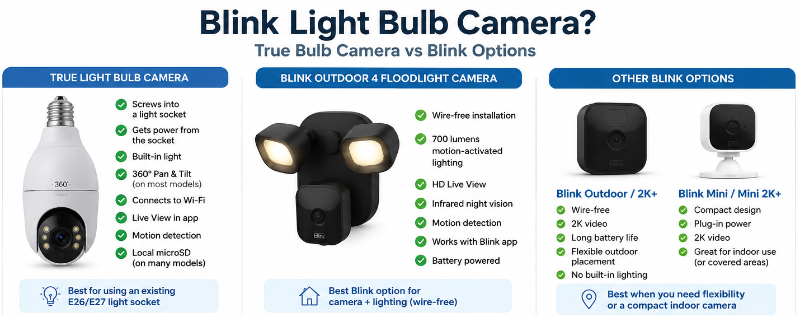
Blink Outdoor 4 Floodlight Camera: Closest Blink Match
If you searched for a Blink light bulb camera outdoor because you want a Blink camera with its own lighting, the Blink Outdoor 4 Floodlight Camera is the closest option I would recommend.
Its main advantage is wire-free installation.
Instead of depending on a light socket, the camera and floodlight setup can be positioned where the view makes sense.
That can be useful around:
- Backyards
- Side entrances
- Detached garages
- Sheds
- Walkways
- Areas where adding wired power would be inconvenient
The built-in lighting is useful for smaller or moderate areas, but this is not the same type of high-output lighting you would expect from a large dedicated wired floodlight system.
The key advantage here is camera + lighting + wire-free placement.
Check Blink Outdoor 4 Floodlight Camera on Amazon
Blink Outdoor 2K+: Better When Lighting Isn’t Needed
If built-in lighting isn’t necessary, Blink Outdoor 2K+ may actually be the better Blink choice.
It focuses on flexible outdoor camera placement rather than combining the camera with a light.
This can make sense when:
- Your property already has good outdoor lighting
- The best camera position isn’t near a light fixture
- You want battery-powered installation
- You want 2K video
- You want a camera positioned for the best view rather than the nearest socket
This is one of Blink’s biggest advantages over a traditional bulb camera.
A screw-in camera can only go where you have a suitable powered socket.
A battery-powered Blink camera gives you more freedom to choose the camera location based on coverage.
Check Blink Outdoor 2K+ on Amazon
Blink Mini 2K+: Compact Plug-In Alternative
Blink Mini 2K+ takes a different approach.
Instead of batteries or a light socket, it uses plug-in power.
This can make sense when:
- You have an electrical outlet nearby
- You don’t need a bulb socket
- You want a compact camera
- You want 2K video
- You want Blink ecosystem integration
This is more of a small plug-in security camera than a light bulb camera alternative, but it can still be useful for someone who started searching for a bulb camera because they wanted a simple installation.
Check Blink Mini 2K+ on Amazon
Blink Mini Pan-Tilt: Best Blink Option for Motorized Viewing
Many true light bulb cameras are popular because they can rotate and tilt through the app.
If that feature is important to you, Blink Mini Pan-Tilt is worth mentioning.
It is a compact plug-in camera with motorized movement rather than a screw-in bulb camera.
This can make sense when:
- You want app-controlled panning and tilting
- You are monitoring an indoor room or suitable protected location
- You have an outlet nearby
- You want Blink rather than a generic bulb-camera app
I would not choose it mainly for outdoor lighting or socket replacement, but it is relevant for buyers who care most about motorized viewing.
Check Blink Mini Pan-Tilt on Amazon
Do Blink Cameras Screw Into a Light Socket?
No current mainstream Blink security camera is designed to screw directly into a standard E26 or E27 bulb socket.
If your goal is specifically:
“Remove my porch bulb and screw the camera into that socket.”
Then Blink isn’t currently offering the type of camera you’re looking for.
You would need a true light bulb security camera instead.
Why Do People Search for a Blink Light Bulb Camera?
The search makes sense.
Blink is a recognizable smart-camera brand, while screw-in bulb cameras have become popular because of their simple power setup.
A shopper may naturally assume Blink has created its own version.
There is also considerable feature overlap.
Both Blink cameras and light bulb cameras can potentially provide:
- Motion alerts
- Live View
- Night vision
- App access
- Two-way audio on compatible models
- Outdoor monitoring
- Recorded video
The biggest differences are usually power, installation, storage and camera placement.
Blink Camera vs Light Bulb Camera
True Light Bulb Camera
Power: Compatible light socket.
Best advantage: Very simple installation when a useful socket already exists.
Common features: Built-in lighting, pan-and-tilt and microSD storage on many models.
Blink Outdoor 4 Floodlight Camera
Power: Battery-based outdoor setup.
Best advantage: Flexible wire-free placement combined with built-in lighting.
Main limitation compared with a bulb camera: Does not screw into a light socket.
Blink Outdoor 2K+
Power: Battery-powered outdoor camera.
Best advantage: Flexible camera placement with 2K video.
Main limitation compared with a bulb camera: No built-in light-socket power or traditional bulb-camera design.
Blink Mini 2K+
Power: Plug-in.
Best advantage: Compact 2K camera that doesn’t require batteries.
Main limitation compared with a bulb camera: Requires a regular outlet rather than a bulb socket.
Blink Mini Pan-Tilt
Power: Plug-in.
Best advantage: Motorized viewing.
Main limitation compared with a bulb camera: Not intended as a bulb-socket replacement.
For a broader comparison, see Light Bulb Camera vs Ring vs Wyze vs Blink.
Blink Light Bulb Camera Cloud Storage: How Does Blink Storage Work?
Because Blink doesn’t make a conventional screw-in bulb camera, there isn’t a separate Blink light bulb camera storage system.
Blink cameras use Blink’s normal storage ecosystem.
There are two main approaches.
Blink Cloud Storage
An eligible Blink Subscription Plan can provide cloud storage and additional camera features.
The exact features depend on the camera and current plan.
Blink Local Storage
Compatible Blink systems can also use local storage through a Sync Module.
Depending on the Sync Module:
- Sync Module 2 uses a compatible USB flash drive
- Sync Module XR uses a compatible microSD card
This is different from many true light bulb cameras.
With a typical bulb camera, the microSD card may insert directly into the camera itself.
With Blink, local storage is generally handled through the Sync Module instead.
What Is a Blink Sync Module?
A Sync Module acts as a hub for compatible Blink devices.
It can help manage camera systems and provide local-storage capability when used with supported cameras and removable storage.
This means you should not compare storage based only on whether the camera itself has a memory-card slot.
The better question is:
How does the entire camera system store recordings?
Do You Need a Blink Subscription?
Not necessarily for every basic camera function.
Blink cameras can operate without automatically requiring a subscription for every use.
However, cloud storage and some additional features require an eligible Blink Subscription Plan.
Local storage can also be available through a compatible Sync Module and removable storage.
Before buying, check whether the features you want require:
- A subscription
- A Sync Module
- USB storage
- microSD storage
- Another Blink accessory
Battery Power vs Light Socket Power
This is arguably the biggest difference between Blink and a typical bulb camera.
Light Bulb Camera
A bulb camera normally relies on continuous electricity from a compatible light socket.
This has one major benefit:
No batteries to replace.
But it also has one major limitation:
The camera can only go where a suitable socket exists.
Blink Battery Camera
A battery-powered Blink camera isn’t tied to a light socket.
This can give you more freedom to choose:
- Camera height
- Viewing angle
- Wall location
- Driveway coverage
- Backyard coverage
- Areas without existing electrical fixtures
The tradeoff is battery management.
Battery life depends on camera activity, settings, network conditions and usage.
One Advantage Blink Has Over a Typical Bulb Camera
Placement flexibility.
A light socket isn’t always in the best place for a security camera.
You may discover that the existing fixture is:
- Too high
- Too low
- Behind glass
- Pointed toward the wrong area
- Too close to a wall
- Far from the best viewing position
A wire-free Blink camera can often be positioned based on the camera view instead of the location of an electrical socket.
One Advantage a Light Bulb Camera Has Over Blink
Simple continuous power.
If you already have a compatible powered socket in exactly the right location, installing a bulb camera can be very straightforward.
You may not need:
- Battery replacement
- A separate power cable
- A new electrical box
- A dedicated camera mount
Many bulb cameras also provide motorized pan-and-tilt and direct microSD storage.
What About Alexa?
Blink is part of Amazon’s smart-home ecosystem and works with compatible Alexa-enabled devices.
If your home already uses Alexa and Blink cameras, staying within that ecosystem can make management simpler.
For some buyers, that convenience may matter more than having a camera that physically screws into a bulb socket.
Want a Camera That Actually Screws Into a Light Socket?
If that’s your main requirement, Blink’s current cameras are not the right product type.
Instead, look at true screw-in light bulb cameras.
Two brands covered on this site are SYMYNELEC and LaView.
Check SYMYNELEC Light Bulb Cameras on Amazon
Check LaView Light Bulb Cameras on Amazon
You can also see our current recommendations in Best Light Bulb Cameras for 2026.
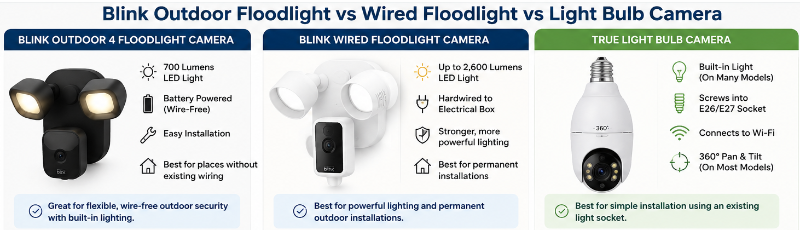
Which Should You Choose?
You Want a Camera That Screws Into a Light Socket
Choose a true light bulb camera.
Blink’s current cameras are not designed for this type of installation.
You Want Blink + Wire-Free Outdoor Lighting
Consider Blink Outdoor 4 Floodlight Camera.
This is the closest Blink recommendation if you want integrated lighting without depending on a light socket.
You Want Blink + Flexible Outdoor Placement
Consider Blink Outdoor 2K+.
This makes more sense when camera placement and 2K video matter more than built-in lighting.
You Want a Compact Plug-In Blink Camera
Consider Blink Mini 2K+.
This is a simple option when a regular outlet is available.
You Want Motorized Viewing
Consider Blink Mini Pan-Tilt.
This is the Blink option I would look at if pan-and-tilt is one of the bulb-camera features you care about most.
Before Buying Any of Them
Check:
- Where the camera needs to go
- Whether a light socket is available
- Whether battery power would be easier
- How much lighting you need
- Wi-Fi signal at the installation point
- Video resolution
- Field of view
- Cloud versus local storage
- Subscription requirements
- Whether a Sync Module is needed
- Weather resistance
- Whether pan-and-tilt matters to you
Our Light Bulb Camera Buyer Checklist covers the most important things to check when comparing screw-in cameras.
Frequently Asked Questions
Does Blink make a light bulb camera?
No. Blink does not currently list a security camera designed to screw directly into a standard E26 or E27 light bulb socket.
What is the closest thing to a Blink light bulb camera?
The Blink Outdoor 4 Floodlight Camera is the closest current Blink option if you want a camera with built-in lighting and wire-free installation.
Does Blink have an outdoor light bulb camera?
Blink has outdoor cameras and a wire-free Outdoor 4 Floodlight Camera, but these are not traditional screw-in light bulb cameras.
Can I screw a Blink camera into my porch light socket?
No current Blink camera is designed to install directly into a normal E26 or E27 bulb socket.
Which Blink camera is best if I don’t need a light?
Blink Outdoor 2K+ is worth considering when you want flexible outdoor placement and higher-resolution video without integrated lighting.
Which Blink camera is best for a small plug-in setup?
Blink Mini 2K+ is the more relevant choice when you have a regular electrical outlet nearby and don’t need battery power.
Which Blink camera can pan and tilt?
Blink Mini Pan-Tilt is the Blink option covered here for motorized viewing.
Do Blink cameras have local storage?
Compatible Blink systems can support local storage through a Sync Module. Sync Module 2 uses compatible USB storage, while Sync Module XR uses compatible microSD storage.
Does Blink put a microSD card inside the camera?
That is not the typical Blink storage design. Compatible local storage is generally handled through a Sync Module rather than by inserting a microSD card directly into the camera.
Do I need a Blink subscription?
Not for every basic function. However, cloud storage and certain additional features require an eligible Blink Subscription Plan. Local storage can be available with compatible equipment.
Is Blink better than a light bulb camera?
It depends on the location. Blink can be better when flexible battery-powered placement matters. A light bulb camera can be better when you already have a suitable socket and want simple continuous power, pan-and-tilt or direct microSD storage.
What is the best Blink option for a driveway?
If you want integrated lighting without a wired installation, the Outdoor 4 Floodlight Camera is worth considering. If the driveway already has adequate lighting, Outdoor 2K+ may give you more flexible camera placement.
Final Thoughts: Is There a Blink Light Bulb Camera?
If you searched for a Blink light bulb camera, the main thing to know is that Blink does not currently make the traditional screw-in bulb-camera design you may be picturing.
But Blink still offers several useful alternatives.
If you want a Blink camera with wire-free outdoor lighting, the Outdoor 4 Floodlight Camera is the closest match I would recommend.
If lighting isn’t important, Blink Outdoor 2K+ gives you more placement flexibility and higher-resolution outdoor video.
If you want a compact plug-in camera, Blink Mini 2K+ is the more relevant option.
If pan-and-tilt is one of the bulb-camera features you care about most, Blink Mini Pan-Tilt is worth considering.
However, if your number-one requirement is being able to remove an existing bulb and screw a Wi-Fi security camera directly into that socket, choose a true light bulb camera instead.
The right choice ultimately depends on where the camera needs to go, how you want to power it, whether you need built-in lighting and how you want recordings stored.