Light bulb security cameras can look surprisingly similar when you’re comparing products online.
One camera advertises 2K video. Another promises 360° coverage. Others emphasize AI detection, color night vision, dual-band Wi-Fi, cloud storage, or “easy installation.”
But the camera with the longest feature list isn’t necessarily the right one for your home.
A light bulb camera depends heavily on where it’s installed. The socket needs to be compatible, the camera needs a useful viewing angle, Wi-Fi has to reach the fixture, and the socket usually needs continuous power. You also need to consider storage, subscriptions, privacy, weather exposure, and the quality of the manufacturer’s app.
This guide walks through those decisions in the order we’d recommend making them.
By the end, you should have a much clearer idea of what features you actually need and which ones you can safely ignore.
Jump to:
- Quick Answer
- 1. Installation Location
- 2. Socket & Fixture
- 3. Continuous Power
- 4. Wi-Fi
- 5. Pan-and-Tilt vs Fixed View
- 6. Resolution
- 7. Night Vision & Lighting
- 8. Storage
- 9. Subscriptions
- 10. Motion & AI
- 11. Outdoor Use
- 12. Manufacturer & App
- 13. Privacy
- 14. Audio & Siren
- 15. Smart-Home Compatibility
- 16. Price
- Final Buyer Checklist
Quick Answer: What Should You Look for in a Light Bulb Camera?
Before buying, check these essentials:
- Compatible light socket
- Enough physical space for the camera
- Useful camera position and viewing angle
- Continuous electrical power
- Reliable Wi-Fi at the fixture
- Appropriate indoor/outdoor rating
- Suitable operating temperature range
- Useful video and nighttime performance
- Local and/or cloud storage
- Subscription requirements
- Motion and person detection features
- Privacy and account-security options
- A manufacturer and app you’re comfortable relying on
Don’t start by asking “Which camera has the most features?”
Start with:
“Will this camera actually work where I want to put it?”
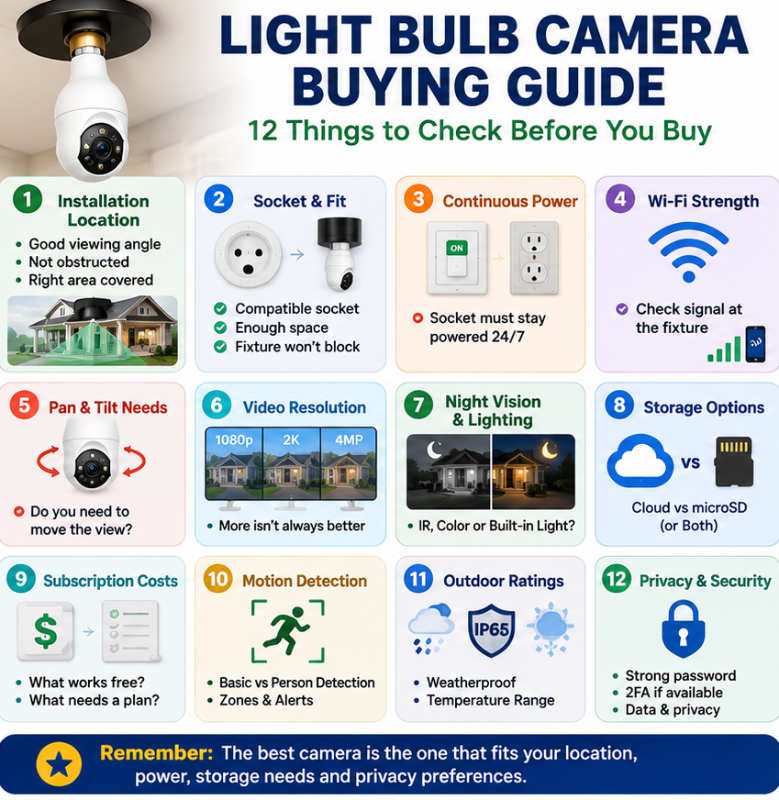
1. Start With Where You Want to Install the Camera
Before comparing brands, resolutions, or prices, decide exactly where the camera needs to go.
This sounds obvious, but it’s one of the most important differences between a bulb camera and a conventional security camera.
A conventional camera can often be mounted specifically for the view you need.
A light bulb camera has to go where there’s a compatible electrical socket.
Ask yourself:
- What area am I trying to monitor?
- Is there already a light fixture there?
- Does that fixture provide a useful view?
- Is the camera intended for indoor or outdoor use?
- Will anything obstruct the lens?
- Will the camera unnecessarily capture neighbouring property?
A perfectly good camera installed in a poor location can produce disappointing results.
Look at the Location From the Camera’s Perspective
Don’t simply stand underneath the fixture and decide it looks good.
Think about what the camera lens will actually see once installed.
For example, an exterior socket may be:
- Too high
- Too close to a wall
- Facing away from the driveway
- Partially enclosed by a fixture
- Behind decorative glass
- Directly above an area you want to see rather than facing toward it
Motorized pan-and-tilt can help compensate for an imperfect angle, but it can’t fix every installation.
2. Check the Socket and Fixture
Many light bulb security cameras use common E26 or E27 screw-in sockets, but don’t assume compatibility. Wyze Bulb Cam, for example, requires a standard E26 socket, while SYMYNELEC P4 models are listed for E26/E27 sockets.
Check the exact socket requirement for the camera you’re considering.
Then check something buyers sometimes overlook:
Will the Camera Physically Fit?
A light bulb camera is generally much larger than a regular household bulb.
Even if the base fits the socket, the camera itself may not fit inside:
- Narrow sconces
- Enclosed fixtures
- Recessed fixtures
- Decorative lanterns
- Fixtures surrounded by glass
- Small ceiling fixtures
You also don’t want the fixture blocking the camera lens.
Glass can create additional problems, particularly at night when infrared illumination or other light can reflect back toward the lens.
Measure the available space and compare it with the camera’s dimensions before ordering.
3. Make Sure the Socket Can Stay Powered
This is one of the most important things to understand about light bulb cameras.
The camera receives electricity from the light socket.
If a wall switch controls that socket:
Switch ON → socket powered → camera works
Switch OFF → socket loses power → camera goes offline
The camera’s built-in light may be controllable separately through its app, but the socket itself still needs electricity.
This means you may leave the physical wall switch on continuously while turning the camera’s light on and off electronically.
Think About Other People in the House
Even if you understand this, does everyone else?
Someone may instinctively switch off the porch light before going to bed.
If that switch also controls your camera, you’ve just lost surveillance until the switch is turned back on.
Before buying, determine:
- Which switch controls the socket
- Whether it can remain continuously powered
- Whether other people regularly use that switch
If maintaining continuous socket power will be inconvenient, a different type of security camera may be a better choice.
If you’re unsure whether the bulb-camera format makes sense for your location, see our Light Bulb Camera vs Ring vs Wyze vs Blink comparison.
4. Test Wi-Fi at the Actual Fixture
A camera’s wireless specifications don’t matter much if your network doesn’t reliably reach the installation location.
Don’t test Wi-Fi beside your router.
Test it where the camera will actually be installed.
This becomes particularly important for:
- Exterior walls
- Detached garages
- Basements
- Upper floors
- Porches
- Backyards
- Areas separated from the router by brick or concrete
Your phone isn’t a perfect substitute for the camera, but testing connectivity at the fixture can identify obvious weak-signal locations.
2.4 GHz vs 5 GHz Wi-Fi
You’ll encounter cameras supporting:
2.4 GHz only
or
2.4 GHz + 5 GHz dual-band Wi-Fi
Neither band is automatically “better” in every situation.
Generally, 2.4 GHz provides greater range and tends to penetrate obstacles better, while 5 GHz can provide higher speeds at shorter distances.
For a security camera outside the house or several rooms from the router, range and reliability may matter more than maximum theoretical speed.
The important thing is making sure the camera supports a network configuration you can actually use. Current models vary: Wyze Bulb Cam uses 2.4GHz Wi-Fi with Wi-Fi 6 support, while the SYMYNELEC P4 lineup includes both 2.4GHz-only and dual-band 2.4GHz/5GHz versions.
5. Decide Whether You Need Pan-and-Tilt
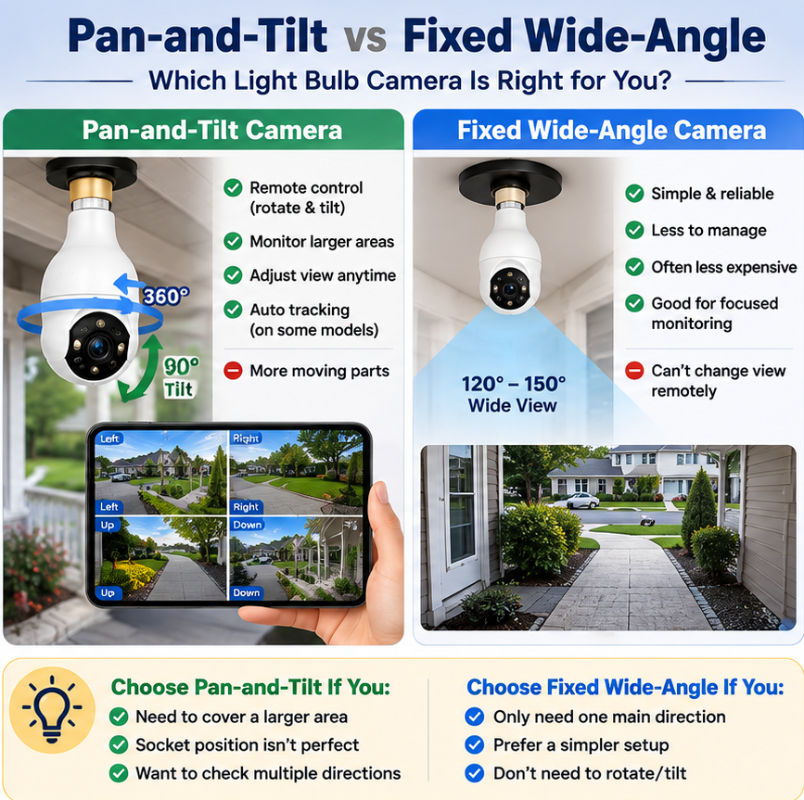
This is one of the biggest differences between bulb cameras.
Some have a fixed lens.
Others use a motor that allows you to pan and tilt the camera remotely through an app.
Pan-and-Tilt Can Be Useful When:
- The light socket isn’t perfectly positioned
- You’re monitoring a relatively large area
- You want to remotely check different directions
- You want automatic tracking on supported cameras
A Fixed Camera Can Be Better When:
- You only need to monitor one area
- The fixture already provides an excellent viewing angle
- The camera has a sufficiently wide field of view
- You prefer fewer moving components
There’s another important distinction.
“360°” Doesn’t Necessarily Mean the Camera Sees Everything at Once
Marketing descriptions sometimes create confusion here.
A camera described as having 360° pan capability can usually rotate through a wide range.
That doesn’t mean the lens records a simultaneous 360-degree panoramic image.
Think of it as:
Camera can TURN 360°
rather than necessarily:
Camera can SEE 360° simultaneously.
Check the manufacturer’s stated field of view separately from its pan-and-tilt range.
6. Don’t Choose Based on Resolution Alone
Security-camera listings heavily emphasize resolution.
You’ll commonly encounter:
- 1080p
- 2K
- 3MP
- 4MP
- Higher-resolution options
More pixels can provide additional detail, but the resolution number alone doesn’t tell you how useful the footage will be.
Actual image quality can also be affected by:
- Lens quality
- Image processing
- Compression
- Available light
- Motion
- Camera position
- Viewing distance
- Nighttime performance
- Wi-Fi/network conditions
A well-positioned 2K camera with good lighting may provide more useful footage than a higher-resolution camera pointed from a poor location.
How Much Resolution Do You Need?
For general monitoring around an entrance, porch, garage or room, 2K-to-4MP-class video can provide a useful balance between detail and storage requirements. For example, Wyze Bulb Cam records at 2K, while the current SYMYNELEC P4 is marketed as 2.5K / 4MP.
Higher resolution can be beneficial when additional detail matters, but it also creates larger recordings.
Don’t pay extra for resolution simply because one number is bigger.
Consider the entire camera.
7. Compare Night Vision and Lighting
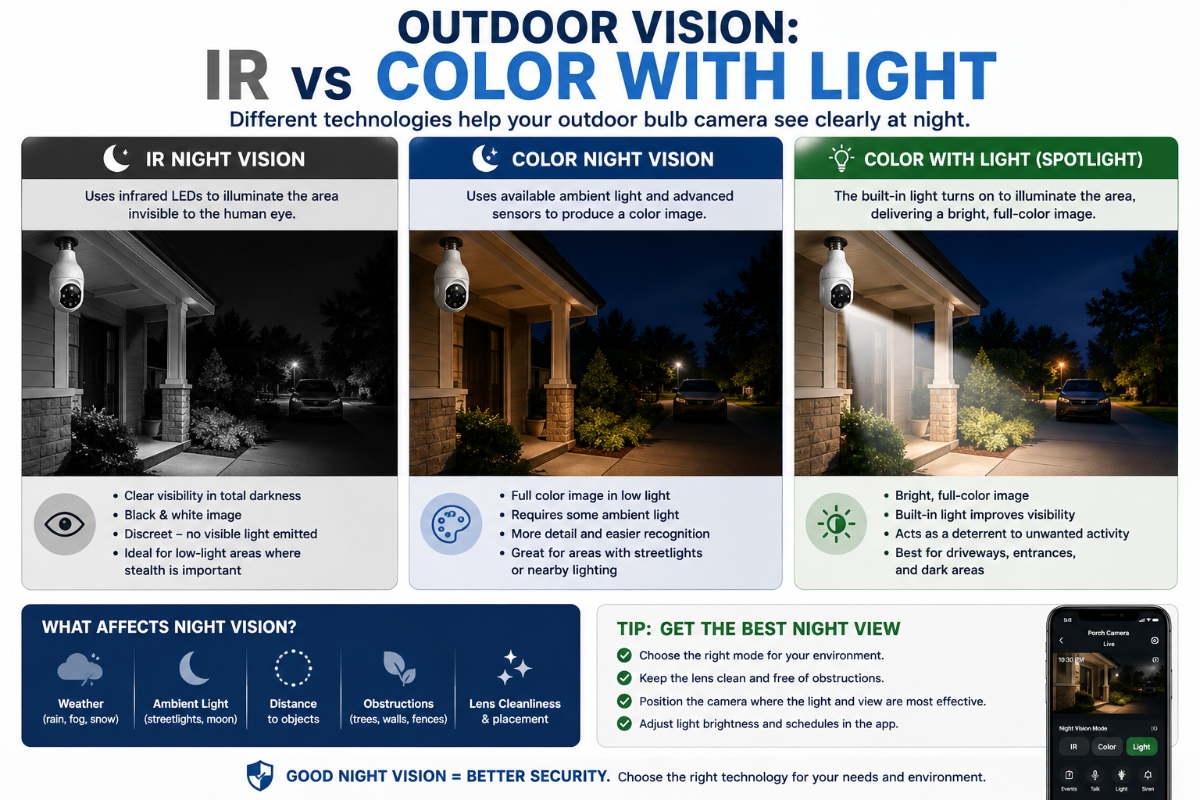
Daytime sample footage tells only half the story.
Many security events occur after dark, so look closely at how the camera handles low-light conditions.
You’ll generally encounter three approaches.
Infrared Night Vision
Infrared LEDs allow the camera to see in very dark conditions without using a bright visible light.
The resulting image is often monochrome.
Good for: discreet nighttime monitoring.
Color Night Vision
Color night vision uses available illumination and image processing to retain more colour in low-light conditions.
Performance depends heavily on how much light is available.
Good for: locations with porch lights, street lighting, landscape lighting, or other ambient illumination.
Built-In Visible Lighting
Many bulb cameras include LEDs that illuminate the area.
This can improve nighttime colour video while also allowing the device to continue functioning as a light.
Good for: entrances, porches, garages and locations where you need both lighting and surveillance.
Don’t assume “color night vision” means the camera produces a bright, colourful image in total darkness without any additional illumination.
Check how the particular camera achieves it.
8. Decide Where You Want Recordings Stored
This is one of the most important buying decisions.
A security camera generally uses some combination of local storage and cloud storage.
Local Storage
Many bulb cameras accept a microSD card, but implementation varies. Wyze Bulb Cam supports local microSD cards up to 256GB and 24/7 local recording, while SYMYNELEC also offers local microSD recording on compatible models.
Recordings are stored directly on the camera.
Potential Advantages
- May avoid a monthly recording fee
- Recordings don’t necessarily need to be stored in the cloud
- Some cameras support continuous 24/7 recording
- You have more direct control over storage
Potential Disadvantages
- Storage capacity is finite
- Memory cards eventually wear out
- Footage stored only in the camera could potentially be lost if the camera is stolen or damaged
Cloud Storage
Recordings are uploaded to remote servers.
Potential Advantages
- Footage is stored away from the camera
- Convenient remote access
- Recordings may remain available if something happens to the device
- Some cloud plans include additional detection features
Potential Disadvantages
- May require a recurring subscription
- Requires internet connectivity for uploads
- Retention periods vary
- Privacy policies and account security become additional considerations
Using Both
Some cameras allow local storage alongside optional cloud services.
That can provide a useful middle ground.
Before buying, ask:
Where is my footage stored?
How long is it retained?
Can I record without paying monthly?
Which features require cloud storage?
What happens when the memory card becomes full?
For a deeper look at these considerations, see our Privacy-First Light Bulb Camera Buyer Checklist.
9. Check Subscription Requirements Before Buying
A $40 camera isn’t necessarily cheaper than a $70 camera.
Suppose the $40 camera requires a subscription for the features you actually want while the $70 camera can perform those functions locally.
Over several years, their total costs could look very different.
Before buying, separate features into two categories:
Included Without Subscription
Find out whether you get:
- Live viewing
- Motion alerts
- Local recording
- Playback
- Person detection
- Detection zones
- Two-way audio
- Continuous recording
Requires a Paid Plan
Determine whether the subscription adds:
- Cloud video history
- Longer event recordings
- AI detection
- Person/package/vehicle recognition
- Extended storage
- Additional notifications
Subscription services aren’t inherently bad.
Cloud storage and advanced detection can be genuinely useful.
The problem is buying a camera assuming a feature is included, only to discover afterward that it requires an ongoing payment.
Calculate the Real Cost
Think about:
Camera + memory card + accessories + subscription over time
rather than simply:
Camera purchase price
If keeping the initial cost down is your priority, see our Best Light Bulb Cameras Under $100 guide.
10. Understand Motion Detection Before Chasing “AI” Features
Motion detection sounds straightforward, but there are several levels.
Basic Motion Detection
The camera detects changes within the image.
Depending on the system, this can potentially generate alerts from:
- People
- Animals
- Vehicles
- Tree branches
- Shadows
- Weather
- Other movement
Person or Human Detection
The camera attempts to distinguish people from other types of movement.
This can make notifications more useful.
Detection Zones
You select which portion of the image should generate alerts.
For example, you may want alerts for your walkway but not every vehicle passing on the street.
Automatic Tracking
On compatible pan-and-tilt cameras, the camera can attempt to follow detected movement.
This can be useful in larger areas but isn’t necessary for every installation.
More Alerts Aren’t Necessarily Better
A camera that sends a notification every few minutes can quickly become annoying.
Eventually, you may stop paying attention to the alerts altogether.
Look for controls that let you adjust:
- Sensitivity
- Detection zones
- Detection type
- Notification frequency
Good detection should help you identify meaningful activity, not simply generate as many alerts as possible.
11. Outdoor Buyers Need to Look Beyond “Weatherproof”
If you’re installing a bulb camera outside, don’t stop after seeing the word weatherproof.
Check:
- IP rating
- Operating temperature
- Socket protection
- Fixture suitability
- Exposure to rain and snow
- Manufacturer installation instructions
IP Ratings Need Context
An IP65-rated camera, for example, has specified protection against dust and water jets.
It doesn’t mean you can submerge it.
It also doesn’t necessarily mean the electrical socket and connection have the same rating as the camera housing.
This is particularly important with bulb cameras because they screw directly into an electrical fixture.
A camera mounted beneath a covered porch and a camera installed in a completely exposed fixture shouldn’t automatically be treated as equivalent installations.
For outdoor installations, read our Best Light Bulb Cameras for Outdoor Use guide before buying.
12. Check the Manufacturer and App
It’s easy to focus entirely on hardware specifications.
But a smart security camera is partly a software product.
You’re relying on the app to:
- View the camera
- Receive notifications
- Change settings
- Review recordings
- Update firmware
- Control lighting
- Manage accounts
- Configure detection
A camera with impressive hardware can become frustrating if its app is unreliable or difficult to use.
Before buying an unfamiliar brand, look at:
- Manufacturer website
- Support documentation
- App availability
- Recent app updates
- Firmware support
- Warranty information
- Privacy policy
- Contact/support options
Be Careful With Look-Alike Marketplace Cameras
You’ll find many inexpensive bulb cameras that appear nearly identical.
Some may even use very similar product descriptions.
That doesn’t automatically make them poor products, but it makes verification more important.
Try to determine:
Who actually makes this camera?
Is there an official website?
Can I find documentation?
Is the app actively maintained?
Can I get support if something goes wrong?
A slightly cheaper purchase isn’t necessarily better value if you can’t confidently answer those questions.
13. Think About Privacy Before Installation
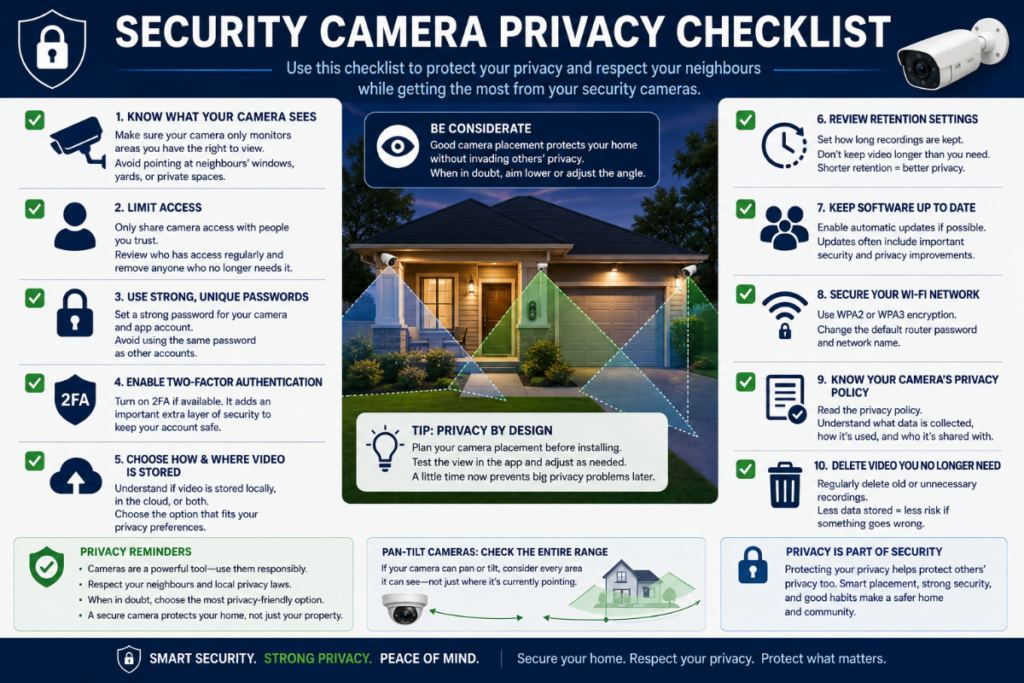
Privacy isn’t something to think about after you’ve mounted the camera.
Consider it while choosing the installation location.
Ask:
- What areas will the camera capture?
- Does it unnecessarily point toward neighbouring windows?
- Does it monitor shared spaces?
- Who has access to the account?
- Is two-factor authentication available?
- Where are recordings stored?
- How long are recordings retained?
- Can old footage be deleted?
- Does the manufacturer explain how data is handled?
Pan-and-tilt cameras deserve additional consideration.
Don’t think only about where the lens is pointing right now.
Think about everywhere the camera can potentially be rotated toward.
For apartment installations, this becomes especially important because hallways, neighbouring doors and common spaces may fall within the camera’s viewing range.
Our Best Light Bulb Cameras for Apartments & Renters guide covers those situations in more detail.
14. Don’t Forget Two-Way Audio and Sirens
These features aren’t essential for everyone, but they’re worth understanding.
Two-Way Audio
A microphone and speaker allow you to hear what’s happening and speak through the camera.
Possible uses include:
- Talking to someone at an entrance
- Communicating with family members
- Checking on pets
- Speaking to a delivery person
Audio quality varies significantly between cameras.
Built-In Siren
Some cameras allow you to activate an audible alarm.
Don’t choose a camera solely because its product page advertises a siren. Check whether the feature is manually activated, automatically triggered, configurable, and appropriate for how you intend to use the camera.
15. Consider Smart-Home Compatibility
If you already use a smart-home platform, check compatibility before buying.
Depending on the camera, integration may be available with platforms such as Alexa or Google Home. Wyze currently lists Alexa, Google Assistant and IFTTT support for Bulb Cam.
Possible integrations can include:
- Viewing the camera on compatible smart displays
- Voice controls
- Lighting routines
- Motion-triggered automations
- Integration with other smart devices
But don’t buy a camera purely because a listing says “Works with Alexa.”
Check what the integration actually allows you to do.
Compatibility can range from basic voice commands to much deeper integration.
If you’re planning to build a larger security ecosystem rather than buying a single camera, our Light Bulb Camera vs Ring vs Wyze vs Blink guide can help you compare approaches.
16. Compare Price Last, Not First
This might sound strange for a buying guide.
But by this point, you should have eliminated cameras that don’t meet your actual requirements.
Now compare prices.
Suppose Camera A costs $35 and Camera B costs $65.
If Camera A:
- Doesn’t support your Wi-Fi configuration
- Requires a subscription you don’t want
- Doesn’t fit the fixture
- Has poorly documented support
- Can’t record the way you want
then saving $30 doesn’t make it a better purchase.
Price matters after compatibility.
Once you’ve identified cameras that genuinely meet your needs, price becomes a useful way to choose between them.
For our current recommendations across different price points, see Best Light Bulb Cameras for 2026.
How Current 2026 Models Illustrate These Choices
It can help to see how these buying decisions play out in real products.
Wyze Bulb Cam is a good example of a wide fixed-view design. It uses a standard E26 socket, records at 2K, provides an 800-lumen light, supports 24/7 microSD recording up to 256GB, and uses 2.4GHz Wi-Fi with Wi-Fi 6 support. Its camera position is adjusted manually rather than remotely panned and tilted.
SYMYNELEC P4 is a good example of a motorized bulb camera. Current P4 models include 2.4GHz-only and dual-band 2.4GHz/5GHz versions, with 2.5K / 4MP video and IP65 outdoor ratings on the selected models.
LaView 4MP L2 is another true screw-in option worth comparing, especially if you want motorized viewing, but check the exact L2 variant because Wi-Fi and resolution differ across the lineup.
The point isn’t that one of these is automatically best. It’s that different camera designs make different tradeoffs, so your installation should determine which features matter most.
Light Bulb Camera Buyer Checklist
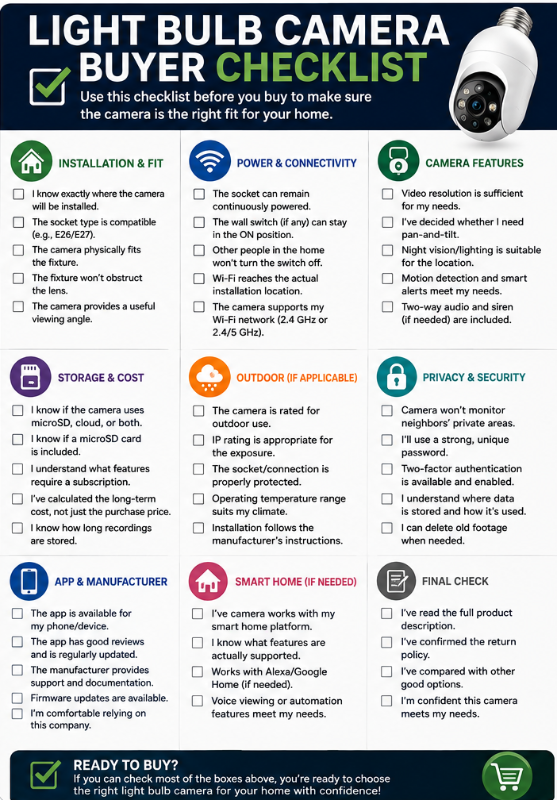
Before clicking Buy, run through this checklist.
Installation
☐ I know exactly where the camera will go.
☐ The camera uses a compatible socket.
☐ The camera physically fits the fixture.
☐ The fixture won’t obstruct the lens.
☐ The camera provides a useful viewing angle.
Power & Connectivity
☐ The socket can remain continuously powered.
☐ Other household members won’t routinely turn off the switch.
☐ Wi-Fi reaches the actual fixture.
☐ The camera supports my Wi-Fi configuration.
Camera Features
☐ The video resolution is sufficient for my needs.
☐ I’ve decided whether I need pan-and-tilt.
☐ The nighttime performance suits the location.
☐ Motion-detection options meet my needs.
☐ I understand what any advertised “AI detection” actually does.
Storage & Cost
☐ I know whether recordings are local, cloud-based, or both.
☐ I know whether a microSD card is included or needs to be purchased.
☐ I know which features require a subscription.
☐ I’ve considered the long-term cost, not just the camera price.
Outdoor Installation
If applicable:
☐ The exact camera is rated for outdoor use.
☐ The socket/connection is appropriately protected.
☐ The operating-temperature range suits my climate.
☐ The installation follows the manufacturer’s instructions.
Privacy & Security
☐ The camera won’t unnecessarily monitor neighbouring private areas.
☐ I know where recordings are stored.
☐ I’ll use a strong, unique password.
☐ I’ll enable two-factor authentication if available.
☐ I understand the manufacturer’s privacy policy.
Manufacturer
☐ I can identify the actual manufacturer.
☐ The manufacturer provides support information.
☐ The camera’s app is currently maintained.
☐ Firmware/software updates are available.
☐ I’m comfortable relying on this company for a connected security device.
If you can confidently check most of those boxes, you’re in a much better position to choose a camera than someone simply comparing Amazon star ratings and resolution numbers.
Common Light Bulb Camera Buying Mistakes
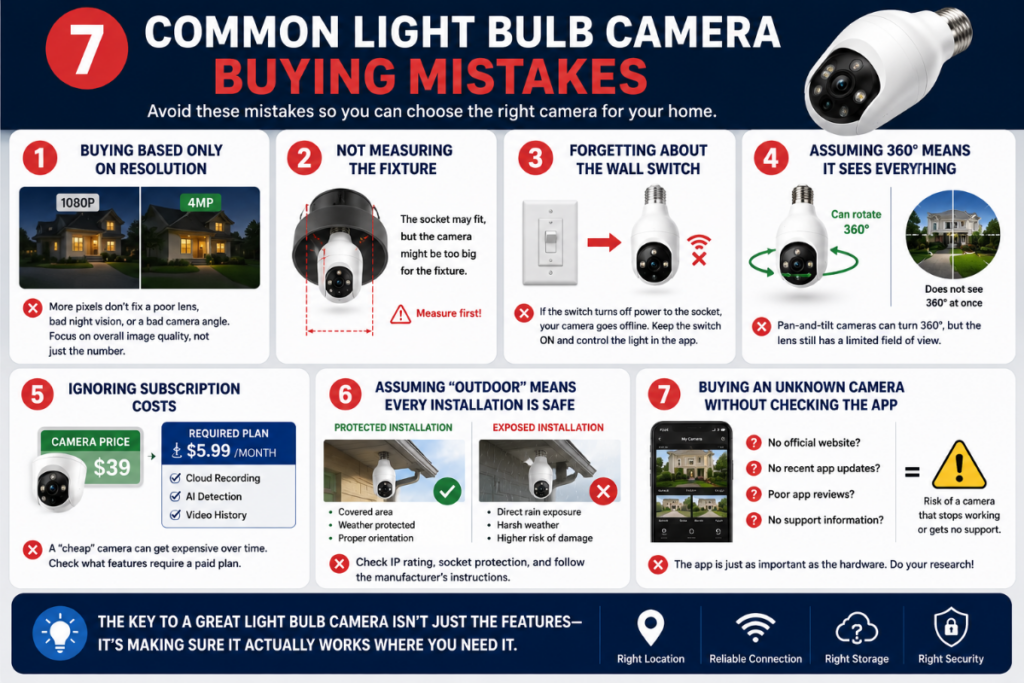
Some mistakes come up repeatedly.
Buying Based Only on Resolution
Higher resolution doesn’t compensate for poor positioning, weak night performance, or an unreliable app.
Not Measuring the Fixture
The socket fits, but the camera doesn’t.
Forgetting About the Wall Switch
Someone turns off the switch and unknowingly takes the camera offline.
Assuming 360° Means It Sees Everything Simultaneously
A pan-and-tilt camera may rotate through 360°, but the lens still has a specific field of view.
Ignoring Subscription Costs
A cheap camera becomes considerably more expensive over several years if the features you want require a paid plan.
Assuming “Outdoor” Means Every Installation Is Safe
Weather resistance of the camera housing doesn’t automatically make the electrical connection appropriate for direct weather exposure.
Buying an Unknown Camera Without Checking the App
The hardware is only half of a smart security camera.
Frequently Asked Questions
What should I look for when buying a light bulb security camera?
Start with compatibility rather than features.
Make sure you have a suitable socket, enough fixture clearance, continuous power, reliable Wi-Fi and a useful viewing angle.
Then compare video quality, night vision, storage, subscriptions, detection features, privacy options and manufacturer support.
Is 2K good enough for a light bulb camera?
For many typical home-monitoring situations, 2K-class video can provide useful detail.
However, resolution isn’t the only factor affecting image quality. Lens quality, lighting, compression, viewing distance and camera position also matter.
Do I need a 360° light bulb camera?
Not necessarily.
Pan-and-tilt is useful when you need to check different directions or your socket doesn’t provide a perfect fixed viewing angle.
If you’re monitoring one defined area, a wide fixed-view camera may be simpler and perfectly adequate.
Should I get a 2.4 GHz or dual-band light bulb camera?
That depends on your network and installation location.
2.4 GHz generally provides better range and obstacle penetration, while 5 GHz can provide higher speeds over shorter distances.
Dual-band support gives you more options, but reliable connectivity at the fixture is more important than simply having both bands listed on the box.
Should I choose microSD or cloud storage?
Neither is universally better.
microSD storage can reduce recurring costs and keep supported recordings local. Cloud storage provides off-device recording and may offer additional features.
Some cameras support both, which can provide additional flexibility.
Do light bulb cameras require a subscription?
Some do not require one for basic operation or local recording, while others reserve cloud recording or advanced detection features for paid plans.
Always check exactly what works without a subscription before buying.
Do light bulb cameras work when the wall switch is off?
Not if the switch cuts electricity to the socket.
The camera needs continuous electrical power even when its built-in light is turned off through the app.
Can light bulb cameras be used outdoors?
Some models are designed for outdoor use.
Check the exact camera’s weather rating, operating-temperature range and installation instructions. Also consider protection of the electrical socket and fixture rather than relying solely on the camera’s IP rating.
Are light bulb cameras good for apartments?
They can be particularly convenient for renters because many screw into an existing socket without permanent camera wiring.
However, lease/building rules, shared spaces, privacy, fixture compatibility and camera positioning deserve additional consideration.
See our Best Light Bulb Cameras for Apartments & Renters guide for more.
Are cheap light bulb cameras worth buying?
Some inexpensive cameras can provide good value, but low price alone isn’t enough.
Pay particular attention to manufacturer support, app quality, storage options, subscriptions and whether the specifications can be verified.
We’ve narrowed down some of the stronger budget options in Best Light Bulb Cameras Under $100.
Which Light Bulb Camera Should You Buy?
Once you’ve completed the checklist, you can narrow your search based on what matters most.
For Most Buyers
Start with our Best Light Bulb Cameras for 2026 comparison.
If Your Budget Is Under $100
See Best Light Bulb Cameras Under $100.
If You’re Renting
See Best Light Bulb Cameras for Apartments & Renters.
If You’re Installing the Camera Outside
See Best Light Bulb Cameras for Outdoor Use.
If You’re Not Sure a Bulb Camera Is Right at All
Compare the alternatives in Light Bulb Camera vs Ring vs Wyze vs Blink.
The important point is that there isn’t one light bulb camera that’s automatically best for every home.
Your installation should determine your requirements.
Final Thoughts
Choosing the right light bulb camera becomes much easier when you stop comparing feature lists and start with the installation itself.
First determine:
Where will it go?
Will it fit?
Can the socket remain powered?
Does Wi-Fi reach it?
What does the camera actually need to see?
Then consider video quality, night vision, storage, subscriptions, detection, privacy and manufacturer support.
That approach can also help you avoid paying for features you don’t need.
A camera with 360° pan-and-tilt, advanced detection and cloud storage might be perfect for one location. Somewhere else, a simple fixed camera with reliable local recording could be the better choice.
And sometimes the answer is that a light bulb camera isn’t the right type of camera at all.
The goal isn’t to find the camera with the most features.
It’s to find the camera whose power, placement, viewing, storage and features match what you actually need.