Light bulb cameras are convenient because they combine a security camera with a device that can be powered from a compatible light socket.
But like other internet-connected security cameras, they also introduce cybersecurity and privacy risks.
That leads to an important question:
Can a light bulb camera be hacked?
The short answer is yes, it is possible for an internet-connected camera to be compromised, but that does not mean every light bulb camera is unsafe.
Risk depends on the camera, the manufacturer, your account security, your home Wi-Fi network, software updates, and how the device is configured.
No connected security camera should realistically be treated as completely “unhackable.” A better goal is to choose a camera with good security controls and reduce the chances of unauthorized access.
This guide explains how camera compromises can happen, what security features to look for, how to secure your camera and Wi-Fi network, and what to do if you think someone has accessed your camera without permission.
Can Light Bulb Cameras Be Hacked?
Potentially, yes.
A light bulb camera is usually part of a larger system:
Camera + Wi-Fi + app + user account + phone + possibly cloud storage
A weakness in any part of that chain can create risk.
For example, unauthorized access could potentially happen because of:
- A reused or weak password
- A compromised email account
- No two-factor authentication
- Outdated camera firmware
- An outdated mobile app
- An insecure home Wi-Fi network
- Shared-account access that was never removed
- A manufacturer security vulnerability
- Poor default security settings
- A camera that no longer receives security updates
That does not mean someone can simply look at your house and instantly hack your camera.
In many cases, the bigger risk is gaining access to the account that controls the camera.
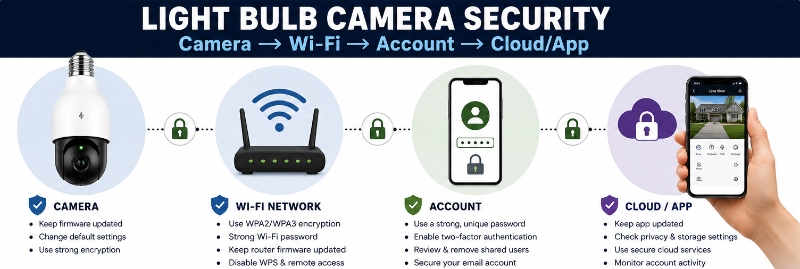
Your Camera Account Can Matter as Much as the Camera
Many Wi-Fi security cameras are controlled through an online account.
That account may provide access to:
- Live video
- Recorded clips
- Microphone audio
- Two-way talk
- Motion alerts
- Camera settings
- Shared users
- Cloud recordings
If someone gains unauthorized access to that account, they may not need to directly “hack” the physical camera.
That is why account security should be treated as part of camera security.
Use a Strong, Unique Password
Do not reuse a password from another website or account.
If the same password is used across several services and one of those services suffers a data breach, attackers may try the exposed password on other accounts.
Use a unique password for the camera account.
A password manager can make it easier to create and store long, unique passwords.
The U.S. Cybersecurity and Infrastructure Security Agency recommends using strong passwords and suggests using a password manager rather than trying to remember every password yourself.
Avoid Default Passwords
If a camera, app or account comes with a default password, change it during setup.
Do not leave common credentials such as:
- admin
- password
- 123456
- manufacturer defaults
Some newer cameras require you to create a password during setup, which is preferable to leaving a shared factory password active.
Turn On Two-Factor Authentication
Two-factor authentication, often called 2FA or multi-factor authentication, adds another step when signing in.
Instead of relying only on:
Password
the account may require:
Password + verification code or another authentication method
This can make it much harder for someone to access your camera account even if they obtain your password.
CISA and the Federal Trade Commission both recommend using multi-factor or two-factor authentication where it is available.
If a camera manufacturer does not offer 2FA, that is something worth considering when comparing products.
Keep Camera Firmware Updated
Firmware is the software that runs on the camera itself.
Manufacturers can release updates to:
- Fix security vulnerabilities
- Improve stability
- Correct bugs
- Add features
- Improve compatibility
A camera that never receives firmware updates may become a bigger security concern over time.
Check for Automatic Updates
If the manufacturer offers automatic firmware updates, consider enabling them.
If updates are manual, periodically check the app or manufacturer support page.
The FTC recommends keeping internet-connected devices updated and also keeping the mobile apps that control them current.
Keep the Camera App Updated
The camera app is another part of the security chain.
Updates may include:
- Security fixes
- Account-protection improvements
- Bug fixes
- Compatibility updates
Use the official app store for your phone rather than downloading camera apps from unofficial websites.
Secure Your Home Wi-Fi Network
Your camera depends on your home network.
A weakly secured router can create risks for multiple connected devices, not just the camera.
The FTC recommends using modern Wi-Fi encryption such as WPA3 Personal or WPA2 Personal.
Change the Router’s Default Administrator Password
Your Wi-Fi password and router administrator password are not always the same thing.
The administrator password controls access to the router’s settings.
If your router still uses its factory administrator credentials, change them.
Use a Strong Wi-Fi Password
Do not use an easy-to-guess network password.
A strong, unique Wi-Fi password helps prevent unauthorized devices from joining your home network.
Keep Router Firmware Updated
Routers also receive software and security updates.
Check whether your router automatically installs updates or whether you need to apply them manually.
Disable Features You Do Not Need
Depending on your router, consider whether features such as remote router administration or WPS are actually necessary.
The FTC recommends disabling remote management and Wi-Fi Protected Setup when those features are not needed.
Should You Put a Camera on a Guest or IoT Network?
Some routers allow you to create a separate guest or Internet of Things network.
This can separate smart devices from computers and other devices containing more sensitive information.
For example:
Main network: computers, phones and personal devices
IoT network: cameras, smart plugs, smart bulbs and other connected devices
This can add another layer of separation if one smart device is compromised.
However, camera features may not work correctly on every guest-network setup.
Some guest networks block communication between devices or prevent local discovery.
If you use a separate network, test:
- Camera setup
- Live View
- Notifications
- Local storage access
- Smart-home integrations
Do not change your network architecture unless you understand how your router handles guest and IoT devices.
Review Who Has Access to the Camera
Many camera apps allow you to share access with:
- Spouse or partner
- Family members
- Roommates
- Property managers
- Other trusted people
Shared access can be useful, but old permissions can become a security problem.
Periodically review the camera’s shared users.
Remove anyone who no longer needs access.
This is particularly important after:
- A breakup
- A roommate moves out
- A property changes tenants
- A shared employee or contractor account is no longer needed
- You gave temporary access to someone
Protect the Email Account Connected to the Camera
Your camera account may rely on email for:
- Password resets
- Security alerts
- Login verification
- Account recovery
If someone gains access to your email, they may be able to reset the camera account password.
Use a strong unique password and two-factor authentication on the email account as well.
Local Storage vs Cloud Storage Security
Neither option is automatically risk-free.
Local microSD Storage
With local storage, video is saved on a memory card inside the camera.
Potential advantages include:
- Less reliance on cloud storage
- Recordings may remain local
- No need to upload every recording to a remote server
Potential risks include:
- The card can be physically removed
- The camera may be stolen
- Anyone with authorized app access may still be able to view recordings
- The card can fail or become corrupted
Cloud Storage
Cloud recordings are stored remotely through the manufacturer or service provider.
Potential advantages include:
- Recordings may remain available if the camera is stolen
- Remote access can be convenient
- Backup may be easier
Potential concerns include:
- Account security
- Provider security
- Cloud privacy policies
- Shared access
- Internet dependence
A compromised online account could potentially expose cloud-stored recordings even if the local camera itself remains physically secure.
For a broader privacy comparison, see our Privacy-First Light Bulb Camera Buyer Checklist.
Cheap Cameras and Security Support
Price alone does not determine whether a camera is secure.
An inexpensive camera from a company that provides good software support may be a better long-term choice than a more expensive camera with poor security practices.
Before buying, look for:
- Clearly identified manufacturer
- Official website
- Current mobile app
- Privacy policy
- Firmware update support
- Two-factor authentication
- Clear security settings
- Customer support
Be cautious with products that have:
- No identifiable manufacturer
- An app with very little information
- No support website
- No visible update history
- No explanation of how cloud data is handled
The Federal Trade Commission specifically recommends researching connected security cameras before purchasing them and checking what security features are provided.
App Permissions Matter Too
Camera apps may request access to parts of your phone such as:
- Microphone
- Camera
- Photos
- Notifications
- Location
- Bluetooth
- Local network
Some permissions may be necessary for setup or specific features.
Others may be optional.
Review the permissions on your phone and disable access that is unnecessary for how you use the camera.
What About Remote Viewing?
Remote viewing is one of the most useful features of a Wi-Fi camera.
It is also one reason account security matters.
When remote access is enabled, your camera feed may be accessible through the internet after you sign in to the manufacturer’s app or service.
Protect that access with:
- Strong unique password
- Two-factor authentication
- Updated app
- Secure email account
- Carefully managed shared users
Signs Someone May Have Accessed Your Camera
There is no single sign that proves a camera has been hacked.
But unexpected behaviour deserves investigation.
Possible warning signs can include:
- Login alerts you do not recognize
- Password-reset emails you did not request
- Unknown shared users
- Camera settings changing unexpectedly
- Camera position changing without explanation on a motorized model
- Microphone or speaker activating unexpectedly
- Unknown devices or sessions in the account
- Account password suddenly no longer working
- Unexpected changes to cloud-storage settings
Some of these symptoms can also be caused by:
- Software bugs
- Other authorized users
- Automations
- Firmware updates
- Accidental setting changes
Do not assume every unusual camera action is proof of hacking.
What to Do If You Think Your Camera Was Hacked
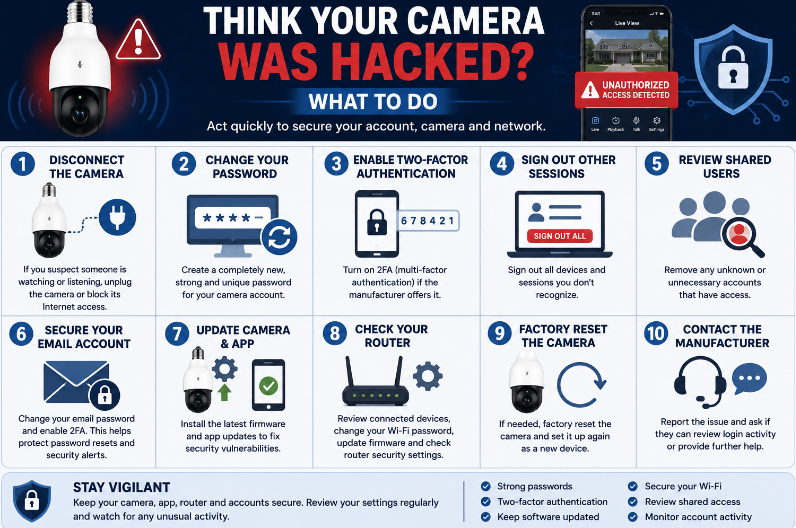
If you suspect unauthorized access:
1. Disconnect the Camera If Necessary
If you are seriously concerned someone is actively watching or listening, disconnect power or network access while you secure the account.
2. Change the Camera Account Password
Create a completely new, unique password.
Do not simply add a number to the old password.
3. Enable Two-Factor Authentication
If the manufacturer supports it, turn it on.
4. Sign Out Other Sessions
Some apps allow you to sign out all devices or review active sessions.
Use that option if available.
5. Review Shared Users
Remove unknown or unnecessary accounts.
6. Secure Your Email Account
Change the password if necessary and enable 2FA.
7. Update the Camera and App
Install available firmware and software updates.
8. Check Your Router
Review:
- Connected devices
- Wi-Fi password
- Router administrator password
- Firmware
- Security settings
9. Factory Reset the Camera if Necessary
If you cannot confidently secure the existing configuration, follow the manufacturer’s instructions for a factory reset and set it up again.
10. Contact the Manufacturer
Report suspicious access or account activity and ask whether the company can review login history or other security information.
Should You Factory Reset a Used Camera?
Yes.
If you buy a used camera, reset it before connecting it to your home network.
This helps remove the previous owner’s settings and account association where supported.
Then:
- Install current firmware
- Create your own account
- Use a unique password
- Enable 2FA
- Review privacy settings
What to Do Before Selling or Giving Away a Camera
Do not simply unscrew it and hand it to someone else.
Before selling, recycling or giving away a light bulb camera:
- Remove saved recordings you do not want transferred.
- Remove the microSD card.
- Remove the camera from your app/account.
- Remove shared-user access.
- Factory reset the camera.
- Check whether the manufacturer’s account portal still lists the device.
This reduces the chance of personal settings or recordings remaining associated with the device.
Can Someone Hack the Camera Through Wi-Fi?
An insecure network can increase risk, which is why router security matters.
However, being within Wi-Fi range does not automatically give someone access to your camera.
Modern security depends on multiple layers such as:
- Wi-Fi encryption
- Camera authentication
- User-account security
- Manufacturer cloud security
- App security
Secure all of those layers rather than focusing only on the camera itself.
Does Using Local Storage Make a Camera Unhackable?
No.
Using a microSD card can reduce reliance on cloud storage, but the camera can still be connected to:
- Your Wi-Fi network
- An app
- An online account
- Remote viewing services
Local storage is a storage choice, not a complete cybersecurity solution.
Is a Camera Safer If You Disable Cloud Storage?
It can reduce some cloud-related exposure, but security still depends on the camera and how it connects to your network.
Some cameras require cloud connectivity for certain app functions even when recordings are stored locally.
Check the exact model before assuming that selecting local storage means the camera no longer communicates with the internet.
10 Ways to Secure a Light Bulb Camera
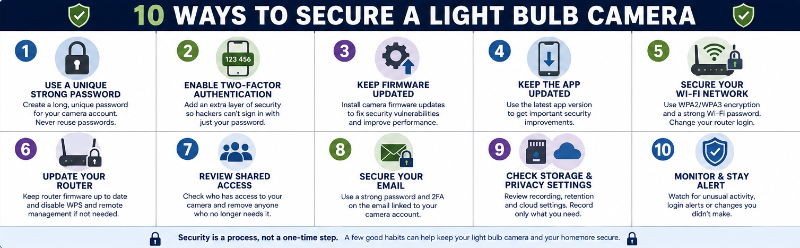
1. Use a unique camera-account password.
2. Enable two-factor authentication.
3. Change default device and router passwords.
4. Keep camera firmware updated.
5. Keep the camera app updated.
6. Secure your home Wi-Fi with WPA3 or WPA2.
7. Keep your router updated.
8. Review shared-camera access.
9. Secure the email account linked to the camera.
10. Review privacy, microphone and cloud-storage settings.
Light Bulb Camera Security Checklist
Before considering setup complete, check the following:
Camera Account
- Unique password created
- Two-factor authentication enabled when available
- Unknown shared users removed
- Email account protected
Camera
- Latest firmware installed
- Automatic updates enabled if available
- Unused features disabled
- Microphone settings reviewed
- Cloud storage settings reviewed
Wi-Fi & Router
- WPA3 or WPA2 encryption enabled
- Strong Wi-Fi password
- Router administrator password changed
- Router firmware current
- WPS or remote management disabled if not needed
Phone & App
- Official camera app installed
- App updated
- Phone software updated
- Unnecessary app permissions removed
Ongoing Security
- Login alerts reviewed
- Shared access reviewed periodically
- Manufacturer still provides updates
- Camera removed and reset before sale or disposal
Privacy and Security Are Related
Cybersecurity protects against unauthorized access.
Privacy focuses on what information is collected, stored and shared in the first place.
A camera can have a strong password and still collect more information than you actually need.
Consider:
- Whether audio recording is necessary
- Where the camera is pointed
- Whether cloud storage is necessary
- Who has shared access
- How long recordings are retained
Our Privacy-First Light Bulb Camera Buyer Checklist covers these issues in more detail.
Frequently Asked Questions
Can someone watch my light bulb camera?
Someone who gains unauthorized access to your camera account or service may potentially be able to view the camera, depending on the system. Strong passwords, two-factor authentication and careful account management can reduce this risk.
Can someone hear me through a light bulb camera?
If the camera has a microphone and someone has access to Live View or recordings with audio enabled, they may potentially hear sounds captured by the camera.
See Do Light Bulb Cameras Record Audio? for more information.
Are cheap light bulb cameras easier to hack?
Price alone does not determine security. A more important question is whether the manufacturer provides firmware updates, account-security features, clear privacy controls and ongoing software support.
Does changing my Wi-Fi password secure the camera?
It can help secure your network, but you should also use a unique camera-account password, enable two-factor authentication and keep the camera software updated.
Should I use the same password for the app and Wi-Fi?
No. Use separate, unique passwords.
Can local microSD cameras be hacked?
Potentially. Local storage does not automatically remove the camera from the internet or eliminate account and network risks.
Should I put my security camera on a guest Wi-Fi network?
A separate IoT or guest network can provide useful separation, but it may interfere with some camera features. Check your router and camera requirements before changing the network setup.
How often should I update my light bulb camera?
Install security and firmware updates when the manufacturer releases them. Automatic updates are useful when supported.
What should I do if the manufacturer stops supporting my camera?
If a connected camera no longer receives security updates, consider whether continuing to use it is appropriate, particularly if it provides remote internet access or monitors a sensitive area.
Final Thoughts
Light bulb cameras can be vulnerable to cybersecurity problems because they are connected devices, but that does not mean they are inherently unsafe.
The biggest risks often come from weak account security, outdated software, poor router security and unnecessary shared access.
You can reduce those risks by using:
- Strong unique passwords
- Two-factor authentication
- Current firmware and apps
- A secure home Wi-Fi network
- Careful account-sharing controls
- Appropriate privacy settings
When comparing cameras, do not look only at resolution, pan-and-tilt or night vision.
Security support should be part of the buying decision too.
Ask whether the manufacturer provides updates, whether the account supports two-factor authentication, how recordings are stored and whether privacy settings are easy to control.
No connected camera can promise zero risk.
The goal is to choose a product with reasonable security controls and configure it in a way that reduces unnecessary exposure.