Many light bulb security cameras include built-in microphones, which raises an important question:
Do light bulb cameras record audio?
The answer is: some do, some do not, and the exact behaviour depends on the camera model and its settings.
A camera with a microphone may allow you to hear sound during Live View, record audio with video clips, or use two-way audio to speak with someone near the camera.
But audio recording deserves more attention than many buyers give it. Microphones can capture conversations outside the area you intended to monitor, audio may be stored locally or in the cloud, and recording laws can differ from the rules that apply to video alone.
This guide explains how audio works on light bulb cameras, the difference between audio recording and two-way talk, privacy considerations, and what to check before enabling a microphone.
Do Light Bulb Cameras Record Audio?
Some light bulb cameras can record audio using a built-in microphone.
Depending on the model, the microphone may be used for:
- Hearing live audio through the camera app
- Recording sound with video clips
- Recording sound during motion events
- Two-way communication
- Audio alerts or other smart features
However, do not assume that every camera with a microphone automatically records audio all the time.
The exact behaviour can depend on:
- The camera model
- App settings
- Recording mode
- Local or cloud storage settings
- Whether the microphone is enabled
- Manufacturer software and firmware
Before buying or using a camera, check the manufacturer’s documentation for the exact model.
How Does Audio Recording Work?
A light bulb camera with a microphone can capture sound near the device.
What happens to that sound depends on how the camera is designed and configured.
Audio During Live View
Some cameras allow you to open the app and hear sound from the camera location while watching Live View.
This does not necessarily mean that audio is also being permanently recorded.
Audio Recorded With Video Clips
Some cameras save audio along with recorded video.
For example, a motion-triggered recording might contain both:
Video + audio
Other cameras may allow you to disable the microphone so that only video is recorded.
Continuous Audio Recording
If a camera supports continuous video recording, do not automatically assume continuous audio is included.
Some models may record audio with continuous footage, while others may handle audio differently.
Check the exact camera settings and documentation.
Audio Recording vs Two-Way Audio
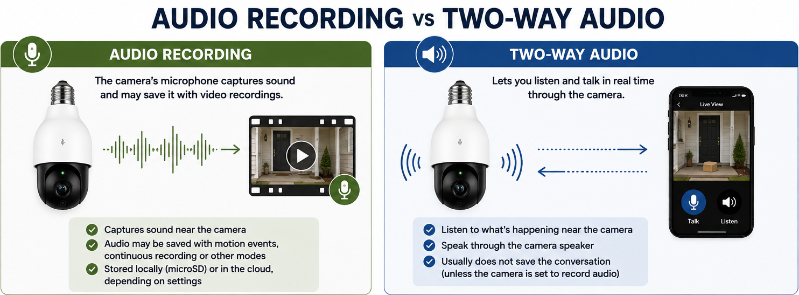
These features are related, but they are not the same thing.
Audio Recording
Audio recording means the camera’s microphone captures sound and may save that sound with recorded footage.
You might later hear conversations, footsteps, vehicles, alarms, dogs barking, or other sounds when reviewing a clip.
Two-Way Audio
Two-way audio typically uses:
Camera microphone + camera speaker
The microphone allows you to hear the person near the camera, while the speaker allows that person to hear you speaking through the app.
This can be useful for situations such as:
- Speaking with a visitor
- Communicating with a delivery driver
- Talking to someone near an entrance
- Warning someone away from a restricted area
A camera can potentially support two-way audio without necessarily storing every conversation as a permanent audio recording.
That is why you should check both the microphone settings and recording settings.
Can You Turn Off Audio Recording?
Many cameras provide microphone or audio controls in their apps.
Depending on the model, you may see settings such as:
- Microphone on/off
- Record audio
- Audio recording
- Sound
- Two-way audio
- Speaker volume
If privacy is important to you, check whether the microphone can be disabled before buying the camera.
Do not assume every app provides the same level of control.
Typical Steps to Check Audio Settings
- Open the camera’s app.
- Select the camera.
- Open Device Settings.
- Look for Audio, Microphone, Sound or Recording settings.
- Check whether microphone recording can be disabled.
- Save the setting if required.
- Make a test recording and confirm whether audio is present.
The menu names will vary by manufacturer.
How Can You Tell If Your Camera Has a Microphone?
There are several places to check.
Product Specifications
Look for terms such as:
- Built-in microphone
- Two-way audio
- Two-way talk
- Audio recording
- Microphone and speaker
The Camera App
You may see:
- A microphone icon
- A speaker icon
- Talk button
- Audio controls
- Microphone settings
Recorded Clips
Play back a test recording.
If the clip contains sound, the camera is capturing audio in that recording mode.
Do not rely only on whether you can hear audio during Live View because Live View audio and recorded audio may be separate functions.
Where Is the Audio Stored?
Audio may be stored with the camera’s video recordings.
That could mean:
Local microSD Storage
Video and audio may be stored on a memory card inside the camera.
This can reduce reliance on cloud storage, but anyone who gains access to the card or camera may potentially access those recordings.
Cloud Storage
If recordings are uploaded to a cloud service, captured audio may be uploaded along with the video depending on the camera and settings.
This means your privacy considerations are not limited to the physical camera.
You should also consider:
- Account security
- Password strength
- Two-factor authentication
- Who has shared access
- How long recordings are retained
- Whether audio can be disabled
Both Local and Cloud Storage
Some cameras support both options.
Check what is stored in each location and whether the audio settings apply to both.
For more on storage and privacy, see our Privacy-First Light Bulb Camera Buyer Checklist.
Audio Can Capture More Than You Expect
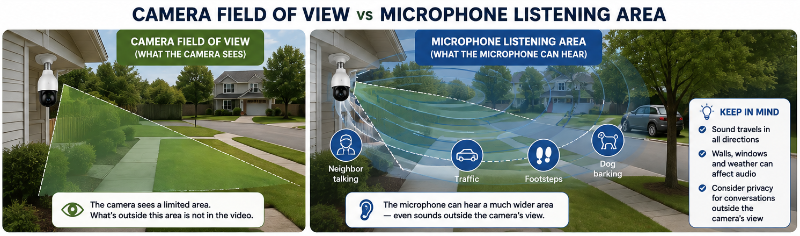
A camera lens has a visible field of view.
A microphone does not.
This is an important difference.
A camera may be pointed only at your front porch while its microphone can potentially capture sounds coming from outside the image.
That might include:
- Neighbouring conversations
- People walking past
- Conversations inside an open window or doorway
- People standing outside the camera’s field of view
- Background television or music
- Children or household members talking nearby
That is one reason audio deserves separate consideration from video.
Is It Legal to Record Audio With a Security Camera?
There is no universal answer.
Audio recording laws depend on where you live, the circumstances, who is being recorded, whether the communication is considered private, and whether consent is required.
Video and audio can also be treated differently under the law.
Canada
Canada’s Criminal Code contains rules dealing with the interception of private communications.
Section 184 generally prohibits knowingly intercepting a private communication, subject to exceptions. One of those exceptions applies where the person intercepting the communication has the express or implied consent of either the originator of the communication or the person intended to receive it.
This is often described in general terms as a form of one-party consent, but that does not mean every use of a security-camera microphone is automatically legal.
A homeowner who is not participating in a private conversation should not assume that simply owning the property gives permission to record that conversation.
Privacy laws, provincial rules, tenancy situations, workplaces, common areas and other circumstances can introduce additional requirements.
United States
Audio recording laws vary by state.
Some jurisdictions generally require consent from one party to a conversation, while others can require consent from all parties in certain circumstances.
Because requirements vary, check the laws that apply where the camera is being used.
Other Countries
Rules can differ substantially.
Do not assume guidance written for Canada or the United States applies elsewhere.
For a broader discussion of camera placement and legality, see Are Light Bulb Cameras Legal?.
Privacy Matters Even When Recording Is Legal
Something can potentially be legally permitted while still being unnecessarily intrusive.
Canadian privacy guidance for organizations recommends minimizing surveillance and says sound should not be recorded unless there is a specific need to do so.
Although rules applying to businesses and organizations are not automatically identical to those applying to a homeowner, the principle is useful:
Collect only the information you actually need.
If video provides the security function you want and audio adds little value, disabling the microphone may be worth considering.
Where Audio Recording Can Become Especially Sensitive
Some locations deserve extra caution.
Apartments and Shared Spaces
A camera near an apartment door may capture conversations in:
- Hallways
- Neighbouring entrances
- Shared stairwells
- Common areas
The microphone may capture more activity than the camera lens suggests.
Renters should also consider lease rules and building policies.
For more renter-specific guidance, see Best Light Bulb Cameras for Apartments.
Neighbouring Property
A porch or driveway camera may pick up conversations occurring on nearby property.
Think about both the camera’s visual direction and the microphone’s potential listening area.
Inside the Home
Indoor cameras can potentially capture household conversations throughout the day.
Consider whether audio recording is actually necessary in that location.
Highly Private Areas
Avoid installing security cameras in areas where people reasonably expect a high degree of privacy.
Our Where NOT to Install a Light Bulb Camera guide covers placement considerations in more detail.
Does Two-Way Talk Mean Conversations Are Recorded?
Not necessarily.
A camera may allow you to communicate through the app without permanently saving that conversation.
However, the behaviour depends on the manufacturer, recording settings and service.
If this matters to you, test it.
- Start a two-way conversation.
- Create or trigger a recording.
- Play the recording back.
- Check whether your voice and the other person’s voice were saved.
You can also review the manufacturer’s documentation and privacy information.
Can Audio Work When the Camera Light Is Off?
Potentially, yes.
The visible light and microphone are separate camera functions on many models.
If the camera still has electrical power, supported audio features may continue even when its visible light is turned off.
If the wall switch cuts power to the entire camera, the microphone cannot continue operating normally because the device itself is off.
See Do Light Bulb Cameras Work When the Light Is Off? for a complete explanation.
Audio Privacy Checklist
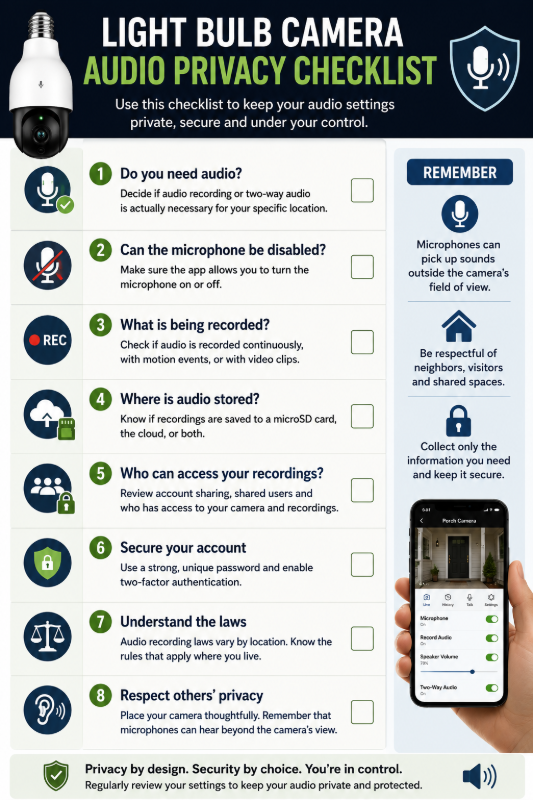
Before enabling audio recording, check:
1. Does the camera actually record audio?
Check the product specifications and make a test recording.
2. Can the microphone be disabled?
Look for microphone and recording controls in the app.
3. What area can the microphone capture?
Remember that sound can come from outside the camera’s field of view.
4. Where are recordings stored?
Check local and cloud storage settings.
5. Who can access the camera?
Review shared users and account permissions.
6. Is two-factor authentication available?
Enable it when supported.
7. Do you actually need audio?
If not, consider disabling it.
8. What laws apply where you live?
Do not assume video and audio recording follow identical rules.
When Audio Can Be Useful
Audio features can provide real benefits when used appropriately.
Speaking With Visitors
Two-way audio can let you communicate with someone at an entrance without opening the door.
Delivery Communication
You may be able to give a delivery driver instructions through the camera speaker.
Adding Context to an Event
Audio can sometimes explain what is happening outside the visual frame.
For example, a recording may capture a sound before someone enters the camera’s field of view.
Remote Communication
Depending on the situation and camera, two-way talk can provide an additional communication option while you are away.
These benefits do not mean audio should automatically remain enabled everywhere.
When It May Be Better to Disable Audio
Consider turning audio off when:
- You do not need it for your security purpose
- The camera is close to neighbouring property
- The microphone captures a shared area
- Household members or visitors are uncomfortable with audio recording
- You are unsure about applicable recording laws
- You want to reduce the amount of personal information being stored
A privacy-conscious setup does not necessarily mean avoiding cameras with microphones entirely.
It means choosing a camera that gives you appropriate control over the feature.
What to Look for When Buying a Camera With Audio
If audio matters to you, check for:
- Built-in microphone
- Two-way audio
- Microphone disable control
- Separate recording-audio setting
- Speaker volume control
- Local storage options
- Cloud storage options
- Account security
- Two-factor authentication
- Clear privacy settings
Audio should be one part of the buying decision, not the only feature you consider.
Use our Light Bulb Camera Buyer Checklist to evaluate the complete camera.
Frequently Asked Questions
Do all light bulb cameras record audio?
No. Audio capabilities vary by camera. Some include microphones and audio recording, some support two-way communication, and others may be video-only.
Can I turn off the microphone on a light bulb camera?
Many cameras allow microphone or audio recording to be disabled in the app, but this depends on the model. Check before purchasing if microphone control is important to you.
Does two-way audio mean the camera is always recording sound?
No. Two-way communication and saved audio recordings are separate functions on some cameras. Check your recording settings and test the camera to determine exactly what is saved.
Can a camera record audio when the visible light is off?
It may be able to if the camera itself remains powered. Turning off only the visible light is different from cutting electricity to the entire camera.
Is it legal to record audio outside my house?
It depends on the jurisdiction and circumstances. Audio recording laws can involve consent and private-communication rules that differ from video surveillance requirements.
Can a porch camera hear my neighbours?
Potentially. Microphones can capture sound from outside the camera’s visible field of view, depending on distance, environmental conditions and microphone sensitivity.
Is local audio storage more private than cloud storage?
Local storage can reduce reliance on a cloud provider, but it does not automatically make recordings secure. Account security, physical access, device security and storage protection still matter.
Should I disable audio recording?
If you do not need audio for your intended use, disabling it can reduce unnecessary collection of conversations and other personal information.
Final Thoughts
Some light bulb cameras can record audio, but a microphone should not be treated as just another feature on a specification sheet.
Audio can capture information well beyond what appears in the camera’s video frame.
Before enabling it, understand:
- What the microphone captures
- Whether audio is actually recorded
- Where recordings are stored
- Who can access them
- Whether the microphone can be disabled
- What laws apply in your location
If you do not need audio, consider turning it off.
If you do want audio, choose a camera that gives you clear control over the microphone, recording settings, storage and account access.
The goal is not to collect as much information as possible.
It is to use the camera in a way that provides the security function you need while avoiding unnecessary recording.