If you’re considering a LaView 4MP bulb security camera, the model you’re most likely looking at is part of LaView’s L2 Light Bulb Camera family.
That naming can be confusing because retailers may emphasize “LaView 4MP Bulb Security Camera,” while LaView itself uses the L2 model name.
Throughout this guide, I’ll use both LaView 4MP Light Bulb Camera and LaView L2 so it’s clear we’re talking about the same 4MP product family.
The appeal is simple: instead of installing a conventional security camera and running separate power, the LaView L2 screws into a compatible light socket and uses that socket for electricity.
That can make it a convenient choice for porches, garages, patios and other locations where a powered socket is already positioned well for a camera.
But easy installation doesn’t automatically mean it’s the right camera. Fixture clearance, socket position, Wi-Fi strength, storage preferences and whether the wall switch can remain on all matter.
This review looks at the LaView 4MP L2’s strongest features, its limitations, who it makes sense for and how it compares with another true bulb-camera option, SYMYNELEC.
This page may contain affiliate links. If you purchase through these links, we may earn a commission at no extra cost to you. As an Amazon Associate I earn from qualifying purchases.
Jump to:
LaView 4MP L2: Quick Verdict
The LaView 4MP L2 is worth considering if you specifically want a true screw-in light bulb camera and already have a suitable powered socket in a useful location.
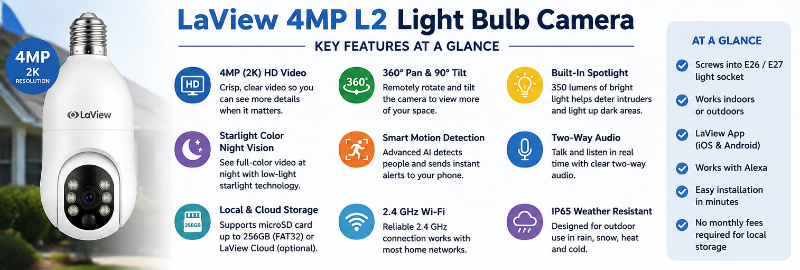
The standard L2 combines 4-million-pixel video with color night vision, AI human detection and a built-in 350-lumen spotlight.
LaView also sells different L2 variants, so don’t assume every listing has identical specifications. Current choices include 2.4GHz-only and dual-band Wi-Fi versions, along with a higher-resolution 4K option.
I like the LaView 4MP L2 most for installations where the existing socket solves the power problem without compromising the camera view.
I would be less likely to choose it if the fixture is enclosed, the socket points in a poor direction, the switch is regularly turned off or a separately mounted camera could provide substantially better coverage.
Check LaView 4MP Light Bulb Camera on Amazon
What Is the LaView 4MP L2 Light Bulb Camera?
The LaView L2 is the model family name, while 4MP describes the four-million-pixel resolution of the standard version covered in this review.
So when you see an Amazon listing describing a LaView 4MP Bulb Security Camera and LaView documentation referring to an L2 Light Bulb Camera, those names can refer to the same 4MP L2 product family.
The L2 is designed to screw into a compatible threaded light socket.
The socket provides continuous power, eliminating the need to recharge batteries or route a separate camera power cable.
After installation, the camera connects to Wi-Fi and is managed through the LaView app.
Possible locations include:
- Porches
- Garage entrances
- Covered patios
- Back doors
- Side entrances
- Indoor rooms with a useful socket location
The most important phrase there is useful socket location.
A convenient power source doesn’t help much if the resulting camera angle is poor.
LaView 4MP L2 Key Features
The standard LaView 4MP L2 offers a useful combination of camera and lighting features.
- True light-socket-powered design
- 4-million-pixel camera
- 360°-style motorized viewing
- Starlight Color Night Vision
- AI human detection
- 350-lumen spotlight
- Motion alerts
- Two-way audio
- LaView app control
- Local microSD recording support
- Optional cloud services
- 2.4GHz version available
- Dual-band 2.4GHz/5GHz L2 version available
LaView also currently sells a 4K L2 variant.
For this article, however, the main focus is the LaView 4MP L2 because that is the version represented by the 4MP product listing and the existing article on this site.
Installing the LaView 4MP Light Bulb Camera
Installation is one of the L2’s biggest selling points.
The general process is:
- Turn off power to the fixture.
- Remove the existing light bulb.
- Screw the LaView L2 into the compatible socket.
- Restore power.
- Open the LaView app.
- Select the correct L2 model during setup.
- Connect the camera to Wi-Fi.
- Test the live view and camera movement.
LaView’s current L2 package information also lists a socket extender.
An extender can help when a fixture is deep or the camera needs additional clearance, but it can’t turn a fundamentally poor socket position into an ideal camera location.
Good Fixture Fit vs Blocked Camera
Before buying the LaView 4MP L2, look closely at the fixture where you plan to install it.
A bulb security camera is much larger than a normal household bulb.
Check whether:
- The camera body physically fits
- The lens has an unobstructed view
- The camera can rotate without hitting the fixture
- A glass enclosure or shade blocks the camera
- A nearby wall limits the useful viewing area
- The socket points toward the area you actually want to monitor
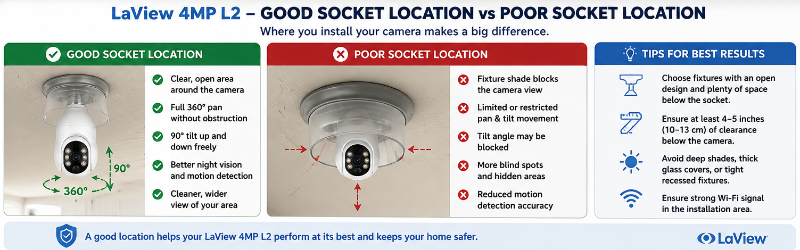
This is one reason I wouldn’t buy any light bulb camera based on specifications alone.
Where you can put the camera often matters more than a small difference in resolution or features.
The Socket Must Remain Powered
The LaView L2 needs electricity even when you don’t want its spotlight illuminated.
If the socket is controlled by a wall switch and someone turns that switch off, the camera loses power and goes offline.
This can be a surprisingly common problem with porch fixtures because people are accustomed to using the switch normally.
The solution is to leave power supplied to the socket and use the camera’s supported controls for its own lighting functions.
See Do Light Bulb Cameras Work When the Light Is Off?.
How Good Is the LaView 4MP Video?
LaView describes the standard L2 as having 4 million pixels.
That is where the “4MP” description comes from.
For general home monitoring, 4MP can provide a useful level of detail, particularly when the subject isn’t too far from the camera.
But resolution is only part of image quality.
Real-world results also depend on:
- Camera distance
- Available lighting
- Wi-Fi stability
- Viewing angle
- Lens cleanliness
- Video compression
- Movement
- Whether you’re watching Live View or recorded footage
If your only goal is buying the largest resolution number, LaView now has a 4K L2 variant.
For many normal porch and entryway installations, though, I would put more emphasis on camera placement and reliable connectivity than chasing resolution alone.
Starlight Color Night Vision
The LaView 4MP L2 includes Starlight Color Night Vision.
This is designed to provide useful color information in low-light conditions rather than relying exclusively on black-and-white nighttime footage.
Night performance still depends on the environment.
Nearby walls, windows, soffits and reflective surfaces can affect what the camera sees after dark.
Once installed, test both daytime and nighttime footage before deciding the camera position is final.
350-Lumen Built-In Spotlight
The standard LaView L2 includes a 350-lumen spotlight.
That can provide useful illumination close to the camera and complements its nighttime monitoring.
However, I would treat the built-in light as supplemental lighting rather than a replacement for a powerful dedicated floodlight.
If illuminating a large driveway or backyard is the primary goal, a dedicated floodlight camera may be a better product category.
360° Viewing, Pan-and-Tilt and Motion Detection
The Amazon listing may describe the LaView 4MP bulb camera as a 360° security camera.
That refers to its motorized viewing capability rather than the camera simultaneously recording every direction around itself.
The advantage is that you can change the viewing direction through the app instead of physically repositioning a fixed camera.
LaView also advertises AI human detection on the L2.
This is intended to help identify human activity and reduce less useful motion notifications.
Keep in mind that the fixture can still physically restrict movement.
A camera capable of rotating through a wide range won’t provide that useful range if half of it is blocked by a wall or light shade.
LaView L2 Wi-Fi: 2.4GHz vs 5GHz
This is another area where using the L2 model name is helpful because there are multiple L2 versions.
LaView currently offers:
- L2 2.4GHz
- L2 dual-band 2.4GHz/5GHz
- L2 4K 2.4GHz
That means you should check the exact listing rather than assuming every LaView 4MP camera supports 5GHz.
The Amazon product shown in this article’s current buying link is identified as a 2.4GHz LaView 4MP Bulb Security Camera.
That’s not necessarily a disadvantage.
For cameras located outside or farther from the router, 2.4GHz often provides better range and wall penetration than 5GHz.
The important thing is having a reliable signal at the actual socket.
LaView App Setup
LaView uses its app to configure and control the L2.
During pairing, make sure you select the L2 option corresponding to your camera’s Wi-Fi version.
LaView’s current support instructions distinguish between L2-2.4GHz and L2-5G/2.4GHz.
The setup process uses a QR code displayed on your phone that the camera scans during pairing.
If setup fails, basic troubleshooting includes:
- Moving the camera closer to the router temporarily
- Resetting the camera
- Confirming the correct L2 version was selected
- Checking the Wi-Fi password
- Trying setup before moving the camera to its final outdoor location
That last step can save a lot of frustration.
I prefer configuring a Wi-Fi camera somewhere convenient before climbing a ladder or working around an outdoor fixture.
LaView 4MP L2 Storage: microSD vs Cloud
The LaView L2 provides local-storage and cloud options.
Local microSD Storage
Compatible L2 cameras can record to a microSD card.
Local storage is appealing if you want to avoid relying entirely on a monthly cloud-storage plan.
Before buying a card, check LaView’s current requirements for the exact L2 version you own, including supported capacity and formatting.
The memory card is only one part of the experience.
Also consider how easily the app lets you find and review the recording you want.
Cloud Storage
LaView also offers cloud services for buyers who prefer remote cloud recording and additional service features.
Cloud plans can change, so I wouldn’t choose the camera based on an old article quoting a particular subscription price.
Instead, check the current LaView plan before subscribing and compare:
- Retention period
- Number of cameras covered
- AI features
- Monthly versus annual cost
- Whether local storage already provides what you need
If avoiding recurring fees is important, local microSD capability is one of the features worth considering when comparing LaView with other camera systems.
Can the LaView 4MP L2 Be Used Outdoors?
LaView currently includes the L2 in both its outdoor-camera and indoor-camera collections.
That doesn’t mean every exposed socket is automatically a good installation.
For outdoor use, consider:
- Whether the electrical fixture itself is suitable for outdoor use
- Protection from direct water exposure
- Rain and snow
- Temperature
- Socket condition
- Wi-Fi strength
- Physical fixture clearance
When two locations provide similar coverage, I generally prefer the more protected location.
See Best Light Bulb Cameras for Outdoor Use.
Two-Way Audio
The LaView L2 includes audio capabilities for communicating through the camera using the app.
That can be useful near an entrance when you want to speak with someone remotely.
Audio recording deserves additional attention because privacy laws for recording conversations may differ from the rules governing video surveillance.
See Do Light Bulb Cameras Record Audio? and Are Light Bulb Cameras Legal?.
Privacy and Security
Because the LaView 4MP L2 connects to your network and can be accessed remotely, treat it like any other internet-connected security camera.
Good practices include:
- Use a strong, unique account password
- Keep the LaView app updated
- Install camera firmware updates when available
- Keep your router updated
- Review shared camera access
- Remove users who no longer need access
- Review cloud-storage settings
- Avoid pointing the camera unnecessarily into private neighboring areas
See Are Light Bulb Cameras Safe From Hacking? for more.
LaView 4MP L2 Pros and Cons
Pros
- True screw-in light bulb security camera
- Uses an existing powered socket
- 4MP resolution on the standard model
- Motorized wide-area viewing
- Starlight Color Night Vision
- AI human detection
- 350-lumen spotlight
- Two-way audio
- Local microSD recording available
- Optional cloud services
- Dual-band L2 variant available
- Socket extender included with LaView’s current L2 package
Cons
- Camera location depends on available sockets
- Large body may not fit every fixture
- Wall switch can accidentally cut power
- Built-in spotlight isn’t a substitute for a powerful floodlight
- Different L2 versions can make shopping confusing
- Wi-Fi quality at the fixture can strongly affect performance
- Some owners report setup, connectivity or playback frustrations
- A conventional mounted camera may provide a better viewing angle
What Do LaView L2 Owners Say?
Feedback on LaView’s own L2 product page is mixed, which is worth acknowledging in a useful review.
Positive owner comments commonly mention clear video, easy installation, useful monitoring and good value.
Other owners report problems involving connectivity, camera movement, playback, instructions or support.
I wouldn’t treat either the strongest praise or the harshest complaint as representative of every camera.
Instead, the mixed feedback reinforces why I would pay particular attention to Wi-Fi strength, fixture fit and return policy when buying.
Who Should Buy the LaView 4MP Light Bulb Camera?
Good Fit
The LaView 4MP L2 makes the most sense if:
- You already have a suitable threaded light socket
- The socket is in a good camera position
- You want continuous socket power instead of batteries
- You want motorized viewing
- You want 4MP video
- You want color night vision
- You want local microSD recording
- You want some built-in lighting
Probably Not the Best Fit
Consider another camera type if:
- Your socket is poorly positioned
- The fixture is enclosed or too small
- The switch is frequently turned off
- You want a discreet camera
- You need a powerful outdoor floodlight
- You want completely wire-free battery operation
- You would get a substantially better view from a wall-mounted camera
Check LaView 4MP Light Bulb Camera on Amazon
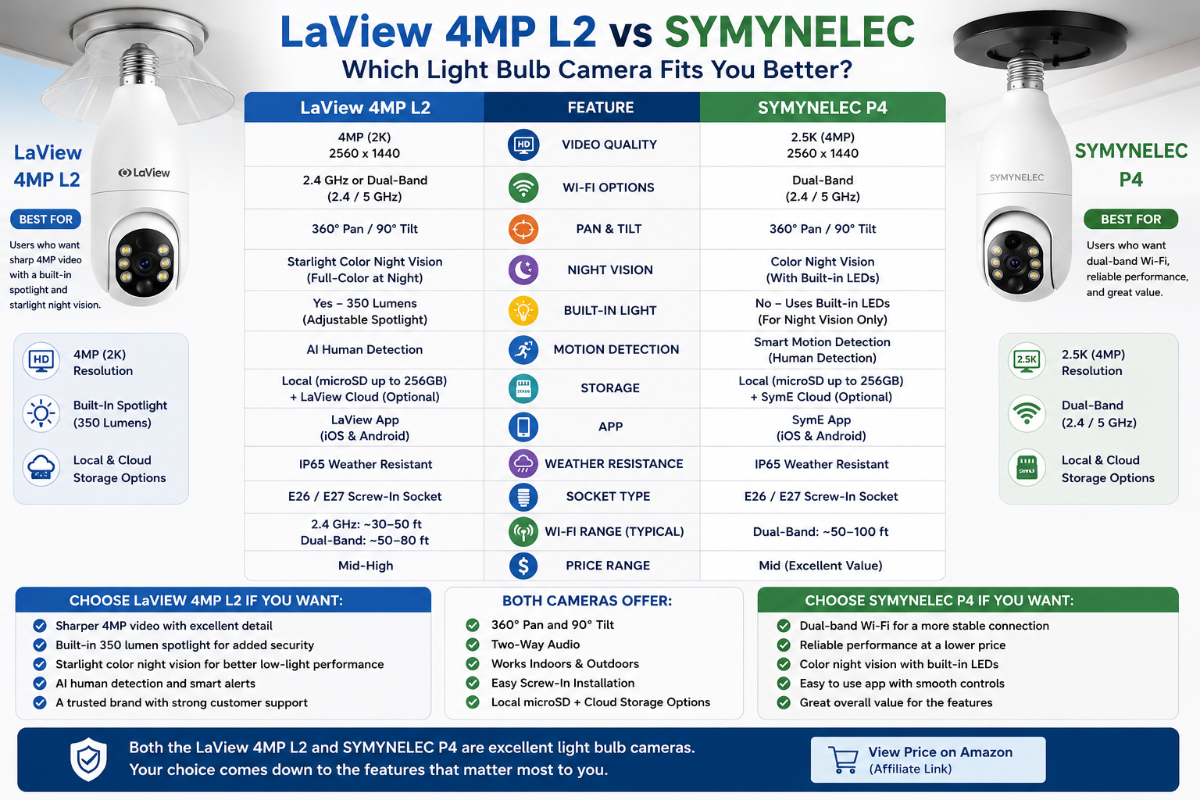
LaView 4MP L2 vs SYMYNELEC
SYMYNELEC is one of the most relevant alternatives because both companies make true screw-in light bulb cameras.
That makes this a much more useful comparison than simply comparing LaView with a battery-powered Blink camera or a hardwired floodlight.
Why Choose LaView?
The LaView 4MP L2 may make more sense if you prefer LaView’s app and product ecosystem, like the L2 design or find a current L2 package that better matches your installation.
LaView also currently offers several L2 variants, giving you choices beyond the standard 4MP 2.4GHz model.
Why Choose SYMYNELEC?
SYMYNELEC may make more sense if you prefer its P4 design, app, storage implementation or if its camera physically fits your fixture better.
SYMYNELEC also offers a current dual-band P4 option.
What Matters More Than the Brand?
For these two cameras, I would compare:
- Exact model and resolution
- 2.4GHz vs dual-band Wi-Fi
- Fixture dimensions
- Camera clearance
- App experience
- Local-storage implementation
- Nighttime performance
- Current price
- Return policy
For many buyers, fixture fit and Wi-Fi reliability will matter more than a minor specification advantage.
Check SYMYNELEC Light Bulb Camera on Amazon
7 Things to Check Before Buying the LaView 4MP L2
- Socket: Confirm your fixture has a compatible threaded socket.
- Clearance: Make sure the L2 body can fit and move without obstruction.
- Viewing angle: Check whether the socket is actually in a useful camera location.
- Power: Make sure the wall switch can remain on continuously.
- Wi-Fi: Test signal strength at the installation point.
- L2 version: Confirm whether you’re buying the 4MP 2.4GHz model, dual-band version or another L2 variant.
- Storage: Decide whether you want microSD storage, cloud service or both.
If those seven items work for your location, the LaView 4MP L2 becomes a much more sensible purchase.
See our complete Light Bulb Camera Buyer Checklist.
Frequently Asked Questions
Is the LaView 4MP Bulb Security Camera the L2?
Yes. LaView uses L2 as the model-family name for its light bulb camera, while 4MP describes the four-million-pixel resolution of the standard version covered in this review.
Is the LaView L2 really 4MP?
LaView describes its standard L2 as a four-million-pixel camera. The company also currently offers other L2 variants, including a 4K model.
Does the LaView 4MP camera use 2.4GHz Wi-Fi?
The standard 4MP listing shown here uses 2.4GHz Wi-Fi. LaView also currently offers a dual-band 2.4GHz/5GHz L2 version, so check the exact model before buying.
Does the LaView L2 have 360-degree viewing?
The L2 uses motorized movement to provide wide-area viewing. “360°” should not be interpreted as simultaneously recording every direction around the camera.
Does the LaView L2 have color night vision?
Yes. LaView advertises Starlight Color Night Vision on the standard L2.
How bright is the LaView L2 light?
LaView lists a 350-lumen spotlight on the standard L2. It is useful supplemental lighting, but it shouldn’t be confused with a high-output dedicated floodlight.
Does LaView L2 detect people?
LaView advertises AI human detection designed to identify human activity and reduce unnecessary alerts.
Can the LaView 4MP L2 record to a microSD card?
Compatible L2 models support local microSD recording. Check LaView’s current requirements for your exact model before purchasing a card.
Do I need a LaView cloud subscription?
Cloud services are available, but local microSD storage provides another recording option for buyers who don’t want to rely entirely on cloud storage.
Can the LaView L2 be used outside?
LaView currently lists the L2 among both its outdoor and indoor camera products. You still need an appropriate electrical fixture and installation location.
Does the camera work when its light is off?
Yes, as long as the socket continues supplying power. Turning off the wall switch that powers the entire socket will also turn off the camera.
Does the LaView L2 include a socket extender?
LaView’s current L2 package listing includes a socket extender.
Is LaView better than SYMYNELEC?
Neither is automatically better for every installation. Compare the exact models for fixture fit, Wi-Fi, resolution, app experience, storage and price. The better choice is the one that works best in your actual location.
Final Thoughts: Is the LaView 4MP L2 Worth It?
The LaView 4MP Light Bulb Camera is a legitimate option if you’re specifically looking for the convenience of a true screw-in security camera.
The L2 name is worth remembering because that’s how LaView identifies the product family, even though retailer listings may put much more emphasis on “4MP Bulb Security Camera.”
The standard 4MP L2 combines useful features including motorized viewing, Starlight Color Night Vision, AI human detection and a 350-lumen spotlight.
It also gives you the basic advantage that makes bulb cameras attractive: an existing light socket can provide continuous camera power without running another cable.
But I wouldn’t choose it solely because installation looks easy.
First make sure the socket is in a useful location, the fixture provides enough clearance, the Wi-Fi signal is reliable and the socket can remain continuously powered.
If those conditions are met, the LaView 4MP L2 can be a practical and relatively simple way to add security-camera coverage.
If they aren’t, a conventional wall-mounted or battery camera may provide a better result even if installation takes more work.
Check LaView 4MP Light Bulb Camera on Amazon