A light bulb camera combines a security camera with a device that receives power from a light socket.
Instead of mounting a traditional security camera and running a separate power cable, many light bulb cameras screw into an existing compatible socket. Once powered and connected to Wi-Fi, the camera can typically be viewed and controlled through a smartphone app.
That sounds simple, but light bulb cameras aren’t all the same.
Some have motorized pan-and-tilt controls. Others use a wide fixed viewing angle. Some record to a microSD card, some rely heavily on cloud storage, and others support both. Outdoor suitability, Wi-Fi requirements, lighting features, subscriptions and app quality can also vary considerably.
This guide explains how light bulb cameras work, their advantages and disadvantages, and when a different type of security camera may be a better choice.
What Is a Light Bulb Camera?
A light bulb camera is a security camera designed to receive power through a compatible light socket.
Many models use the familiar screw-in bulb design, although the exact socket, voltage and installation requirements vary by product.
A typical light bulb camera may combine:
- Video camera
- LED light
- Wi-Fi connectivity
- Motion detection
- Smartphone app
- Night vision
- Microphone and speaker
- Local or cloud recording
However, do not assume every light bulb camera includes all of these features.
For example, some cameras support local microSD recording while others emphasize cloud storage. Some allow remote motorized movement while others are manually positioned and remain fixed afterward.
The specifications of the exact model matter.
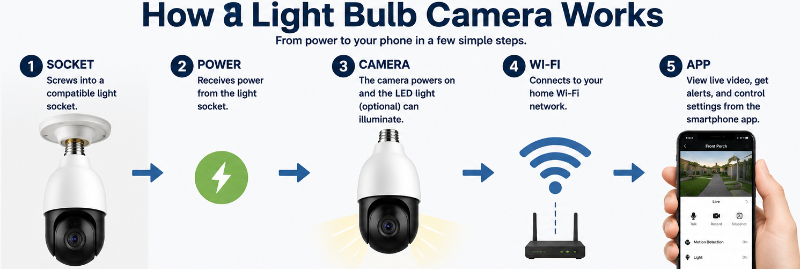
How Does A Light Bulb Camera Work?
The basic concept is straightforward.
1. The Light Socket Supplies Power
The camera screws into a compatible light socket and draws electricity from it.
This eliminates the need for a separate camera power adapter in many installations.
However, there is an important catch:
The socket generally needs to remain powered for the camera to work.
If a wall switch cuts electricity to the socket, it will normally shut down the camera along with the light.
That is different from turning off only the camera’s visible LED light through its app.
For a deeper explanation, see Do Light Bulb Cameras Work When the Light Is Off?
2. The Camera Connects to Your Network
Most smart light bulb cameras connect to a home Wi-Fi network.
The exact requirements depend on the model, but 2.4 GHz Wi-Fi is common.
Once connected, the network can allow the camera to communicate with its app and provide functions such as Live View, notifications and remote access.
3. You Use an App to Control the Camera
The manufacturer’s app is usually the main control centre.
Depending on the camera, the app may allow you to:
- Watch live video
- Review recordings
- Receive motion notifications
- Control the light
- Speak through two-way audio
- Change motion sensitivity
- Create detection zones
- Adjust recording settings
- Control motorized pan-and-tilt
- Manage other camera settings
App quality matters more than many buyers initially realize.
A camera with impressive hardware can still be frustrating if its app is unreliable or difficult to use.
4. Video Is Recorded or Streamed
Recording options vary substantially.
A camera may support:
Local storage: Recordings are saved to a microSD card in the camera.
Cloud storage: Recordings are uploaded to the manufacturer’s online service.
Both: Some cameras provide local storage while offering optional cloud services.
Some models also support continuous recording.
Do not assume every bulb camera provides the same storage options. Always check the recording capabilities of the specific model you are considering.
Do Light Bulb Cameras Still Work as Lights?
Many do.
A camera may incorporate an LED light that can be controlled independently from the camera.
Depending on the model, lighting controls might include:
- On/off control through the app
- Adjustable brightness
- Motion-activated lighting
- Schedules
- Automatic lighting based on ambient conditions
The important distinction is:
Light off does not necessarily mean camera off.
If the camera still receives electricity, its camera functions may continue even when its visible LED light is not illuminated.
But:
Power off means the camera itself cannot operate.
What Can a Light Bulb Camera See?
This depends on the camera design.
There are two concepts worth understanding.
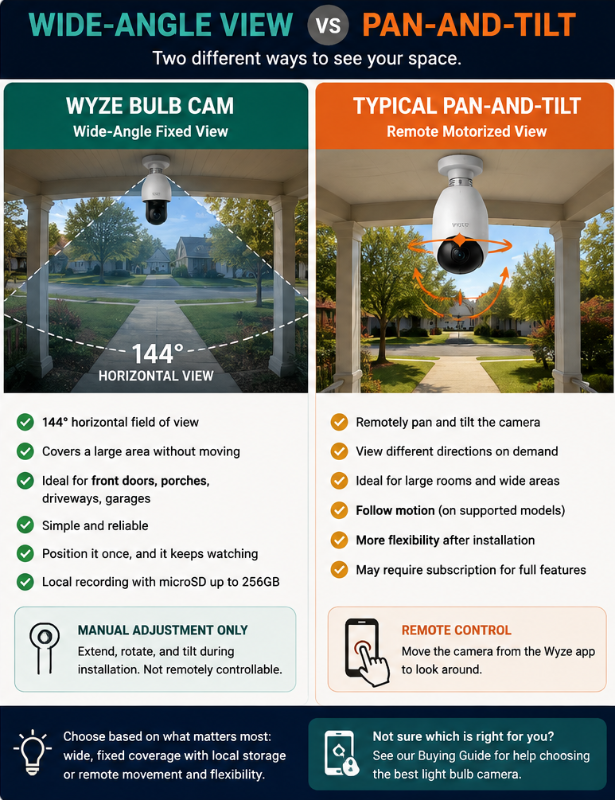
Wide Fixed Field of View
A camera can use a wide-angle lens to capture a large area while remaining physically stationary.
This can work well when you want a consistent view of something such as a front entrance or driveway.
Motorized Pan-and-Tilt
Other bulb cameras contain motors that physically move the camera.
The app may allow you to turn the camera left or right and tilt it up or down.
Some models also use motorized movement for tracking.
Does 360° Mean the Camera Sees Everything at Once?
Not necessarily.
Be careful with phrases such as 360° camera.
A manufacturer may be describing how far the camera mechanism can rotate, not the amount of the surrounding area visible in the video at one moment.
A camera’s field of view and its pan range are different specifications.
This is one reason we do not recommend choosing a camera based on one large number printed on the product listing.
Do Light Bulb Cameras Have Night Vision?
Many do, but nighttime technology and performance vary.
Infrared Night Vision
Infrared LEDs can help a camera produce an image in low-light or dark conditions without relying entirely on the camera’s visible light.
Infrared footage is commonly black and white.
Color Night Vision
Some cameras can provide color video in low-light conditions, particularly when sufficient visible illumination is available.
But placement matters.
A camera positioned behind glass or close to reflective surfaces can experience glare or infrared reflections.
Even the shape of the light fixture can matter.
Do not evaluate night vision only from the specification sheet.
Test the camera in its final location after dark.
Do Light Bulb Cameras Record Audio?
Many include a microphone, and some also include a speaker for two-way communication.
That can allow you to hear sound near the camera or communicate with someone through the app.
But audio recording introduces additional privacy and legal considerations.
Video and audio recording are not necessarily treated identically under applicable laws.
If audio is important to you, see our full guide:
Do Light Bulb Cameras Record Audio?
Advantages of Light Bulb Cameras
Light bulb cameras can make sense in the right location.
Simple Power Setup
The biggest advantage is often power.
If you already have a compatible light socket in a useful location, the camera can receive electricity without installing a separate outlet or running a traditional camera power cable.
DIY-Friendly Installation
Many models are relatively simple to physically install.
- Turn off power to the socket.
- Remove the existing bulb.
- Screw in the compatible camera.
- Restore power.
- Complete setup through the app.
That does not mean every installation is equally simple. Large cameras, enclosed fixtures, outdoor exposure and unusual sockets can create complications.
Our How to Install a Light Bulb Camera guide covers the complete process.
Camera and Lighting in One Location
A bulb camera can provide both illumination and camera functionality from the same socket.
That is useful when the existing light location also provides the view you need.
Potentially Less Installation Work
Compared with some hardwired security cameras, a bulb camera may require less physical installation.
This can be attractive for renters and people who do not want to drill into exterior walls.
If you are renting, installation rules and shared-space privacy still matter.
See Best Light Bulb Cameras for Apartments.
Flexible Camera Features
Depending on the model, you can find options with:
- Wide-angle lenses
- Motorized movement
- Motion detection
- Night vision
- Two-way audio
- Local recording
- Cloud storage
- Smart lighting
- Detection zones
- Notifications
The key phrase is depending on the model.
Disadvantages of Light Bulb Cameras
The convenience comes with some important compromises.
1. Your Light Socket Determines the Location
A camera can only be useful if the socket is in a useful camera position.
An existing porch light might be:
- Too high
- Too low
- Pointing in the wrong direction
- Behind glass
- Too close to a wall
- Too far from the router
- Exposed to unsuitable weather
- Capturing more neighbouring property than necessary
A convenient source of electricity does not automatically make a good camera location.
Our Where to Install a Light Bulb Camera guide goes into this in much more detail.
2. The Socket Needs Power
A wall switch can become an unexpected problem.
If someone turns off the switch controlling the socket, they may unknowingly turn off the security camera.
Some households solve this by leaving the switch on and controlling the camera’s light through its app, when supported.
3. Wi-Fi Can Be a Limitation
Outdoor installations can be particularly challenging.
Your router may be inside while the camera is:
- Across the house
- On another floor
- Behind an exterior wall
- Inside or near a metal fixture
- At the end of a garage or driveway
If the camera works beside the router but becomes unreliable at the final installation location, Wi-Fi coverage may be the problem.
See Light Bulb Camera Not Connecting to Wi-Fi for troubleshooting steps.
4. Fixture Compatibility Can Be a Problem
Bulb cameras are often considerably larger than ordinary light bulbs.
Before purchasing one, check:
- Socket type
- Voltage
- Camera dimensions
- Fixture dimensions
- Lens clearance
- Installation orientation
- Manufacturer restrictions
Do not assume that because an ordinary bulb fits, a bulb camera will fit too.
5. App and Software Quality Vary
A security camera is not just hardware.
You are also relying on:
Camera + firmware + app + account + network + possibly cloud service
This makes software support an important buying consideration.
6. Outdoor Use Requires More Than an IP Rating
A weather-resistant camera does not automatically make the entire electrical installation weatherproof.
Consider the:
- Camera body
- Bulb or socket portion
- Electrical connection
- Fixture
- Installation orientation
- Exposure to rain and snow
This is why you should read the manufacturer’s actual outdoor-installation instructions instead of relying on an IP number alone.
See Best Light Bulb Cameras for Outdoor Use.
Are Light Bulb Cameras Safe From Hacking?
A light bulb camera is an internet-connected device, so account and network security deserve attention.
Good practices include:
- Using a strong, unique account password
- Enabling two-factor authentication when available
- Keeping the camera’s firmware and app updated
- Securing your home Wi-Fi network
- Reviewing account-sharing permissions
- Downloading apps from legitimate sources
- Reviewing privacy and cloud-storage settings
Avoid assuming that all cameras provide the same security features.
We cover this separately in Are Light Bulb Cameras Safe From Hacking?
Are Light Bulb Cameras Legal?
The answer depends on where you live, where the camera is installed, what it captures and whether it records audio.
Rules can vary considerably between jurisdictions.
There can also be differences between recording your own property and recording areas where other people have an expectation of privacy.
Rentals, shared spaces, workplaces and audio recording can introduce additional considerations.
Rather than giving a one-size-fits-all answer here, see our dedicated guide:
You can also use our Privacy-First Light Bulb Camera Buyer Checklist before purchasing or installing a camera.
When a Light Bulb Camera Makes Sense
A light bulb camera may be worth considering when:
You already have a useful light socket.
The socket provides both power and a suitable viewing position.
You want a relatively simple DIY installation.
You would rather avoid running a separate camera power cable or doing more extensive mounting work.
You want lighting and a camera in the same location.
Wi-Fi is strong at the socket.
The available viewing angle covers the area you actually want to monitor.
The model provides the storage and privacy features you need.
When You Should NOT Buy a Light Bulb Camera
The Light Socket Is in the Wrong Location
Do not compromise the entire camera installation simply because there is a convenient socket.
If a wired, plug-in, battery or doorbell camera can be positioned substantially better, it may be the smarter choice.
Your Wi-Fi Is Weak There
A Wi-Fi camera is not particularly useful if it constantly drops offline.
Test the location before assuming the camera is the problem.
You Need a Different Type of Coverage
A doorbell camera may make more sense for seeing visitors at a front entrance.
A dedicated floodlight camera may provide considerably more exterior lighting.
A battery camera may offer more flexible placement.
A wired camera system may make more sense for extensive or continuous property monitoring.
The Fixture Does Not Fit the Camera
Do not force a large bulb camera into an unsuitable enclosed fixture or use questionable adapters simply to make it fit.
Follow the manufacturer’s installation requirements.
The Socket Cannot Remain Powered
If people routinely turn the wall switch off and that switch cuts electricity to the camera, a different power arrangement or camera type may be more reliable.
You Need Features the Camera Does Not Provide
Do not assume a bulb camera supports:
- 24/7 recording
- Local storage
- Remote pan-and-tilt
- 5 GHz Wi-Fi
- Outdoor use
- Two-way audio
- Smart-home integration
- Subscription-free recording
Check the exact model.
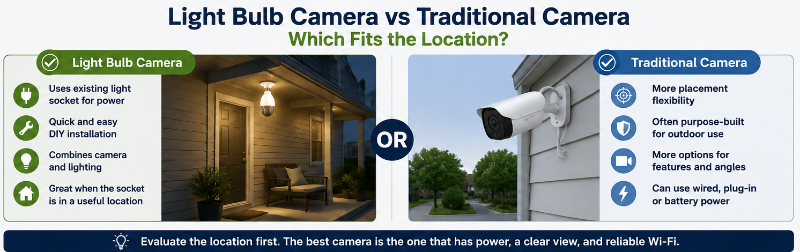
Light Bulb Camera vs Traditional Security Camera
| Consideration | Light Bulb Camera | Traditional Camera |
|---|---|---|
| Power | Uses compatible light socket | Wired, plug-in, battery or other |
| Placement | Limited by socket locations | Often more flexible |
| Installation | Can be very simple | Varies by camera |
| Integrated lighting | Common | Depends on model |
| Viewing options | Fixed or pan-and-tilt | Fixed or pan-and-tilt |
| Local storage | Depends on model | Depends on model |
| Cloud storage | Depends on model | Depends on model |
| Outdoor use | Depends on model and installation | Depends on model |
| Best use | Useful socket in useful location | Broader installation choices |
The real question is not:
Are light bulb cameras better?
It is:
Does a light bulb camera make sense at the location where I need a camera?
7 Things to Check Before Buying
1. Socket and fixture compatibility
Will it physically and electrically fit?
2. Continuous power
Can the socket remain powered when you want the camera operating?
3. Wi-Fi coverage
Does your network reliably reach the location?
4. Viewing angle
Will a fixed wide view work, or do you need motorized movement?
5. Recording and storage
MicroSD, cloud, both, motion events or continuous recording?
6. Environment
Is the camera and complete installation appropriate for indoor or outdoor use?
7. Privacy
What will the camera and microphone capture?
For a much more detailed version, use our Light Bulb Camera Buyer Checklist.
Frequently Asked Questions
Do light bulb cameras need Wi-Fi?
Most smart bulb cameras use Wi-Fi for remote Live View, app control, notifications and other connected features. Some models may continue certain local functions without internet access, depending on their design and storage capabilities.
Do light bulb cameras need electricity?
Yes. A bulb camera needs a source of electrical power. Models designed for light sockets normally receive that power from the socket.
Can a light bulb camera work when its light is off?
Often, yes, if only the camera’s visible LED light is turned off while the device continues receiving power. If electricity to the entire socket is switched off, the camera cannot continue operating normally.
Do all light bulb cameras rotate 360 degrees?
No. Some models use motorized pan-and-tilt while others have a fixed wide-angle lens. Even when a camera advertises 360° movement, that does not necessarily mean it sees the entire 360° area simultaneously.
Can light bulb cameras record continuously?
Some can. Others record only motion events or use different recording methods. Check the exact model’s local and cloud recording specifications.
Can light bulb cameras be used outside?
Some can, but outdoor suitability depends on the specific camera and the complete installation. Check weather ratings, temperature limits, fixture requirements and protection of the electrical connection.
Are light bulb cameras good for apartments?
They can be useful where a compatible socket provides a good viewing location and the installation complies with lease rules and applicable privacy requirements. Shared spaces require additional consideration.
Are light bulb cameras worth it?
They can be when an existing light socket provides a useful camera position and the model meets your requirements for viewing, storage, Wi-Fi, privacy and outdoor use. If the socket forces poor placement, another camera design may be better.
Final Thoughts
The biggest advantage of a light bulb camera is also its biggest limitation:
It uses an existing light socket.
When that socket is in the right location, has continuous power, receives reliable Wi-Fi and provides a useful viewing angle, a bulb camera can offer a convenient way to add camera coverage without a more complicated installation.
When the socket is in the wrong location, the convenience does not matter nearly as much.
That is why we recommend evaluating the location first and the camera second.
Before buying, check the socket, fixture, power, Wi-Fi, field of view, storage, outdoor exposure and privacy considerations.
Then compare cameras that actually fit those requirements.