You don’t need to spend hundreds of dollars to add a security camera to an existing light socket.
There are plenty of light bulb security cameras selling for less than $100, but price alone doesn’t make a camera a good value. Video resolution, Wi-Fi reliability, storage options, app support, motion detection, fixture compatibility, and potential subscription costs can make a relatively inexpensive camera either a smart purchase or a frustrating one.
For this guide, we’ve narrowed our recommendations to just two light bulb cameras under $100: the SYMYNELEC P4 Light Bulb Security Camera and Wyze Bulb Cam. Prices change, so always confirm the current listing still falls below your budget before buying.
Why only two?
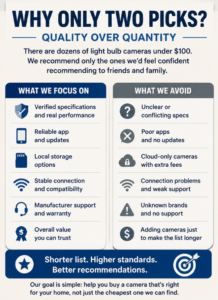
Because we’d rather recommend a shorter list of products that stand out for meaningful reasons than fill the page with inexpensive cameras simply because they meet the price limit.
Affiliate Disclosure: This article contains affiliate links. If you purchase through these links, we may earn a commission at no extra cost to you.
Jump to:
Quick Comparison: SYMYNELEC vs Wyze
| Feature | SYMYNELEC Light Bulb Security Camera | Wyze Bulb Cam |
|---|---|---|
| Our Pick | Best Overall Under $100 | Best for Local Recording |
| Video | 2.5K / 4MP* | 2K |
| Camera Movement | Motorized pan/tilt | Manually adjustable |
| Viewing Coverage | 360° pan/tilt* | 166° diagonal / 144° horizontal |
| Wi-Fi | 2.4/5 GHz on selected model* | 2.4 GHz Wi-Fi 6 |
| Local Storage | Available on supported model* | microSD up to 256 GB |
| 24/7 Local Recording | Check exact model/settings | Yes |
| Built-in Light | Yes | 800 lumens |
| Two-Way Audio | Yes* | Yes |
| Best For | Features and pan/tilt | Local recording and smart lighting |
*SYMYNELEC sells several similar light bulb camera models. Specifications should be verified against the exact model before purchasing.
Best Overall Under $100: SYMYNELEC Light Bulb Security Camera
For model-specific details, see our SYMYNELEC Light Bulb Camera Review.
Why We Chose It
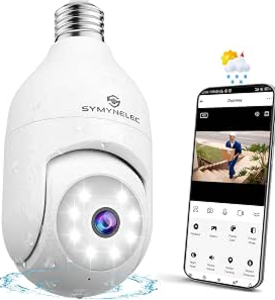
SYMYNELEC is our overall pick under $100 because the current P4 model selected for this guide provides a strong combination of features without requiring the price of a more elaborate home-security system.
One of its biggest advantages is motorized pan-and-tilt viewing.
That’s particularly useful for a light bulb camera because your installation position is determined by where the light socket already exists. Instead of being stuck with a single fixed viewing direction, you can remotely change where the camera is looking.
The selected P4 model offers 2.5K / 4MP video, dual-band 2.4GHz/5GHz Wi-Fi, IP65 weather resistance, human detection and automatic tracking.
What We Like
The combination of motorized pan-and-tilt coverage, 2.5K / 4MP video and dual-band connectivity makes the current SYMYNELEC P4 an interesting choice at this price.
Human detection and automatic tracking can also be more useful than basic motion alerts when you’re primarily interested in activity involving people rather than every movement within the camera’s view.
Installation is relatively straightforward. If you have a compatible light socket in an appropriate location, the camera screws into the socket much like a regular light bulb.
That eliminates the need to run a separate power cable to the camera.
What to Consider Before Buying
There is one particularly important issue with SYMYNELEC: the company sells multiple bulb cameras that look very similar.
Don’t assume specifications from one model apply to another.
Depending on the version, Wi-Fi compatibility, video resolution, storage and other features may differ.
Check the exact product listing before purchasing.
You should also check your physical light fixture.
Light bulb cameras are considerably larger than ordinary bulbs. A camera may use the correct socket but still not fit properly inside a narrow or enclosed fixture.
Best For
I’d consider SYMYNELEC if your priorities include:
- Motorized pan-and-tilt coverage
- Dual-band Wi-Fi on the selected model
- Human detection
- Automatic tracking
- Simple screw-in installation
- Getting a broad feature set while staying below $100
Skip It If…
Choose Wyze instead if straightforward 24/7 local recording is your biggest priority.
I’d also skip any bulb camera entirely if the light socket you plan to use doesn’t provide a useful camera position.
Check SYMYNELEC Light Bulb Security Camera Price on Amazon
Best for Local Recording Under $100: Wyze Bulb Cam
For the full feature breakdown, see our Wyze Bulb Cam Review.
Why We Chose It
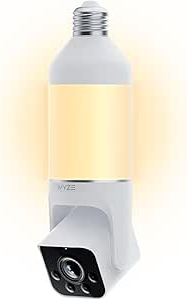
The Wyze Bulb Cam is our second recommendation, but it could easily be the better camera for some buyers.
Its biggest advantage is its unusually straightforward approach to local recording.
Install a compatible microSD card and the Bulb Cam can record continuously 24/7 without requiring a subscription for that local recording. Wyze officially supports microSD cards up to 256 GB.
That makes the Wyze particularly appealing if you’re trying to keep the long-term cost of your camera down, not merely its initial purchase price.
What We Like
The Bulb Cam records at 2K resolution and combines the camera with a dimmable 800-lumen LED light. Wyze also provides Color Night Vision, two-way audio, motion notifications, detection zones and a built-in siren.
Its very wide field of view is another advantage: Wyze currently specifies 166° diagonal and 144° horizontal coverage.
Unlike SYMYNELEC, however, this isn’t a motorized pan-and-tilt camera. You manually extend, pan and tilt the camera during installation until you’ve found the viewing angle you want.
That distinction matters.
If you want to remotely turn your camera toward different areas from your phone, SYMYNELEC is the better fit.
If you have one main area to monitor and can position the camera correctly during installation, Wyze’s wide fixed view may be all you need.
Local Recording Is the Standout Feature
Wyze supports both continuous and event-only recording to a compatible microSD card without requiring a subscription.
That’s a substantial benefit in an under-$100 camera.
However, local recording shouldn’t be confused with Wyze’s optional paid services. Some smarter detection, cloud storage and AI-related features are associated with Wyze’s subscription plans.
You therefore don’t need a subscription simply to record continuously to microSD, but you may want one if its additional features appeal to you.
If storage and privacy are particularly important considerations, our Privacy-First Light Bulb Camera Buyer Checklist covers additional questions to ask before choosing between local and cloud recording.
What to Consider Before Buying
The biggest limitation compared with SYMYNELEC is the lack of motorized pan and tilt.
The camera has to be manually positioned.
Wyze specifies 2.4GHz Wi-Fi for the current Bulb Cam, with Wi-Fi 6 support. It does not connect directly to a 5GHz-only network.
Weather protection deserves attention as well. Wyze rates the camera portion IP65, but specifically advises keeping the socket connection from direct contact with water.
That’s an important distinction if you’re planning an outdoor installation.
Best For
I’d consider Wyze if your priorities include:
- 24/7 local recording
- microSD support up to 256 GB
- No subscription required for continuous local recording
- A wide viewing area
- Bright 800-lumen integrated lighting
- Color Night Vision
- An established smart-home ecosystem
Skip It If…
Choose SYMYNELEC if you specifically want motorized pan-and-tilt control or dual-band Wi-Fi.
Check Wyze Bulb Cam Price on Amazon
Why We’re Only Recommending Two Cameras
What About the LaView 4MP L2?
LaView’s 4MP L2 is another true screw-in bulb camera and can sometimes fall below the same $100 budget.
We are not adding it as a third main pick here simply to make the list longer. LaView offers useful features, but owner feedback is more mixed than we would like for a top recommendation, with reports ranging from easy setup and clear video to connectivity, playback and support frustrations.
That does not mean the LaView L2 is a bad choice. It means we would compare it more carefully against SYMYNELEC and Wyze rather than automatically promoting it because it meets the price limit.
Read our LaView 4MP L2 Light Bulb Camera Review.
Search Amazon for light bulb security cameras and you’ll find many options below $100.
Some are substantially cheaper than either of our recommendations.
So why aren’t they here?
Because being cheap isn’t enough to earn a recommendation.
When evaluating an inexpensive security camera, we’re interested in more than the feature list printed on the product page. We also consider factors such as:
- Whether important specifications can be verified
- Storage options
- Wi-Fi compatibility
- Manufacturer support
- App ecosystem
- Installation requirements
- Subscription requirements
- Whether the product offers something meaningfully different from our other recommendations
Adding another three cameras simply so we could call this the “Top 5” wouldn’t necessarily make this guide more useful.
If we find another sub-$100 model that we believe deserves a place here, we can add it when the guide is updated.
What Can You Realistically Get for Under $100?
A sub-$100 budget no longer means settling for basic 1080p video and simple motion alerts.
Depending on the camera, you can now find features such as:
2K video: Both cameras recommended here provide higher nominal resolution than traditional 1080p video.
Pan-and-tilt: Available with SYMYNELEC, allowing you to remotely adjust the viewing direction.
Continuous local recording: A major strength of the Wyze Bulb Cam.
Human detection and tracking: Available on selected SYMYNELEC models.
Color night viewing: Available with Wyze and commonly available on many current bulb cameras.
Two-way audio: Lets you communicate through the camera using its app.
Smart lighting: Wyze combines its camera with a particularly capable 800-lumen smart bulb.
You therefore don’t necessarily need to move into a much higher price range just to get useful security-camera features.
Cheap vs Good Value: They’re Not the Same Thing
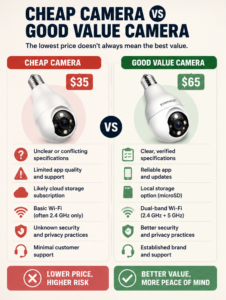
Imagine two cameras:
Camera A costs $35.
Camera B costs $65.
Camera A isn’t automatically the better value because you save $30.
Suppose Camera B has better manufacturer support, dependable local recording, a more established app and clearly documented specifications.
Those differences could easily be worth the extra money over several years of use.
The opposite can also be true. Paying more doesn’t guarantee that a camera is better.
That’s why we prefer to evaluate what you’re getting for the money rather than simply ranking cameras from cheapest to most expensive.
If minimizing the purchase price is your primary goal, compare that against the features you actually need rather than automatically buying the least expensive listing.
Where Inexpensive Light Bulb Cameras Can Cut Corners
This is where shoppers should be particularly careful.
App Quality and Support
A security camera is heavily dependent on its app.
The hardware can have impressive specifications, but that doesn’t help much if the app is difficult to use or stops receiving adequate support.
Consider who actually develops and supports the software before purchasing an unfamiliar camera.
Poorly Documented Specifications
Marketplace listings sometimes contain conflicting information.
One section may say 2K while another describes a different resolution. Similar-looking versions of the same camera may support different Wi-Fi bands or storage capacities.
When specifications matter to you, verify the exact model rather than relying solely on a product title.
Cloud Subscriptions
A cheap purchase price can become less impressive if the features you want require ongoing payments.
Before purchasing, determine what the camera does without a subscription.
Fixture Compatibility
This isn’t necessarily a quality issue, but it causes plenty of potential frustration.
Bulb cameras are much larger than ordinary light bulbs.
A $40 camera that doesn’t fit your fixture isn’t a bargain.
Our How to Choose the Right Light Bulb Camera checklist can help you check compatibility before ordering.
Don’t Forget the Wall Switch
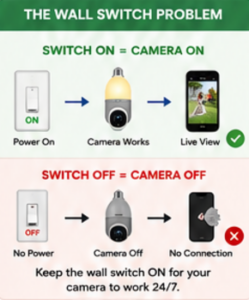
This is one of the easiest things to overlook with a light bulb camera.
The camera gets its electricity through the light socket.
If a wall switch cuts power to that socket:
Switch ON → socket has power → camera operates
Switch OFF → socket loses power → camera goes offline
The smart light itself can usually be controlled separately through the manufacturer’s app, but the socket still needs to provide electricity to the camera.
If several people live in your home and routinely switch the porch light off, you’ll need to account for that.
Wyze actually includes a “Do Not Turn OFF” sticker with its Bulb Cam, which illustrates how important continuous power is to this type of camera.
What About Local vs Cloud Storage?
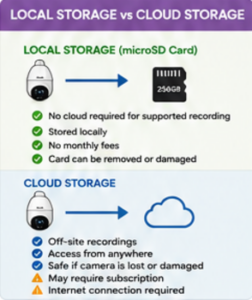
The purchase price isn’t the only cost to consider.
Local Storage
A camera with microSD recording can save footage directly to a card inside the camera.
Potential advantages include:
- No cloud required for supported recordings
- Potentially no monthly recording fee
- More direct control over where footage is stored
Potential disadvantages include:
- Limited storage capacity
- Cards eventually wear out or fail
- Recordings stored only on the camera can potentially be lost if the device is damaged or removed
Cloud Storage
Cloud services store supported recordings remotely.
Potential advantages include:
- Off-site storage
- Convenient remote access
- Recordings may remain available if something happens to the camera
Potential disadvantages include:
- Possible recurring subscription costs
- Dependence on internet connectivity for uploading
- Storage periods and features vary by provider
Neither is automatically the right choice.
For someone shopping under $100 specifically to keep costs down, though, subscription-free local recording can add considerable value.
That’s one reason Wyze earns a recommendation in this guide.
Should You Spend More Than $100?
Sometimes.
A $100 limit shouldn’t prevent you from buying the camera that actually suits your home.
Spending more may make sense if you need:
- Multiple cameras
- More advanced smart-home integration
- A complete security ecosystem
- Particular weather-resistance requirements
- More sophisticated detection
- A different installation method
- Features unavailable from the cameras in this guide
You may also encounter multi-camera packages costing more than $100 that provide a lower per-camera price.
We haven’t included those here because this guide focuses specifically on purchases that stay below the $100 threshold.
For recommendations without the strict price limit, see our Best Light Bulb Cameras for 2026 guide.
What About Apartments and Renters?
Light bulb cameras can look particularly attractive to renters because installation may require less modification than a conventionally mounted wired camera.
That doesn’t automatically make every installation appropriate.
You still need to consider:
- Whether you’re allowed to install the device
- Where the camera points
- Privacy of neighbours and shared spaces
- Whether the socket can remain continuously powered
- Wi-Fi coverage
- Fixture compatibility
Renters should read our Best Light Bulb Cameras for Apartments guide before choosing a model.
7 Things to Check Before Buying
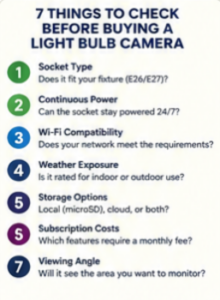
1. Socket and Fixture
Does the camera use the correct socket, and will its larger body physically fit?
2. Continuous Power
Can the light socket remain powered without someone regularly turning off the wall switch?
3. Wi-Fi
Does the camera support your network, and is the signal strong enough at the actual fixture?
4. Camera Position
Will the existing socket give you a useful view of the area you’re trying to monitor?
5. Storage
Do you want microSD recording, cloud storage, or both?
6. Subscriptions
Which features work without a paid plan?
7. Outdoor Exposure
If you’re installing it outside, is the exact camera and electrical installation appropriate for the location?
Also see Where NOT to Install a Light Bulb Camera before deciding on a permanent location.
Frequently Asked Questions
Can you get a good light bulb security camera for under $100?
Yes. Spending less than $100 doesn’t necessarily mean giving up 2K video, local storage, motion detection or other useful features.
The bigger challenge is separating worthwhile cameras from the large number of inexpensive models with similar-looking specifications.
What’s the best light bulb camera under $100?
Our overall choice is the SYMYNELEC Light Bulb Security Camera for buyers who prioritize motorized pan-and-tilt viewing and its broader feature set.
The Wyze Bulb Cam is our preferred alternative for buyers who prioritize continuous local recording and smart lighting.
What’s the best light bulb camera without a subscription?
The Wyze Bulb Cam is particularly attractive for this purpose because it supports continuous 24/7 recording to a compatible microSD card without requiring a subscription.
Optional paid Wyze services provide additional features, but aren’t required for continuous microSD recording.
Are cheap light bulb security cameras safe?
Price alone doesn’t determine whether a smart camera is secure.
Regardless of price, use a strong unique password, enable available account-security features, keep the camera and app updated, and understand what data and cloud services the product uses.
Our Privacy-First Light Bulb Camera Buyer Checklist covers this topic in more detail.
Do light bulb cameras work when the light switch is off?
Not if the switch cuts electrical power to the socket.
The camera requires continuous electricity even when its built-in light isn’t illuminated.
Do light bulb cameras need Wi-Fi?
Most smart bulb cameras rely on Wi-Fi for remote viewing, notifications, app controls and cloud features.
Requirements differ between cameras, so check the supported Wi-Fi bands before purchasing.
Is 2K worth paying extra for?
Higher resolution can provide additional image detail, but resolution shouldn’t be your only consideration.
Camera optics, lighting, compression, nighttime performance, positioning and Wi-Fi reliability also influence how useful the recorded video actually is.
Which Under-$100 Camera Should You Buy?
For these two cameras, the decision is relatively straightforward.
Choose SYMYNELEC if you want:
Motorized pan/tilt + dual-band connectivity on the selected model + tracking features.
Choose Wyze Bulb Cam if you want:
24/7 local recording + a wide fixed view + an 800-lumen smart light + an established smart-home ecosystem.
We wouldn’t choose based solely on which one happens to be $10 or $20 cheaper on a particular day.
Start with the features that matter for your installation and then compare the current prices.
Check SYMYNELEC Light Bulb Security Camera Price on Amazon
Check Wyze Bulb Cam Price on Amazon
Final Thoughts
There are dozens of light bulb security cameras available below $100, but we don’t think a useful buying guide needs to recommend all of them.
For 2026, SYMYNELEC is our best overall light bulb camera under $100, particularly for buyers who want motorized viewing, 2.5K / 4MP video and dual-band Wi-Fi on the selected P4 model.
The Wyze Bulb Cam is our preferred option for local recording, with subscription-free 24/7 microSD recording, a 166° diagonal / 144° horizontal viewing area and an 800-lumen integrated light among its strongest features. Because prices vary by country, retailer and sale period, check the current listing rather than relying on a fixed price quoted here.
Most importantly, don’t buy a camera simply because it falls below an arbitrary price limit.
Check your socket, fixture, Wi-Fi, viewing angle, storage requirements and subscription preferences first. A $60 camera that’s appropriate for your installation is a much better value than a $35 camera that isn’t.