The Wyze Light Bulb Camera takes a slightly different approach to light bulb security cameras.
Instead of combining a traditional-looking bulb with a rotating camera underneath, Wyze combines a 2K security camera with an 800-lumen smart light designed to screw directly into a standard E26 light socket.
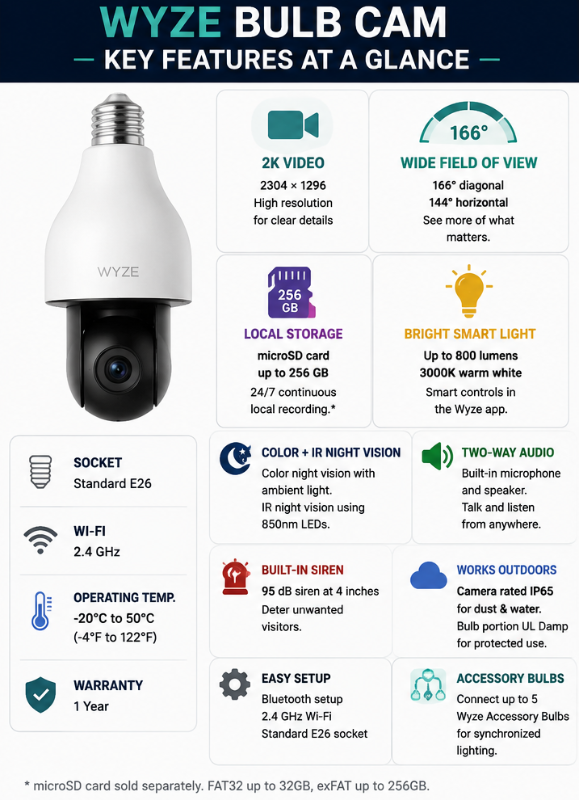
It offers local microSD recording, color and infrared night vision, two-way audio, motion detection, smart-light controls, and a particularly wide field of view.
But there’s an important limitation to understand before buying:
The Wyze Bulb Cam is not a motorized pan-and-tilt camera.
You can manually extend, rotate, and tilt the camera during installation, but you can’t remotely turn the camera around from the Wyze app.
That makes the Wyze Bulb Cam particularly interesting for people who want a fixed wide-angle view and local recording, rather than remotely controlled 360-degree coverage.
As an Amazon Associate I earn from qualifying purchases. This page contains affiliate links. If you purchase through these links, we may earn a commission at no extra cost to you.
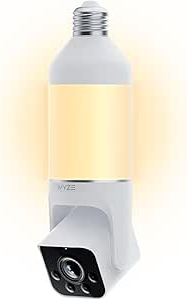
Quick Summary
Best for: Wide fixed coverage and local recording
Video: 2K (2304 × 1296)
Field of view: 166° diagonal / 144° horizontal
Light: Up to 800 lumens
Night vision: Color + infrared
Storage: microSD up to 256 GB
Continuous local recording: Yes
Wi-Fi: 2.4 GHz
Socket: Standard E26
Weather resistance: Camera portion IP65; bulb portion UL Damp
Pan and tilt: Manual adjustment only
Two-way audio: Yes
Siren: Yes
Subscription required for local recording: No
These specifications are based on Wyze’s current product information and support documentation.
What Is the Wyze Bulb Cam?
The Wyze Bulb Cam is essentially two devices combined:
Smart LED light + Wi-Fi security camera
It screws into a standard E26 light socket and uses the socket’s existing 120V AC power.
That can make installation considerably simpler than installing a conventional hardwired outdoor security camera.
The camera itself extends below the bulb and can be manually positioned during installation.
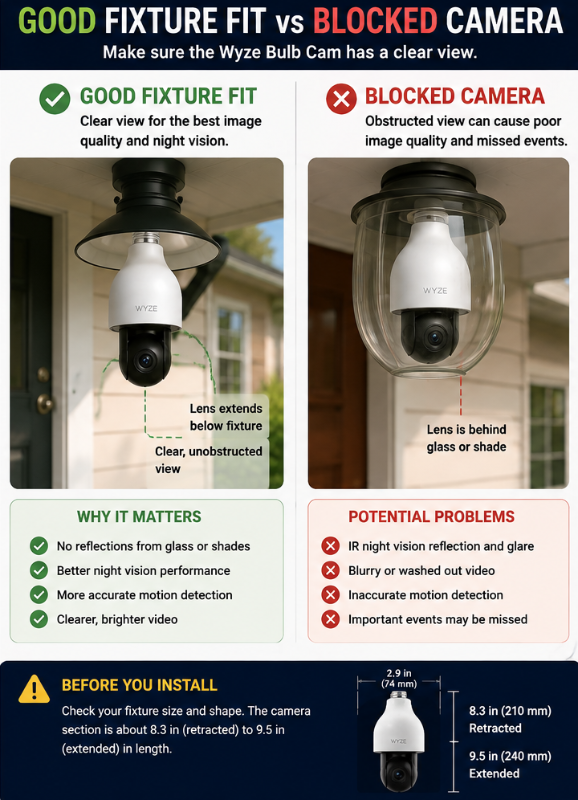
Wyze allows the camera section to extend approximately 3 cm, which can help the lens clear the bottom of certain fixtures. The company specifically recommends making sure the lens extends beyond the fixture or sconce because glass and fixture housings can interfere with image quality, motion detection, and nighttime performance.
This is an important practical advantage because fixture compatibility is one of the biggest issues with light bulb cameras.
Wyze Bulb Cam Specifications
| Feature | Wyze Bulb Cam |
|---|---|
| Resolution | 2K (2304 × 1296) |
| Diagonal field of view | 166° |
| Horizontal field of view | 144° |
| Vertical field of view | 82.5° |
| Day frame rate | 20 FPS |
| Night frame rate | 15 FPS |
| Night vision | Color + IR |
| Light output | Up to 800 lumens |
| Color temperature | 3000K |
| Local storage | microSD up to 256 GB |
| Wi-Fi | 2.4 GHz |
| Socket | E26 |
| Power | 120V AC |
| Two-way audio | Yes |
| Siren | 95 dB at 4 inches |
| Camera weather rating | IP65 |
| Operating temperature | -20°C to 50°C |
| Warranty | 1 year |
Wyze’s current documentation specifies FAT32 for 8 GB, 16 GB, and 32 GB cards and exFAT for cards up to 256 GB.
What We Like About the Wyze Bulb Cam
1. 24/7 Local Recording Without a Subscription
This is one of the strongest reasons to consider the Wyze Bulb Cam.
Insert a compatible microSD card and the camera supports continuous 24/7 local recording without requiring a Wyze subscription for that local storage.
That gives you an alternative to relying entirely on cloud storage.
It’s important to distinguish the two:
Local recording → microSD card
Cloud recording/features → may require a Wyze service subscription
For buyers who specifically want local storage, this is one of the features that makes the Wyze stand out in our broader Best Light Bulb Cameras for 2026 comparison.
2. Very Wide Field of View
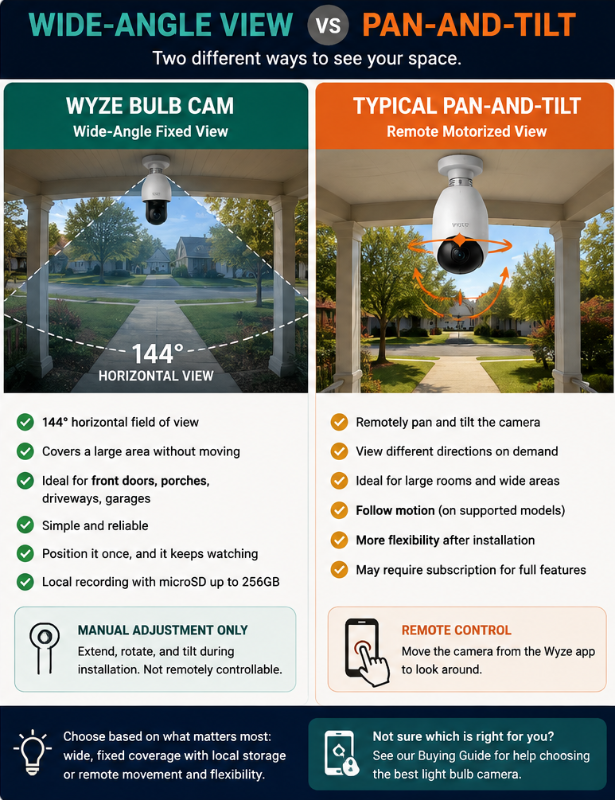
The camera has a 166° diagonal and 144° horizontal field of view.
That’s quite wide for a fixed camera.
For locations such as:
- Front entrances
- Porches
- Driveways
- Garages
- Large rooms
a wide-angle lens can reduce the need to physically rotate the camera after installation.
However, don’t confuse wide-angle coverage with 360° pan-and-tilt.
They’re very different.
3. 2K Video
Wyze specifies 2304 × 1296 resolution.
That’s higher than standard 1080p and provides additional image detail, although actual usable detail will still depend on lighting, distance, motion, compression, and where the camera is installed.
Resolution shouldn’t be the only specification you consider when choosing a security camera.
A well-positioned 2K camera can be considerably more useful than a higher-resolution camera with a poor viewing angle.
Our Light Bulb Camera Buyer Checklist explains the other specifications worth comparing.
4. Color and Infrared Night Vision
The Wyze Bulb Cam supports both color night vision and infrared night vision.
It uses four 850nm infrared LEDs for IR illumination.
This gives the camera options for different nighttime conditions.
Infrared can provide nighttime visibility without leaving the main 800-lumen light illuminated continuously, while available ambient or camera lighting can support color nighttime video.
As with any camera, nighttime performance depends heavily on placement.
Nearby walls, fixture edges, glass, and reflective surfaces can affect infrared performance.
5. The Light Is Actually Useful
Some inexpensive bulb cameras include relatively modest lighting.
Wyze specifies up to 800 lumens at a warm 3000K color temperature.
The light can be controlled through the Wyze system with options including:
- Manual control
- Motion activation
- Ambient-light control
- Schedules
- Wyze Automations
That makes the lighting side of the product more than an afterthought.
6. Optional Accessory Bulbs
Another unusual feature is the ability to connect up to five Wyze Accessory Bulbs to a Bulb Cam.
Those additional bulbs can synchronize lighting and provide broader smart-light coverage around an area.
That could be useful if you have several bulbs in the same exterior fixture or area but only need one camera.
The accessory bulbs are separate products and don’t add additional cameras.
7. Bluetooth Setup
Initial setup uses Bluetooth rather than requiring the camera to scan a QR code from your phone.
Wyze promotes this as a simpler setup method.
The camera ultimately uses 2.4 GHz Wi-Fi for network connectivity.
If you have connection problems, see our Light Bulb Camera Not Connecting to Wi-Fi troubleshooting guide.
View the Wyze Bulb Cam on Amazon
The Biggest Limitation: No Remote Pan and Tilt
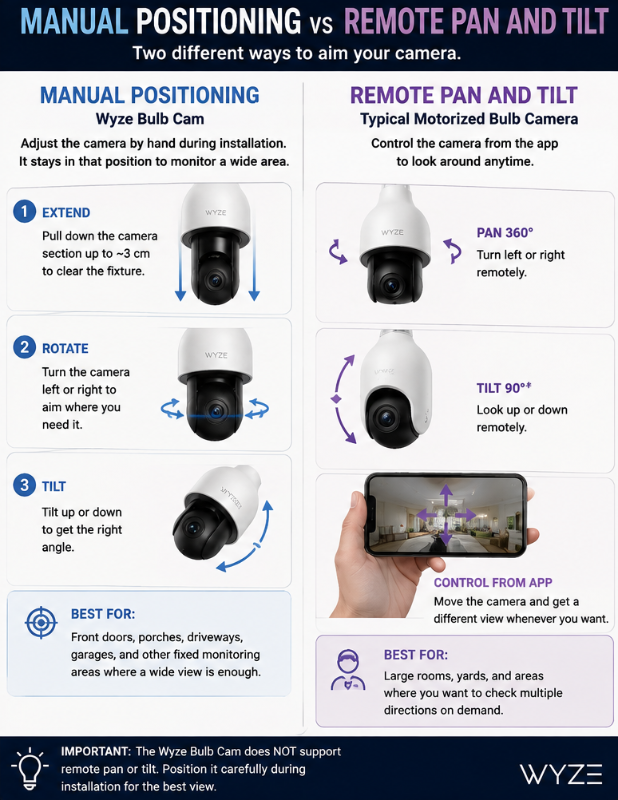
This is probably the most important thing to understand before buying the Wyze Bulb Cam.
The camera can be physically:
- Extended
- Rotated
- Tilted
But those adjustments are manual.
Wyze specifically confirms that the Bulb Cam cannot be panned or tilted remotely through the Wyze app.
That means you position the camera during installation and its wide-angle lens monitors that area.
If you’re comparing it with one of the inexpensive motorized bulb cameras that can rotate around the room from an app, the experience is quite different.
Who Might Prefer Wyze’s Approach?
Someone monitoring:
- Front porch
- Front door
- Driveway
- Garage entrance
- Fixed backyard area
may not need remote pan-and-tilt if the wide 144° horizontal view already covers the important area.
Who Might Prefer a Motorized Camera?
Someone who specifically wants to remotely look around:
- Large room
- Backyard
- Multiple directions
- Wide open area
may prefer a true pan-and-tilt model.
This is one of those situations where more features don’t automatically mean better. It depends on what you’re trying to monitor.
Local Storage vs Wyze Subscription
The Wyze Bulb Cam supports both local and cloud-based options.
Local Storage
Install a compatible microSD card.
Wyze supports cards up to 256 GB and allows continuous local recording.
Cloud Services
Wyze also offers subscription services for additional cloud and AI-related features.
For example, Wyze currently advertises AI notifications and Descriptive Alerts through its paid services.
Subscription offerings can change over time, so I wouldn’t choose the camera based on a specific subscription price or feature bundle without checking Wyze’s current plans first.
The important point is:
You do not need a subscription simply to use the camera’s supported microSD local recording.
Can You Use the Wyze Bulb Cam Outdoors?
Yes, but there’s an important qualification.
Wyze lists the camera portion as IP65, while the bulb portion is rated UL Damp. The company also specifically warns that most socket adapters aren’t waterproof and says the socket connection should be kept away from direct water contact.
So:
IP65 camera does not mean every part of every installation can be exposed directly to rain.
That’s exactly why we recommend looking at the complete installation rather than only the IP number printed in a product listing.
For outdoor installations, see our Best Light Bulb Cameras for Outdoor Use guide.
Fixture Compatibility
This deserves its own section.
The Bulb Cam is much longer than an ordinary household light bulb.
Wyze lists it at approximately:
8.27 inches (210 mm) retracted
and
9.45 inches (240 mm) extended.
Before buying, look at your fixture.
Ask:
- Is there enough vertical clearance?
- Will the camera lens extend beyond the fixture?
- Is the fixture enclosed?
- Will glass sit in front of the camera?
- Can you manually angle the camera toward the area you need?
Wyze specifically warns that viewing through glass or a fixture housing can create reflections, motion-detection problems, and poor image quality.
Measure first.
The Socket Needs Continuous Power
Like other bulb security cameras, the Wyze Bulb Cam needs electricity to remain online.
If your wall switch controls the socket:
Switch ON → camera powered
Switch OFF → camera loses power
Wyze even includes a “Do Not Turn OFF” sticker in the box.
That’s a small detail, but it addresses a very real problem with bulb-camera installations.
If someone habitually switches off the porch light before bed, they may also switch off the security camera.
Wi-Fi Requirements
The Wyze Bulb Cam uses 2.4 GHz Wi-Fi.
It doesn’t connect directly to a 5 GHz-only network.
This is particularly worth checking for outdoor installations because exterior walls and distance can also weaken Wi-Fi.
Before deciding the camera is defective, test it closer to your router.
If it works near the router but not in the final fixture, the problem may be coverage rather than the camera.
Two-Way Audio and Siren
The Bulb Cam includes:
- Built-in microphone
- Two-way audio
- Speaker
- Siren
Wyze rates the siren at 95 dB measured at four inches.
Two-way audio allows you to communicate through the camera using the app.
As with any internet-connected camera with a microphone, consider privacy and security when deciding where to install it.
Our Privacy-First Light Bulb Camera Buyer Checklist covers those considerations.
Wyze Bulb Cam Pros and Cons
Pros
2K video
Higher resolution than standard 1080p.
Very wide field of view
144° horizontal coverage can work well for fixed monitoring areas.
24/7 local recording
Compatible microSD cards support continuous recording without requiring a subscription.
Up to 256 GB microSD support
Useful for buyers who prioritize local storage.
800-lumen smart light
The lighting component is genuinely functional rather than decorative.
Color and IR night vision
Provides options for different nighttime conditions.
Manual positioning
The extendable/adjustable design provides more flexibility than a completely fixed bulb.
IP65 camera portion
Suitable for appropriate outdoor installations when the rest of the installation is properly protected.
Accessory-bulb ecosystem
Can coordinate up to five additional Wyze bulbs.
Cons
No remote pan-and-tilt
This is the biggest limitation for buyers expecting 360° motorized movement.
2.4 GHz Wi-Fi only
No 5 GHz Wi-Fi connection.
Large physical size
It won’t fit every light fixture.
Outdoor installation still requires protection
The camera’s IP65 rating doesn’t make the socket connection waterproof.
Some advanced/cloud features require a subscription
Buyers should check Wyze’s current service plans for the cloud/AI features they want.
Fixed monitoring direction after installation
You can manually reposition it, but not remotely move it around from the app.
Who Is the Wyze Bulb Cam Best For?
I think this camera makes the most sense for someone who wants:
A wide, fixed view
rather than motorized 360° movement.
It also makes particular sense if you value:
- Local microSD storage
- 24/7 recording
- No subscription requirement for local recording
- A useful integrated light
- A recognizable smart-home camera ecosystem
- Wide front-door or driveway coverage
Good Use Cases
Front porch: Wide view of an entrance and approach.
Driveway: Fixed overview where remote rotation isn’t necessary.
Garage: Wide coverage from an existing socket.
Covered outdoor fixture: Provided the fixture and electrical connection meet the installation requirements.
Large indoor area: When a wide fixed view is more useful than remote pan-and-tilt.
Who Should Skip It?
The Wyze Bulb Cam probably isn’t the best choice if your main priority is:
Remote 360° Pan and Tilt
Look at a motorized bulb camera instead.
5 GHz Wi-Fi
The Wyze Bulb Cam uses 2.4 GHz.
A Very Small or Enclosed Fixture
Its physical size and need for an unobstructed lens may make another camera more suitable.
Extremely Bright Security Lighting
800 lumens is useful for general lighting, but a dedicated floodlight camera can provide considerably more illumination.
For comparison, Wyze’s current Floodlight Cam v2 uses two LED panels producing a combined 2,800 lumens.
That’s a different type of product for a different installation.
Wyze Bulb Cam vs LaView 4MP L2 vs SYMYNELEC
Wyze, LaView and SYMYNELEC now represent three genuine approaches to the screw-in light bulb camera category.
Choose Wyze Bulb Cam If:
- You want an 800-lumen smart light.
- You prefer a very wide fixed view.
- You want 24/7 local microSD recording.
- You already use the Wyze ecosystem.
- You want coordinated accessory lighting.
Choose LaView 4MP L2 If:
- You want motorized pan-and-tilt viewing.
- You prefer the LaView L2 design or app.
- You want to compare 2.4GHz, dual-band or higher-resolution L2 variants.
- The L2 physically fits your fixture better.
Read our LaView 4MP L2 Light Bulb Camera Review.
Choose SYMYNELEC If:
- You want motorized pan-and-tilt viewing.
- You prefer the SYMYNELEC P4 design.
- You want a current dual-band option.
- Its fixture dimensions or app suit your installation better.
Read our SYMYNELEC Light Bulb Camera Review.
Wyze’s biggest differentiator is its combination of wide fixed 2K coverage, strong local recording and an 800-lumen smart-light system.
LaView and SYMYNELEC are more attractive when remote motorized viewing is one of your main requirements.
Wyze Bulb Cam vs Typical Motorized Bulb Camera
| Feature | Wyze Bulb Cam | Typical Motorized Bulb Camera |
|---|---|---|
| Installation | E26 socket | Usually E26 socket |
| Video | 2K | Varies |
| Viewing | 144° horizontal fixed view | Often motorized pan/tilt |
| Remote pan/tilt | No | Often yes |
| Local storage | Up to 256 GB | Varies |
| 24/7 local recording | Yes | Varies |
| Integrated light | 800 lumens | Varies |
| Outdoor rating | Camera IP65 | Varies |
| Accessory lighting | Up to 5 Wyze bulbs | Usually no |
| App ecosystem | Wyze | Manufacturer-dependent |
The choice really comes down to:
Wide fixed coverage + strong local-recording options
versus
motorized viewing flexibility.
Is the Wyze Bulb Cam Worth Considering?
Yes, for the right installation.
Its strongest combination is:
2K video + wide viewing angle + 24/7 microSD recording + useful smart lighting
The biggest compromise is equally clear:
No remote pan-and-tilt.
I actually think being explicit about that limitation makes this a more useful recommendation.
Someone buying a bulb camera because they want to remotely rotate it around a large area shouldn’t discover after installation that the Wyze doesn’t do that.
But if your camera is going above a front door or driveway and a 144° horizontal field of view already captures what you need, motorized movement may not matter.
Frequently Asked Questions
Does the Wyze Bulb Cam require a subscription?
A subscription isn’t required for supported local microSD recording. Wyze supports continuous 24/7 recording to a compatible microSD card. Some cloud and AI features require Wyze subscription services.
Does the Wyze Bulb Cam support microSD cards?
Yes. Wyze currently lists support up to 256 GB.
Can the Wyze Bulb Cam record continuously?
Yes. Wyze supports 24/7 continuous local recording using a compatible microSD card.
Can you remotely rotate the Wyze Bulb Cam?
No. You manually adjust the camera’s position during installation. It can’t be remotely panned and tilted through the Wyze app.
Does it work on 5 GHz Wi-Fi?
No. Wyze specifies 2.4 GHz Wi-Fi for the Bulb Cam.
Is the Wyze Bulb Cam waterproof?
Be careful with that wording.
The camera portion is IP65, while Wyze describes the bulb portion as UL Damp and warns that the socket connection should not have direct contact with water.
How bright is the Wyze Bulb Cam?
The integrated light produces up to 800 lumens at 3000K.
Can I install it in an enclosed fixture?
Check the fixture carefully. Wyze recommends that the camera lens extend beyond the bottom of the fixture and warns that glass or fixture housing can interfere with image quality and motion detection.
Final Verdict
The Wyze Bulb Cam is one of the more interesting light bulb cameras because it doesn’t simply chase the longest feature list.
Its strengths are practical:
2K resolution
very wide fixed viewing angle
up to 256 GB microSD storage
24/7 local recording
800-lumen smart lighting
color and infrared night vision
two-way audio
outdoor-capable camera housing
The tradeoff is that it’s not a remote pan-and-tilt camera.
For someone who wants a camera over a front entrance, driveway, garage, or other area where a wide fixed view is sufficient, that tradeoff may be perfectly reasonable.
For someone who specifically wants to remotely rotate a camera around a large area, another bulb camera design will probably be a better fit.
The most important step before buying is to check the fixture dimensions, viewing angle, continuous power, Wi-Fi coverage, and outdoor exposure at the exact location where you plan to install it.
Check Current Wyze Bulb Cam Price on Amazon