Choosing a light bulb security camera can get confusing quickly.
Two cameras that look almost identical may have very different storage options, Wi-Fi requirements, weather protection, lighting controls, viewing angles, apps, and subscription requirements.
And choosing the camera is only part of the decision.
You also need to consider whether your light socket stays powered, whether Wi-Fi reaches the installation location, what the camera will capture, and whether a light bulb camera is actually the right type of security camera for that location.
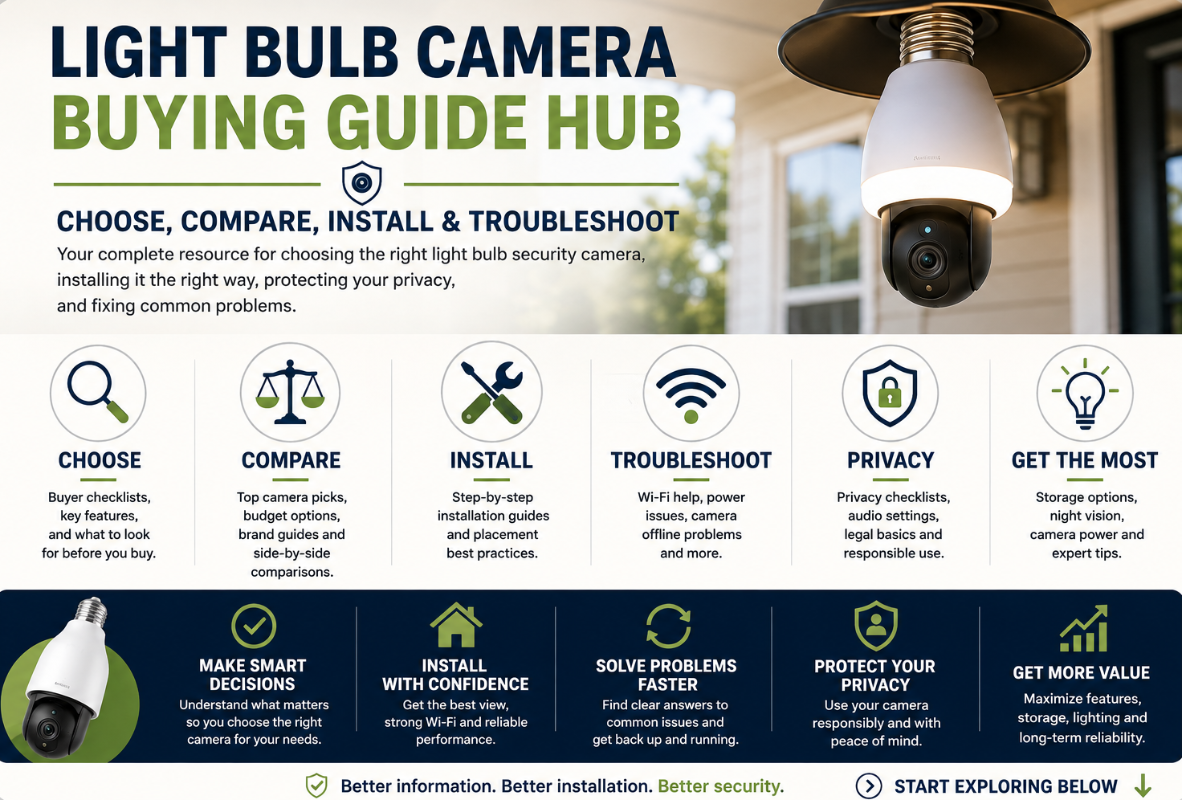
This Light Bulb Camera Buying Guide Hub brings our buyer guides, product recommendations, comparisons, privacy information, installation guides, and troubleshooting resources together in one place.
Whether you’re just starting your research or already own a camera and need help, you can use this page to find the right guide.
Jump to:
Start Here: New to Light Bulb Cameras?
If you’ve never owned a light bulb security camera, don’t start by comparing dozens of products.
First, determine whether this type of camera actually fits your situation.
What Is a Light Bulb Camera?
Start with our guide to what a light bulb camera is, how it works, its advantages and disadvantages, and when another type of security camera may be a better choice.
Read: What Is a Light Bulb Camera? Pros, Cons & When NOT to Buy One
How to Choose the Right Light Bulb Camera
Once you understand the basics, use our main buyer checklist.
It covers the important things to check before purchasing, including:
- Socket compatibility
- Camera size
- Resolution
- Field of view
- Pan-and-tilt
- Wi-Fi
- Local and cloud storage
- Night vision
- Lighting
- Outdoor suitability
- App support
- Privacy and security
Read: How to Choose the Right Light Bulb Camera – Buyer Checklist
Best Light Bulb Cameras
Already understand what you’re looking for?
These guides narrow the choices according to budget and installation.
Best Light Bulb Cameras for 2026
Our main recommendations compare the cameras we think make the most sense for different buyers.
Rather than simply choosing whichever camera advertises the longest feature list, we consider practical differences such as storage, installation, Wi-Fi, viewing style, lighting, weather protection, and subscription requirements.
Read: Best Light Bulb Cameras for 2026
Best Light Bulb Cameras Under $100
A low price doesn’t necessarily mean good value.
Our budget guide focuses on a smaller number of options rather than filling the article with inexpensive cameras we wouldn’t be comfortable recommending.
Read: Best Light Bulb Cameras Under $100
Best Light Bulb Cameras for Apartments & Renters
Renters have additional considerations, including lease rules, privacy, shared spaces, installation limitations and whether the existing socket provides a useful viewing angle.
Read: Best Light Bulb Cameras for Apartments
Best Light Bulb Cameras for Outdoor Use
Outdoor installation requires more than finding a camera advertised as weather-resistant.
Our outdoor guide covers camera weather ratings, electrical connections, fixture protection, Wi-Fi, temperature, nighttime performance and exposure.
Read: Best Light Bulb Cameras for Outdoor Use
Brand & Product Guides
Sometimes it’s easier to research one camera in detail rather than compare an entire category.
Wyze Bulb Cam
The Wyze Bulb Cam takes a different approach from many motorized light bulb cameras.
It combines a wide fixed viewing angle with 2K video, an integrated smart light and local microSD recording.
One particularly important difference is that its position is adjusted manually rather than through remote motorized pan-and-tilt controls.
Our dedicated guide explains the advantages and limitations before you buy.
Read: Wyze Bulb Cam Review: Features, Pros, Cons & Who It’s Best For
Light Bulb Camera vs Other Security Cameras
A light bulb camera isn’t automatically the best security camera simply because you already have a light socket.
Sometimes another camera design makes more sense.
Light Bulb Camera vs Ring vs Wyze vs Blink
Our comparison looks at the broader differences between light bulb cameras and popular security-camera ecosystems.
It covers factors such as:
- Power
- Installation
- Storage
- Subscriptions
- Camera placement
- Smart-home integration
- Privacy
- Long-term use
Read: Light Bulb Camera vs Ring vs Wyze vs Blink
A traditional wired, plug-in, battery, doorbell or floodlight camera may be a better choice when the available light socket doesn’t provide the coverage you actually need.
Installation & Placement
Buying the camera is only the beginning.
Where and how you install it can have a major effect on image quality, Wi-Fi reliability, motion detection and nighttime performance.
How to Install a Light Bulb Camera
Our installation guide takes you from the box to a working Live View.
It covers:
- Socket compatibility
- Power
- Initial setup
- 2.4 GHz Wi-Fi
- Camera positioning
- Storage
- Motion detection
- Notifications
- Nighttime testing
Read: How to Install a Light Bulb Camera
Where to Install a Light Bulb Camera for the Best View
Camera placement isn’t simply about putting the camera as high as possible.
A useful location needs the right combination of:
View + angle + power + Wi-Fi + environment + privacy
Our placement guide explains how to evaluate front doors, porches, driveways, garages, backyards and indoor locations.
Read: Where to Install a Light Bulb Camera for the Best View
Where NOT to Install a Light Bulb Camera
Some locations create unnecessary privacy risks, poor images, Wi-Fi problems or unsuitable electrical/weather conditions.
Check this guide before finalizing your installation.
Read: Where NOT to Install a Light Bulb Camera – Avoid These Mistakes
Power & Wall Switches
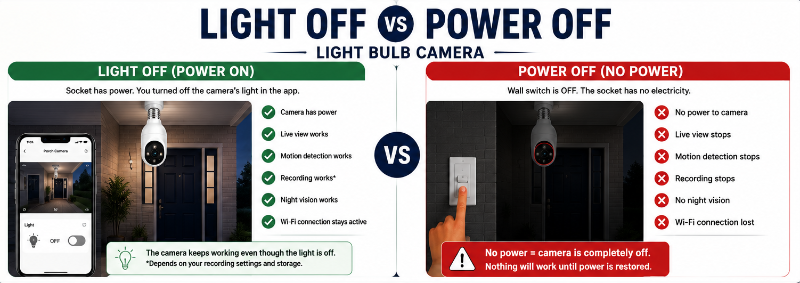
One of the most commonly misunderstood parts of light bulb cameras is the difference between turning off the light and turning off the electricity.
Do Light Bulb Cameras Work When the Light Is Off?
In many models, the visible light can be turned off while the camera remains powered.
But if a wall switch cuts electricity to the socket, the camera normally shuts down too.
Our guide explains:
- Light off vs power off
- Wall switches
- Recording
- Motion detection
- Night vision
- Wi-Fi outages
- Power outages
- Dimmers
- Timers and motion-controlled fixtures
Read: Do Light Bulb Cameras Work When the Light Is Off?
Wi-Fi & Connection Problems
A large number of apparent “camera problems” are actually network problems.
Light Bulb Camera Not Connecting to Wi-Fi
If your camera won’t connect, keeps going offline or works near the router but not at its installation location, start here.
The troubleshooting guide covers:
- 2.4 GHz vs 5 GHz
- Wi-Fi passwords
- Router distance
- Exterior walls
- Weak signal
- Setup problems
- App issues
- Camera resets
- Determining whether the problem is the camera or Wi-Fi
Read: Light Bulb Camera Not Connecting to Wi-Fi
A Useful Diagnostic Test
If the camera works reliably near your router but fails when installed outside or farther away, that’s an important clue.
The camera may be functioning properly while the final location has insufficient Wi-Fi coverage.
Don’t automatically return a camera until you’ve tested the connection closer to the router.
Privacy & Responsible Camera Use
Security cameras can capture information about visitors, neighbours, household members and other people.
Privacy should therefore be part of both the buying and installation process.
Privacy-First Light Bulb Camera Buyer Checklist
Before choosing a camera, consider:
- Where video is stored
- Cloud vs local storage
- Account security
- Two-factor authentication
- Microphone controls
- Privacy zones
- App permissions
- Who can access the account
- What areas the camera will capture
Read: Privacy-First Light Bulb Camera Buyer Checklist
Where You Point the Camera Matters
A camera shouldn’t automatically be aimed to capture the widest possible area.
Ask:
What am I actually trying to monitor?
Then position the camera around that purpose rather than unnecessarily capturing neighbouring windows, private spaces or unrelated areas.
Audio Recording
Many light bulb cameras include microphones and two-way audio.
That makes it important to understand both the camera’s settings and the rules that may apply where you live.
If you don’t need audio recording, check whether your camera allows it to be disabled.
Local Storage vs Cloud Storage
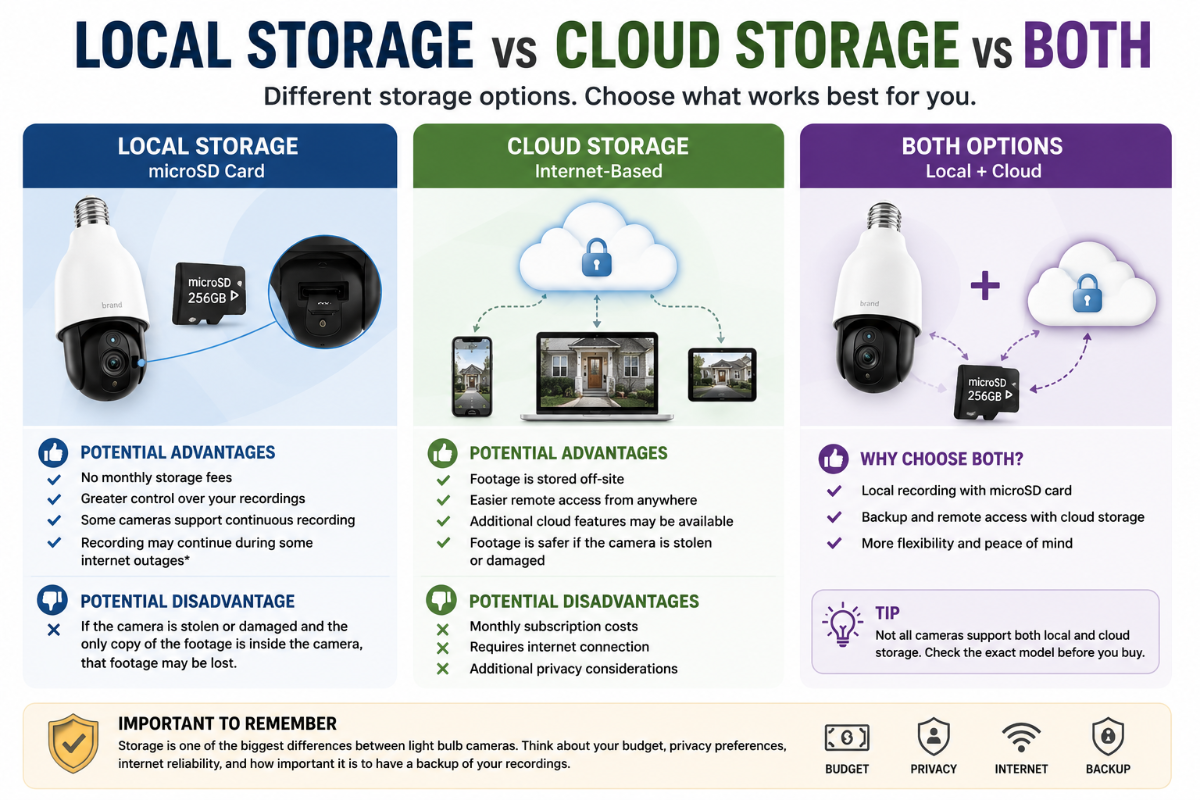
Storage is one of the biggest differences between light bulb cameras.
Local microSD Storage
Footage is stored on a memory card inside the camera.
Potential advantages include:
- No monthly storage fee
- Greater control over recordings
- Some cameras support continuous recording
- Recording may continue during some internet outages, depending on the model
Potential disadvantage:
If someone steals or damages the camera and the only copy of the footage is stored inside it, that footage may be lost or inaccessible.
Cloud Storage
Recordings are stored remotely through the camera provider’s service.
Potential advantages include:
- Footage isn’t stored only inside the camera
- Easier remote access
- Additional cloud features may be available
Potential disadvantages include:
- Subscription costs
- Greater reliance on internet connectivity
- Additional privacy considerations
Both
Some cameras support local storage while offering optional cloud services.
For many buyers, this provides the most flexibility.
But don’t assume a camera supports both. Check the exact model before buying.
Pan-and-Tilt vs Wide Fixed View
These terms are frequently confused.
Motorized Pan-and-Tilt
The camera physically moves.
You may be able to use the app to look:
← Left
→ Right
↑ Up
↓ Down
Some cameras also use motorized movement for automatic tracking.
Wide Fixed View
A wide-angle camera captures a large area without physically turning.
This can be very effective for a front door, porch or driveway where the important monitoring area doesn’t change.
A wide field of view is not the same thing as a 360-degree motorized camera.
Consider which type of viewing you actually need rather than choosing based on the larger-sounding specification.
Night Vision
Most buyers will eventually use their camera after dark, so nighttime performance deserves as much attention as daytime resolution.
Light bulb cameras may use:
Infrared Night Vision
Infrared illumination can allow the camera to see when its main visible light is off.
Footage is often black and white.
Color Night Vision
Color nighttime footage generally requires enough visible light from the camera or surrounding environment.
Watch for Reflections
Glass, nearby walls, fixture edges and other reflective surfaces can interfere with infrared night vision.
Always test the final camera position during both the day and night.
Outdoor Use: Don’t Look at the IP Rating Alone
An outdoor camera rating tells you something about the rated component, but it doesn’t automatically make the entire installation weatherproof.
Consider:
Camera body
Socket
Electrical connection
Fixture
Installation orientation
Exposure to rain and snow
A camera under a covered porch and the same camera installed in a fully exposed socket aren’t necessarily equivalent installations.
Always follow the manufacturer’s instructions for the exact camera and fixture.
7 Things to Check Before Buying Any Light Bulb Camera
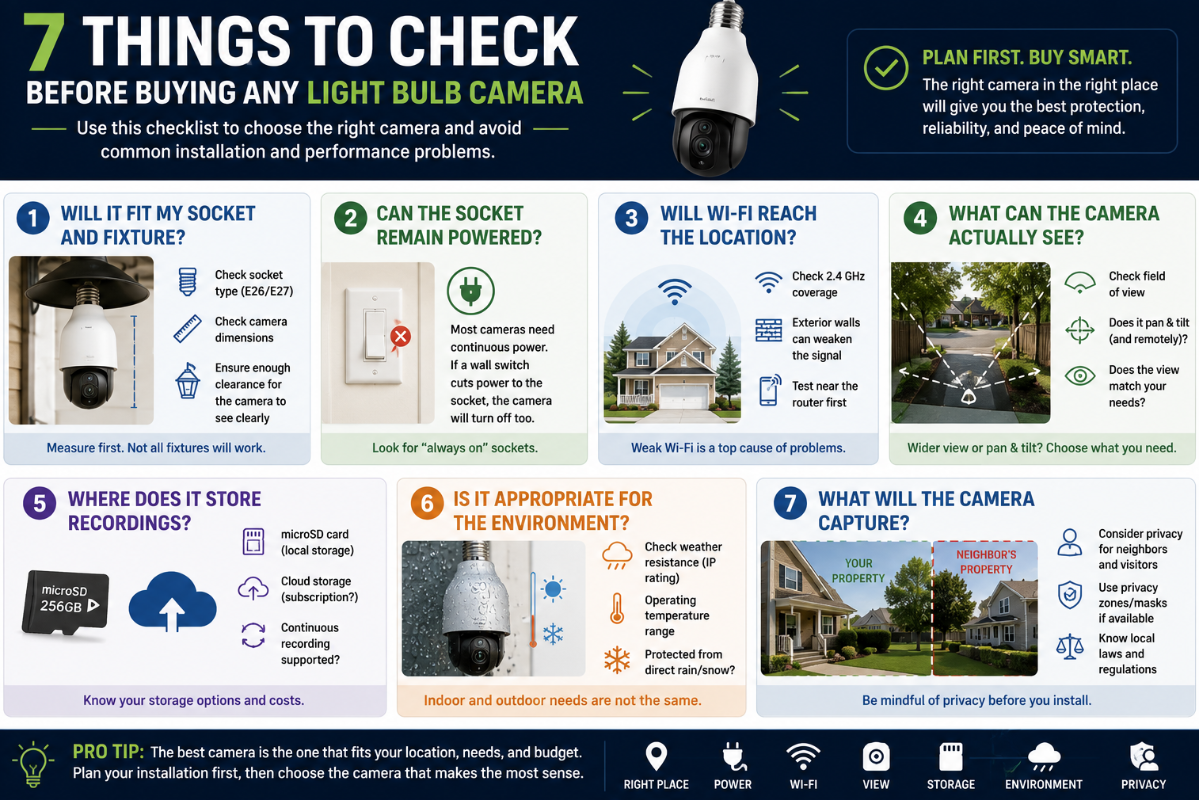
If you want the condensed version of this entire hub, check these seven things:
1. Will it fit my socket and fixture?
Check socket type and physical dimensions.
2. Can the socket remain powered?
The camera normally needs continuous electricity.
3. Will Wi-Fi reach the location?
Outdoor and distant sockets can be particularly challenging.
4. What can the camera actually see?
Compare field of view and pan-and-tilt capabilities.
5. Where does it store recordings?
Check microSD, cloud, subscriptions and continuous-recording support.
6. Is it appropriate for the environment?
Indoor and outdoor requirements aren’t the same.
7. What will the camera capture?
Consider privacy before installation, not afterward.
For the complete checklist, see our Light Bulb Camera Buyer Checklist.
Choose Your Path
Still not sure where to start?
Use the option that sounds most like you.
“I just want to know which cameras you recommend.”
→ Best Light Bulb Cameras for 2026
“I don’t want to spend more than $100.”
→ Best Light Bulb Cameras Under $100
“I rent or live in an apartment.”
→ Best Light Bulb Cameras for Apartments
“I want to install one outside.”
→ Best Light Bulb Cameras for Outdoor Use
“I’m not sure what features I need.”
→ Light Bulb Camera Buyer Checklist
“I’m comparing a bulb camera with other security cameras.”
→ Light Bulb Camera vs Ring vs Wyze vs Blink
“Privacy is my biggest concern.”
→ Privacy-First Light Bulb Camera Buyer Checklist
“I already bought a camera.”
Start with:
→ How to Install a Light Bulb Camera
If it won’t connect:
→ Light Bulb Camera Not Connecting to Wi-Fi
Recommended Reading Order
If you want to research everything in a logical order, I’d recommend:
1. Learn the basics
What Is a Light Bulb Camera?
↓
2. Determine what features you need
Light Bulb Camera Buyer Checklist
↓
3. Compare recommended cameras
Best Light Bulb Cameras for 2026
↓
4. Narrow the choices for your situation
Apartment | Outdoor | Under $100
↓
5. Check privacy and placement
↓
6. Install the camera
↓
7. Test Wi-Fi, recording, motion detection and nighttime performance
This approach helps prevent one of the most common buying mistakes:
Choosing a camera first and figuring out whether it works in your location afterward.
Frequently Asked Questions
What should I look for when buying a light bulb camera?
Start with socket and fixture compatibility, continuous power and Wi-Fi coverage. Then compare video quality, viewing angle, storage, night vision, motion detection, lighting, app support, outdoor suitability and privacy features.
Are more expensive light bulb cameras always better?
No.
A more expensive camera may offer better hardware, software or support, but the best camera is the one that fits your installation and provides the features you actually need.
Do I need cloud storage?
Not necessarily.
Some cameras support local microSD recording without requiring cloud storage. Others rely more heavily on cloud services.
Check exactly what happens with and without a subscription before buying.
Should I get a 360-degree light bulb camera?
Only if motorized viewing is useful for your installation.
A wide fixed camera may be better for an entrance or driveway where you want a consistent view of one area.
Also check what the manufacturer means by “360°.” It may describe the camera’s pan movement rather than its simultaneous field of view.
Do light bulb cameras need Wi-Fi?
Most rely on Wi-Fi for features such as app access, remote Live View, notifications and cloud services.
Some cameras may continue certain local functions without internet access, but capabilities vary by model.
Can I install a light bulb camera outside?
Only if the camera and installation are suitable for outdoor use.
Check the manufacturer’s weather rating and installation instructions, and remember that the electrical socket and connection also need appropriate protection.
Do light bulb cameras need continuous power?
Generally, yes.
If a wall switch cuts electricity to the socket, the camera normally shuts down too.
Are light bulb cameras better than traditional security cameras?
Not necessarily.
They’re particularly convenient when an existing light socket provides a good camera location.
Traditional wired, plug-in, battery, doorbell or floodlight cameras may provide better placement or features in other situations.
Final Thoughts
There isn’t one light bulb camera that’s best for every person, home or installation.
A renter may prioritize easy installation and privacy.
A homeowner monitoring a driveway may care more about outdoor suitability, Wi-Fi range and nighttime performance.
Someone trying to avoid subscriptions may prioritize microSD storage.
Another buyer may discover that the available light socket is in such a poor location that a conventional security camera is the better choice.
That’s why we recommend starting with the installation and your needs, rather than starting with a product.
Ask:
Where will I install it?
Will it fit?
Will it stay powered?
Will Wi-Fi reach it?
What do I need to see?
How do I want recordings stored?
What privacy considerations apply?
Once you can answer those questions, choosing the right camera becomes much easier.
Main Buying Guides
- Best Light Bulb Cameras for 2026
- Light Bulb Camera Buyer Checklist
- Best Light Bulb Cameras Under $100
- Best Light Bulb Cameras for Apartments
- Best Light Bulb Cameras for Outdoor Use
- Light Bulb Camera vs Ring vs Wyze vs Blink