Light bulb security cameras can be particularly appealing for apartment renters.
Instead of drilling holes, running new wiring, or permanently mounting a traditional security camera, a light bulb camera can screw into an existing compatible socket and use the power that’s already there.
That sounds ideal for renters, but there’s an important catch:
Just because a camera is easy to install doesn’t mean every apartment is a good place to install one.
The location of your light fixtures, your lease or building rules, Wi-Fi coverage, privacy of neighbours, shared hallways, and whether the socket can remain continuously powered all matter.
For apartment renters in 2026, our two picks are the SYMYNELEC P4 Light Bulb Security Camera and Wyze Bulb Cam. More importantly, this guide will help you determine whether you should use a bulb camera in your apartment at all.
Affiliate Disclosure: This article contains affiliate links. If you purchase through these links, we may earn a commission at no extra cost to you.
Jump to:
- Quick Comparison
- Why Bulb Cameras Can Make Sense for Renters
- Best Overall: SYMYNELEC P4
- Best for Local Recording: Wyze Bulb Cam
- Before Installing in an Apartment
- Shared Hallways & Privacy
- Fixture Compatibility
- Apartment Wi-Fi
- Local vs Cloud Storage
- Bulb Camera vs Doorbell Camera
- Frequently Asked Questions
- Which Should You Choose?
Best Light Bulb Cameras for Apartments & Renters in 2026
| Feature | SYMYNELEC Light Bulb Security Camera | Wyze Bulb Cam |
|---|---|---|
| Our Pick | Best Overall for Apartments | Best for Local Recording |
| Video | 2.5K / 4MP* | 2K |
| Viewing | Motorized pan/tilt* | Wide fixed view |
| Wi-Fi | 2.4/5 GHz on selected model* | 2.4GHz Wi-Fi 6 |
| Local Storage | Available* | microSD up to 256 GB |
| 24/7 Local Recording | Check exact model | Yes |
| Installation | Compatible light socket | E26 light socket |
| Best For | Flexible viewing | Local recording & smart lighting |
*SYMYNELEC sells several similar models. Verify the specifications of the exact model you’re considering.
Why Light Bulb Cameras Can Make Sense for Renters
The biggest advantage is simple: installation can be less permanent.
Many renters don’t want to drill through walls, install electrical wiring, or make modifications they’ll have to repair when they move.
If your apartment already has a compatible light socket in a useful location, installing a bulb camera may be as simple as removing the existing bulb, installing the camera, connecting it to Wi-Fi, and configuring the app.
When you eventually move, you can remove the camera and reinstall the original bulb.
That doesn’t mean installation is automatically permitted by your landlord or building. Lease agreements, condo rules, building policies, and local privacy requirements can still apply.
But from a physical-installation perspective, bulb cameras can offer renters considerably more flexibility than permanently installed security systems.
Best Overall for Apartments: SYMYNELEC Light Bulb Security Camera
For model-specific details, see our SYMYNELEC Light Bulb Camera Review.
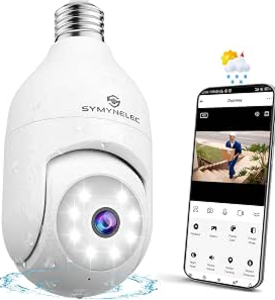
Why We Chose It for Renters
The biggest reason we like the selected SYMYNELEC model for apartment use is motorized pan-and-tilt viewing.
Apartment renters usually have little control over where an existing light fixture is located.
If the socket isn’t pointing exactly where you’d ideally place a security camera, being able to remotely adjust the viewing direction can make the existing location more useful.
The selected P4 model also provides 2.5K / 4MP video, dual-band 2.4GHz/5GHz Wi-Fi, IP65 weather resistance, human detection and automatic tracking.
Why Pan-and-Tilt Can Matter More in an Apartment
Imagine an existing light socket near an apartment entrance.
A fixed camera might give you a good view of one part of the entrance but leave another area outside its field of view.
A motorized camera gives you more flexibility.
There is, however, an important apartment-specific downside:
More viewing flexibility also means more responsibility for where you point the camera.
Being technically able to rotate a camera toward a neighbour’s doorway or window doesn’t mean you should.
We’ll discuss privacy and shared spaces in more detail below.
What We Like
The selected SYMYNELEC model provides:
- 2.5K / 4MP video
- Motorized pan-and-tilt viewing
- Dual-band Wi-Fi
- Human detection
- Automatic tracking
- Two-way audio
- App-based remote viewing
- Screw-in light-socket installation
For renters, the combination of relatively simple installation and adjustable viewing is the main attraction.
What to Consider
SYMYNELEC sells several light bulb cameras that look very similar.
Specifications can vary between versions, including Wi-Fi support, resolution and storage options.
Make sure you’re checking the exact model before purchasing.
Fixture clearance is another concern.
A bulb camera is considerably larger than an ordinary light bulb. An apartment fixture may use the correct socket but still be too narrow or enclosed for the camera to provide a clear view.
Best For
SYMYNELEC makes the most sense for renters who want:
- Flexible pan-and-tilt viewing
- Human detection
- Automatic tracking
- Dual-band Wi-Fi on the selected model
- A removable installation using an existing socket
Check SYMYNELEC Light Bulb Security Camera Price on Amazon
Skip It If…
Skip it if your light fixture points toward an area where camera use would be inappropriate or if your lease/building rules don’t permit the installation.
Wyze may also be preferable if 24/7 local recording is more important than motorized viewing.
Best for Local Recording: Wyze Bulb Cam
For the full feature breakdown, see our Wyze Bulb Cam Review.
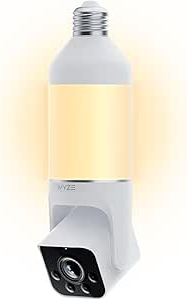
Why We Chose It for Renters
Wyze takes a different approach.
The Bulb Cam doesn’t have app-controlled pan and tilt. Instead, you manually extend, rotate and tilt the camera during installation.
It provides a very wide field of view, with Wyze specifying 166° diagonal, 144° horizontal and 82.5° vertical coverage.
For an apartment where you’re primarily interested in monitoring one defined area, that may be all you need.
24/7 Local Recording Without a Subscription
This is the biggest reason Wyze earns a place in this guide.
The Bulb Cam supports microSD cards up to 256 GB and can continuously record locally without requiring a subscription.
That’s attractive for renters who would rather store footage locally than depend entirely on a cloud subscription.
Wyze currently specifies 24/7 local recording to a compatible microSD card up to 256GB without requiring a subscription.
A Useful Light, Not Just a Camera
The Bulb Cam also functions as a substantial light.
Wyze rates it at up to 800 lumens, with dimming, scheduling and motion-activated lighting controls.
That’s useful if you’re replacing an existing exterior or entrance bulb and still need the fixture to function as everyday lighting.
What We Like
The Wyze Bulb Cam provides:
- 2.5K / 4MP video
- Wide viewing coverage
- Color Night Vision
- 800-lumen dimmable light
- 24/7 local recording
- microSD support up to 256 GB
- Two-way audio
- Built-in siren
- Motion notifications
- Detection zones
- 2.4 GHz Wi-Fi
- Alexa, Google Assistant and IFTTT integration
Wyze also includes a telescoping section that helps position the camera lens beyond the bottom of some fixtures.
What to Consider
The camera can’t be remotely panned and tilted.
Once installed, you manually position the camera where you want it.
It requires 2.4GHz Wi-Fi and supports Wi-Fi 6; it does not connect directly to a 5GHz-only network.
Another consideration is fixture design. Wyze specifically warns that viewing through glass or parts of the fixture can interfere with image quality and motion detection.
That’s particularly important in apartments where you may not have the option of replacing the landlord’s existing fixture.
Best For
Wyze makes the most sense for renters who want:
- Straightforward 24/7 local recording
- No subscription required for continuous microSD recording
- Wide fixed coverage
- A bright integrated light
- An established smart-home platform
- A camera that can be removed when moving
Check Wyze Bulb Cam Price on Amazon
Skip It If…
Choose a pan-and-tilt model such as SYMYNELEC if you need to remotely change the viewing direction.
What About the LaView 4MP L2?
The LaView 4MP L2 is another true screw-in light bulb camera and can work in an apartment when the fixture and building rules allow it.
We are not making it one of our two main apartment picks because owner feedback is more mixed than we would like for a top recommendation. Some users report easy setup and clear video, while others report connectivity, playback or support frustrations.
That does not make it a poor choice for everyone. If you prefer the LaView L2 design or app, compare it carefully with SYMYNELEC and Wyze before deciding.
Read our LaView 4MP L2 Light Bulb Camera Review.
Before Installing Any Camera in an Apartment
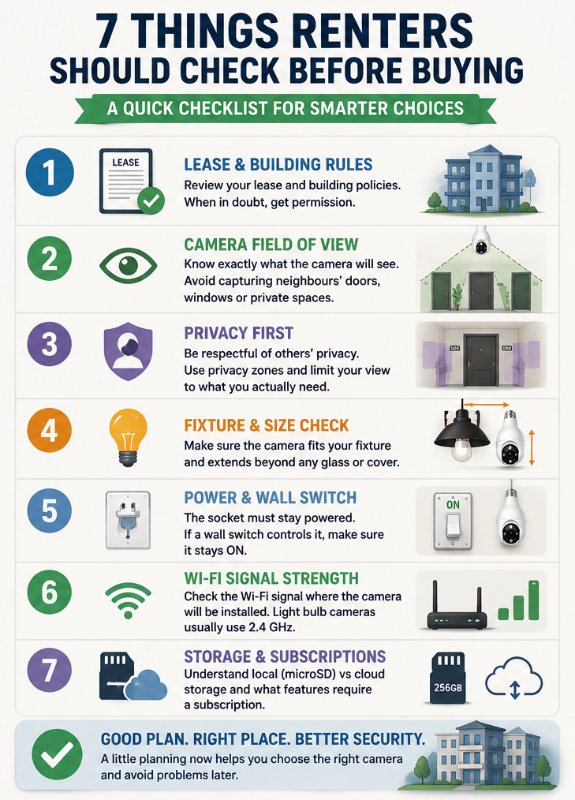
This is where buying a camera for an apartment becomes different from buying one for a detached home.
Before ordering anything, consider these five questions.
1. Does Your Lease or Building Allow It?
Start with your lease, landlord, property manager or building rules.
Rules can vary substantially between properties.
A camera that doesn’t require drilling can still be subject to restrictions concerning surveillance equipment, common areas, exterior fixtures or modifications to building equipment.
Don’t assume “no drilling” automatically means “no permission needed.”
2. What Will the Camera Actually See?
This is arguably the most important apartment-specific question.
A camera monitoring the inside of your own apartment is very different from a camera pointed down a shared hallway.
Depending on its location and field of view, an exterior-facing apartment camera could potentially capture:
- A neighbour’s doorway
- People entering other apartments
- Shared hallways
- Elevators
- Stairwells
- Balconies
- Windows
- Common areas
Think about what falls within the camera’s view before installing it.
Our Privacy-First Light Bulb Camera Buyer Checklist goes deeper into privacy considerations when choosing and positioning a camera.
Shared Hallways Require Extra Consideration
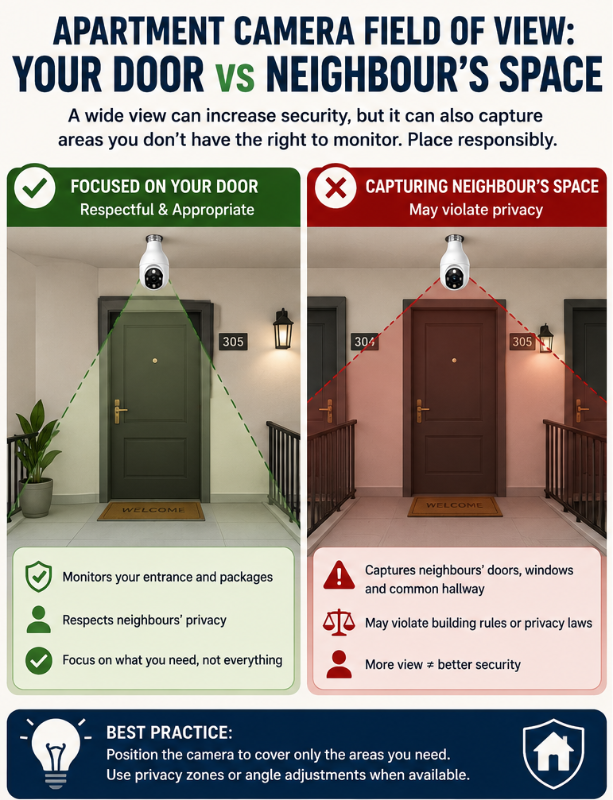
A shared hallway isn’t the same as your own private entrance.
Even when your goal is simply monitoring your doorway, a wide-angle or pan-and-tilt camera can capture considerably more.
This is one situation where more camera coverage isn’t automatically better.
If you’re using a camera near an apartment entrance, try to limit the view to the area you actually need rather than maximizing coverage simply because the camera allows it.
Features such as detection zones or privacy zones can be useful where available, but they don’t replace responsible positioning.
If you’re unsure about placement, also read Where NOT to Install a Light Bulb Camera before choosing a location.
3. Can the Socket Stay Powered?
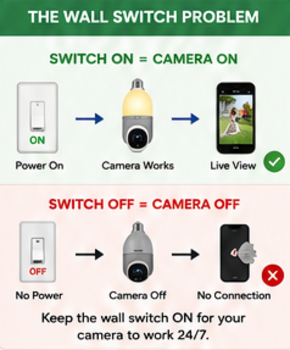
A light bulb camera gets its electricity from the light socket.
That means:
Wall switch ON → socket powered → camera operates
Wall switch OFF → socket loses power → camera goes offline
This can be surprisingly important in an apartment.
Roommates, partners, family members or visitors may instinctively turn off a wall switch when leaving.
The camera may then disappear from the network until someone switches the fixture back on.
Wyze even includes a “Do Not Turn OFF” sticker with its Bulb Cam, illustrating how important continuous socket power is for this type of device.
4. Will the Camera Fit the Existing Fixture?
Don’t check only the socket type.
Check the physical dimensions of the fixture.
Many apartment buildings use decorative sconces, glass covers, recessed fixtures or compact enclosures.
A large bulb camera may screw into the socket but still:
- Hit the fixture housing
- Have its camera blocked
- Sit behind glass
- Produce reflections at night
- Have a poor viewing angle
Wyze specifically recommends that the camera lens extend beyond the edge of the fixture and warns that glass or fixture housing can interfere with motion detection and image quality.
Our How to Choose the Right Light Bulb Camera guide covers fixture and compatibility checks in more detail.
5. Is the Wi-Fi Signal Strong Enough?
Apartment Wi-Fi presents its own challenges.
The distance may be short, but walls, neighbouring networks and crowded wireless environments can affect connectivity.
Don’t judge signal strength based solely on how well Wi-Fi works beside your router.
Stand near the actual light fixture with your phone and see how reliable the connection is there.
Also check which Wi-Fi bands your camera supports.
The Wyze Bulb Cam uses 2.4GHz Wi-Fi with Wi-Fi 6 support.
Indoor vs Outside-the-Door Apartment Cameras
These are two very different use cases.
Inside Your Apartment
An indoor bulb camera might be used to monitor:
- Your entrance from inside
- A living area
- Pets
- A room while you’re away
Privacy considerations still matter, especially when guests, roommates, cleaners or other people may be present.
But you’re generally dealing with a space you control.
Outside Your Apartment Door
This requires more thought.
Now the camera may capture people who aren’t entering your apartment at all.
Before installing one, consider building rules, your lease, camera positioning and applicable privacy requirements.
If monitoring your entrance is the primary goal, a purpose-built doorbell camera or another device may sometimes be more appropriate than a 360-degree bulb camera.
When a Light Bulb Camera Is NOT the Best Choice for an Apartment
This deserves emphasis.
A light bulb camera isn’t automatically the best renter-friendly security camera.
I’d choose something else if:
- Your apartment has no appropriately located socket
- The fixture is enclosed
- The socket can’t remain powered
- The camera would primarily capture neighbouring property
- Building rules prohibit it
- You need a very specific viewing angle
- You don’t actually need the integrated light
A small plug-in indoor camera may sometimes be a much simpler solution.
Because you’re renting, the best camera is often the one that provides the coverage you need with the least disruption to the property and other residents.
Local Storage vs Cloud Storage for Renters
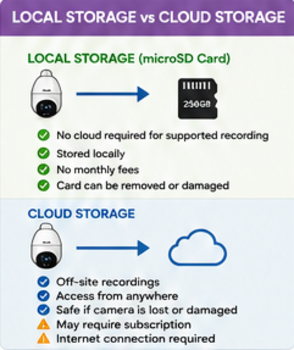
Storage deserves consideration beyond monthly cost.
Local Storage
Recordings are stored on a memory card inside the camera.
Potential advantages include:
- No cloud required for supported recording
- Potentially no monthly storage fee
- More direct control over recordings
Potential disadvantages include:
- Limited card capacity
- Memory cards can eventually fail
- Footage stored only in the camera could potentially be lost with the device
Cloud Storage
Recordings are uploaded to remote servers when supported.
Potential advantages include:
- Off-site storage
- Convenient remote access
- Recordings may survive loss or damage to the camera
Potential disadvantages include:
- Subscription costs
- Internet dependency
- Different retention periods and privacy policies
Some cameras provide both.
If this is particularly important to you, use our Privacy-First Light Bulb Camera Buyer Checklist before choosing a storage approach.
What About Renters on a Budget?
You don’t necessarily need to spend a lot.
Both cameras in this guide can fall into relatively affordable territory depending on current pricing.
But don’t buy the cheapest marketplace camera simply because you’re renting.
You still want a camera with reasonably clear documentation, useful storage options, an app you can depend on and features appropriate for your installation.
For more budget-focused recommendations, see our Best Light Bulb Cameras Under $100 guide.
7 Things Renters Should Check Before Buying
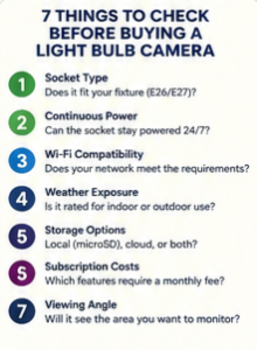
1. Lease and Building Rules
Make sure the intended installation is permitted.
2. Camera Field of View
Know exactly what the camera will capture.
3. Privacy
Avoid unnecessarily monitoring neighbouring doors, windows or private spaces.
4. Fixture Compatibility
Make sure the camera physically fits without modifying the landlord’s fixture.
5. Continuous Power
Confirm that the socket can remain powered.
6. Wi-Fi
Check signal strength at the actual installation location.
7. Storage and Subscriptions
Understand what is stored locally, what goes to the cloud and what requires an ongoing fee.
Light Bulb Camera vs Doorbell Camera for an Apartment
This is worth considering before buying.
A light bulb camera can make sense if you already have an appropriately positioned light fixture.
A doorbell camera may make more sense if your primary goal is specifically seeing people at your door.
A small indoor camera may be better if you’re primarily monitoring the inside of the apartment.
Don’t choose a bulb camera simply because installation looks easy.
Choose the camera type that matches what you’re trying to monitor.
Frequently Asked Questions
Are light bulb cameras good for apartments?
They can be.
They’re particularly appealing when an existing light socket provides a useful camera location and you want to avoid permanent installation.
However, renters should consider lease rules, fixture compatibility, continuous power and privacy before installing one.
Can renters install security cameras?
Whether a particular installation is allowed depends on factors such as your lease, building policies, location and applicable laws.
Don’t assume that a screw-in camera is automatically permitted simply because you aren’t drilling holes.
Can I point a security camera into my apartment hallway?
This is something to approach carefully.
Shared hallways can include neighbouring entrances and other residents who aren’t interacting with your apartment.
Consider your building’s rules and applicable privacy requirements, and limit the camera’s view to what you actually need whenever possible.
Do light bulb cameras damage the apartment?
A compatible screw-in bulb camera generally doesn’t require the same mounting holes as many conventional cameras.
However, the camera still needs to be compatible with the fixture, and renters shouldn’t alter landlord-owned electrical fixtures without appropriate permission.
Can I take a light bulb camera with me when I move?
That’s one of their advantages.
A screw-in camera can generally be removed from a compatible socket and taken with you, after which the original light bulb can be reinstalled.
Do light bulb cameras work if the wall switch is off?
No, not if the switch cuts power to the socket.
The camera requires electricity even when its built-in light isn’t illuminated.
Which light bulb camera is best for local recording?
Of our two apartment picks, Wyze Bulb Cam is the stronger choice for straightforward local recording.
It supports continuous 24/7 recording to a compatible microSD card up to 256 GB without requiring a subscription for that recording.
Which is better for apartments: SYMYNELEC or Wyze?
It depends on what you need.
Choose SYMYNELEC if motorized pan-and-tilt viewing and dual-band connectivity on the selected model are priorities.
Choose Wyze Bulb Cam if 24/7 local recording, a wide fixed view and an 800-lumen integrated light matter more.
Which Apartment Light Bulb Camera Should You Choose?
Start with the apartment, not the camera.
Ask yourself:
Where can I legally and appropriately put it?
What will it see?
Can the fixture remain powered?
Will the camera physically fit?
Is Wi-Fi reliable there?
Only then should you compare products.
If those questions check out, SYMYNELEC is our overall apartment pick for renters who value motorized pan-and-tilt viewing and flexible positioning.
Wyze Bulb Cam is our preferred option for local recording, particularly if you want continuous microSD recording without requiring a subscription.
Check SYMYNELEC Light Bulb Security Camera Price on Amazon
Check Wyze Bulb Cam Price on Amazon
For a broader comparison that isn’t specific to renters, see our Best Light Bulb Cameras for 2026 guide.
Final Thoughts
Light bulb cameras have several characteristics that make them attractive to renters: they’re relatively easy to install, use existing electrical power and can usually be removed when you move.
But those advantages don’t eliminate the issues that matter most in an apartment.
Privacy, shared spaces, lease rules and camera placement deserve just as much attention as resolution and motion detection.
Before buying, determine what the camera would actually see and whether that location is appropriate.
If a bulb camera makes sense for your apartment, SYMYNELEC offers the more flexible viewing option, while Wyze Bulb Cam stands out for local recording and integrated lighting.
If neither fits your apartment properly, don’t force the installation. A conventional indoor camera, doorbell camera or another security option may be a better fit.